Sentinel — Gmail Phishing Defender
Extension Actions
Auto-scans Gmail emails for phishing before you open them. Detects spoofing, malicious links & tracking pixels. Free.
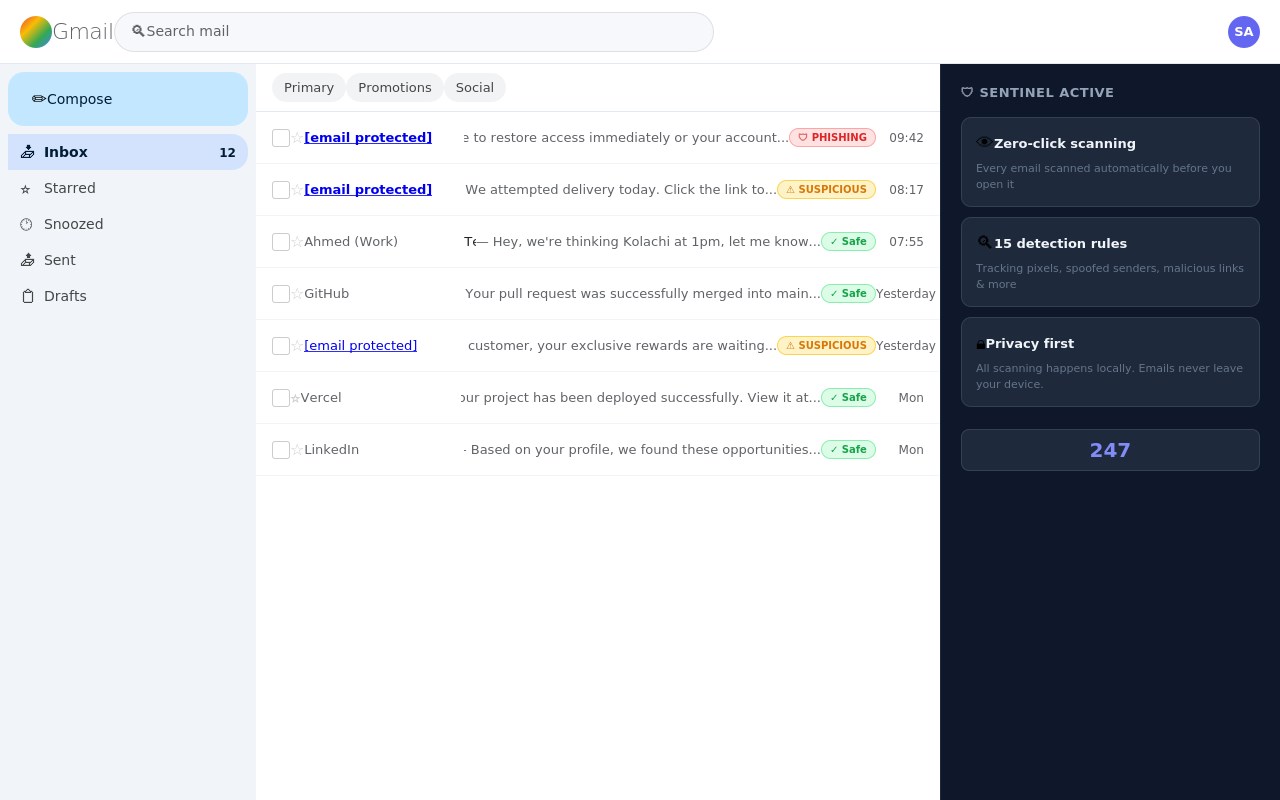
Sentinel silently protects your Gmail inbox from phishing attacks before you even open an email.
The moment an email arrives, Sentinel scans it automatically in the background and shows a safety verdict right in your inbox — no clicks needed.
WHAT SENTINEL DETECTS:
Tracking pixels — invisible images that spy on when you open emails
Display name spoofing — "PayPal" sent from paypa1-support.ru
Lookalike domains — amaz0n.com, g00gle.com, paypa1.net
Dangerous redirect links — URLs bouncing through unknown servers
Credential harvesting — forms and password fields inside emails
Urgency language — artificial deadlines and account suspension threats
Reply-To hijacking — replies secretly redirected to attackers
Hidden text — invisible content used to bypass spam filters
Suspicious file attachments — .exe, .bat, .ps1 files
Newly registered domains — sites created days ago to run scams
HOW IT WORKS:
Install Sentinel
Open Gmail
Sentinel scans every email automatically
You'll see colour badges next to every email:
✓ Safe — green
⚠ Suspicious — yellow
🛡 Phishing — red
Click any flagged email to see exactly what was detected, explained in plain English.
PRIVACY FIRST:
All scanning happens locally in your browser. Your emails never leave your device. No account required. No data collection whatsoever.
FREE FOREVER:
Full protection is completely free — no credit card, no signup needed. Pro subscribers (£3/month) unlock AI chat powered by Claude to ask questions about flagged emails.