
Share Files - TransferWoW
Extension Actions
Send & receive files instantly! Fast, secure P2P file sharing like WeTransfer. No size limits. Includes 1:1 Video Call.
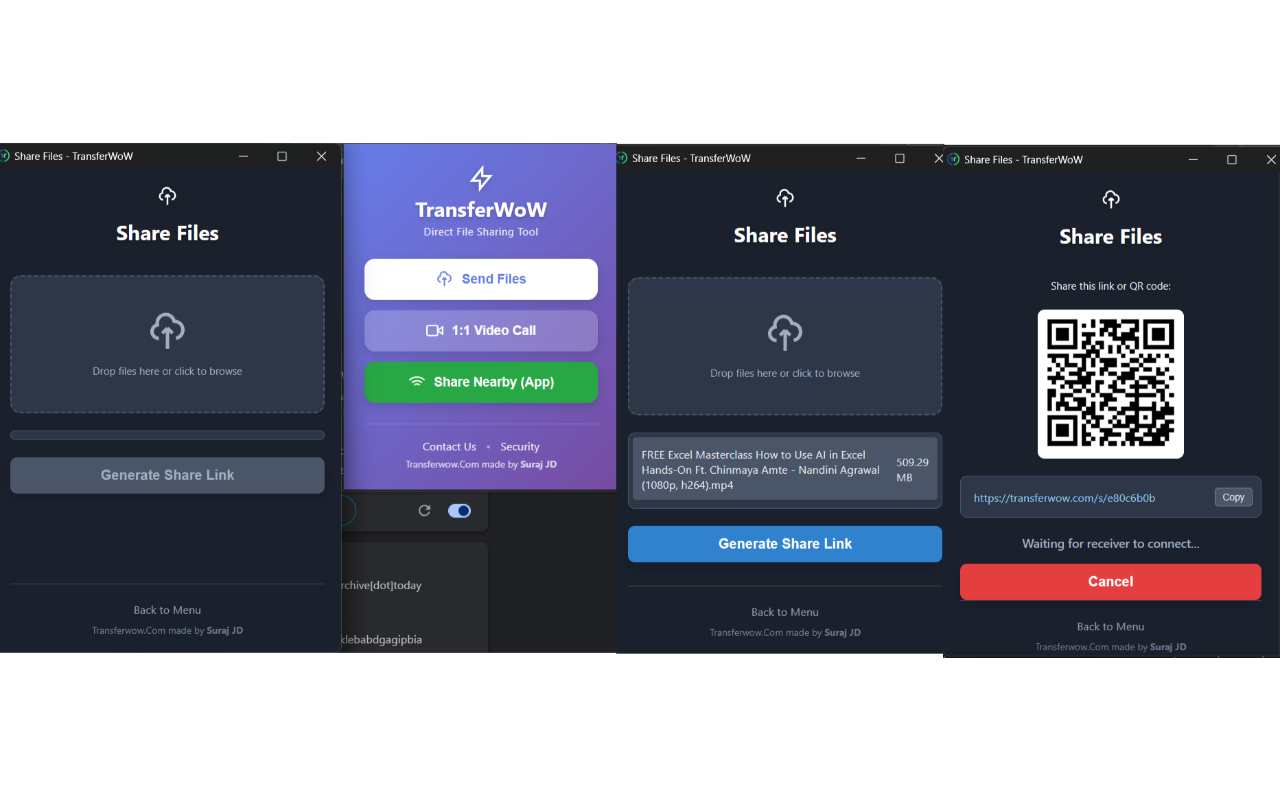
TransferWoW is a powerful browser extension designed to revolutionize the way you share files and communicate online by offering instant, secure, and unlimited peer-to-peer (P2P) file transfers combined with seamless 1:1 video calling. Unlike traditional file-sharing services that impose size restrictions and rely on third-party servers, TransferWoW leverages cutting-edge WebRTC technology to establish encrypted, direct connections between devices. This approach not only provides blazing-fast transfers but also ensures maximum privacy and security, as your files never pass through intermediate servers or cloud storage.
This extension offers an intuitive, user-friendly interface where users can simply drag and drop files or entire folders of any size into the sharing panel. Once uploaded, TransferWoW generates unique, secure sharing links or QR codes that recipients can use to instantly receive files without the need for accounts, registrations, or app installations. Additionally, the extension features proximity detection through its "Nearby" functionality, enabling users to automatically discover and connect with devices on the same local network—ideal for office environments, classrooms, or home settings. Alongside file sharing, TransferWoW includes integrated real-time video calls that establish encrypted one-on-one sessions directly within the browser, allowing users to discuss shared content instantly without compromising privacy.
The workflow of TransferWoW is streamlined into clear, simple phases: select files, generate secure sharing links or QR codes, and monitor the live transfer progress. Visual feedback such as progress bars, transfer speed, and details about each file keeps users informed and in control. For local transfers, the automatic peer discovery eliminates the need for manual IP input or complex configurations. Security is enforced rigorously: all transfers use AES-GCM encryption, and cryptographic keys are exchanged securely so only intended recipients can decrypt the files. Throughout the process, TransferWoW maintains a zero-knowledge approach, meaning personal files and data are never stored or analyzed on third-party servers.
Cross-platform compatibility ensures that TransferWoW functions seamlessly across any operating system running Edge browsers, requiring no additional software or registration. Its design caters to a broad spectrum of users—from designers and creatives exchanging large multimedia assets, professionals securely sending confidential documents, to friends and family sharing memories—all with a focus on speed, simplicity, and privacy. Real-time notifications and smart error recovery mechanisms further enhance the user experience by providing transparency and reliability during transfers.
In summary, TransferWoW replaces cumbersome upload/download cycles and service limits with a modern, decentralized file-sharing and communication solution that fits perfectly into today’s fast-paced digital life. Its combination of unlimited file sizes, robust encryption, proximity detection, and built-in video calls make it a versatile tool that empowers users to share and connect effortlessly and securely.
Key Features:
- Unlimited file size peer-to-peer sharing: Transfer any file or folder directly between browsers with no artificial size restrictions.
- AES-GCM encrypted end-to-end transfers: Ensures that only sender and recipient can access shared content.
- Secure sharing links and QR codes: Quickly generate and share unique, time-limited URLs or QR codes for instant access.
- “Nearby” local discovery: Automatically detect and connect to devices on the same network for seamless local file transfers.
- Integrated 1:1 video calling: Launch encrypted video sessions directly within the browser for secure, real-time communication.
- Intuitive drag-and-drop interface: Modern, simple UI designed for ease of use with minimal setup or learning curve.
- Real-time transfer progress tracking: Visual cues including progress bars, transfer speed, and file details provide transparent monitoring.
- Cross-platform and registration-free: Compatible with all major operating systems on Edge; no sign-ups or external apps required.
How It Works:
1. Install TransferWoW from your browser’s extension store.
2. Click the TransferWoW icon in your browser toolbar to open the popup interface.
3. To send files, drag and drop your chosen files or folders into the “Share” area or use the built-in file picker.
4. Click “Generate Link” to create a secure sharing link or QR code for the recipient.
5. Share the generated link or QR code via email, chat, or direct scan.
6. The recipient opens the link, and their browser automatically connects to yours through a secure WebRTC channel.
7. Monitor the transfer in real time, with options to pause or cancel if needed. Use the “Nearby” feature to detect and connect to devices on the local network automatically.
8. For instant communication, click the “Video” button to start a secure 1:1 video call in-browser, sharing the same encrypted connection as the file transfer.
Privacy: - No personal data collected. Your files remain directly between devices and are never stored on third-party servers, ensuring complete privacy and security throughout every transfer and communication session.