
Tab Renamer
Extension Actions
- Extension status: Featured
- Live on Store
Customize your tab titles and favicons for a more organized browsing experience.
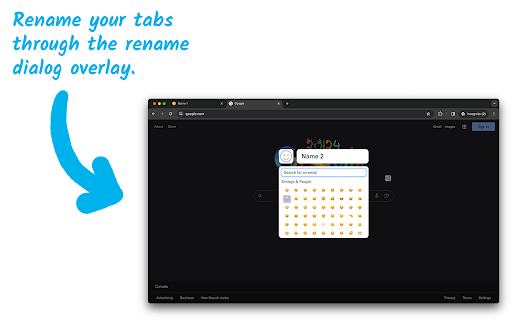
Tab Renamer is a handy Chrome extension that allows you to rename and change the favicon of your browser tabs for better organization and productivity. With a simple keyboard shortcut, you can open a dialog to customize any tab. This tool is perfect for users who often find themselves with multiple tabs open and need a quick and easy way to identify each one.
Key Features:
- ✏️ Tab Renaming: Open a dialog to rename any tab with a simple keyboard shortcut.
- 🎨 Favicon Customization with Emojis: Choose from a wide range of emojis using the built-in emoji picker to replace each tab's favicon, adding a custom visual element to each tab to make them more distinguishable.
- 🔄 Persistent Names: Your custom tab names and favicons are stored and will be preserved even when you close and reopen the tabs or even the entire window.
Install Tab Renamer to experience a more organized and efficient browsing experience!
Latest reviews
- Swan Blanc
- Perfect when I open multiples tabs with the same name (monitoring dashboard) with different parameters
- Cain Thomas
- This extension is an absolute lifesaver, I kept losing track of all the articles I'm using for uni lab reports and now I can organise them so easily
- ВДК Сервис
- cyrillic causes some unexpected behavior
- arc toad
- Works great! Stupid that chrome doesn't do this natively, and I'm on a Chromebook for now and can't easily use another browser. I almost started making "tab groups" to label some resources I have open in multiple tabs for an online class: all of them have the same title since it's all from the same website/platform. Glad I found this instead! A couple notes for anyone else like me, who prefers not to waste time reading instructions (even when they are short) but also doesn't mind wasting time stumbling through figuring it out and scouring reviews to find tips.... - It keeps the new name even after refreshing a page or navigating to a new site. I like this, but just a heads-up in case you need different functionality.To get the original name of a tab back, you can erase the name you made and hit enter with the input menu blank. - chrome doesn't allow adding options to the right-click context menu of a tab. You can right click anywhere on the actual web-page to get access to the extension though. - The keyboard shortcut didn't work for me (maybe because of Chromebook?) but you can set a custom shortcut in chrome://extensions/shortcuts if that's functionality you want. Thank you dev! --- Edit: I saw some other reviews which state it doesn't remember names after closing chrome. I tested this out and, after navigating back to a web-page it did remember it for me. My test was not for an extended period of time though, so there might be some cache that gets cleared by chrome? YMMV. Personally I'm not using the extension to remember the name of tabs in this way, so its not an issue for me if that doesn't work (as I mentioned, I have multiple instances of the same website open and I want to rename them to know which is displaying what content). BUT, if you are confused by the polarity in reviews, consider whether you are hoping to use this as a permanent label because it sounds like maybe that won't last.
- Brett Barker
- Does not remember names after closing Chrome. Defeats the purpose of having it.
- Erik Hill
- Everything I've ever dreamed of.. thank you! PERFECT solution for naming gemini chat tabs!! Keep up the great work!!
- Ramón Castillo
- WORKS FINE!
- Grue Turtle
- should be built into chrome
- Brandy Martin
- I rename my tabs and assign an emoji, but after a couple of days, it's all deleted, and I have to redo it all. Very frustrating.
- Muhammad Umar Sotvoldiev
- First impression: it is working as I need, awesome. Thanks a lot ❤️
- Matteo Tej
- Renamned and assigned emojis to all my most used tabs. A couple of days later, they're all gone. Not sure how this extension has 4.9/5 stars, maybe it's just my setup.
- silly billy (real)
- just got this but so far it works pretty well!!!
- Charlie Hewitt
- Does the job perfectly - so easy even i can use it
- Martin Géč
- Simple, excellent, handy tool! Thank you!
- Todor Tashev
- Great tool. Very useful. Thank you for the awesome job!
- H Wu
- This is exactly what I am looking for! Great on you! Deserve 6 Stars out of 5!
- Ethan Du
- simple and useful. a good tool
- Łukasz Hirt
- Simple yet powerful! "Persistent names" is a killer feature!
- Allen Coleman
- Renames tabs as I prefer and seems to be persistent so far
- Mario Jad
- Thank you :)
- Daniel Ricaud
- Easy peasy! Thanks Ahmad!!
- Nikki Elias-Niverson
- Easy to use and awesome! Exactly what I needed!
- Joe W
- Good extension, easy to use, thx
- k h (Phaze)
- most useful app that doesnt hog memory space
- Chris Pope
- Perfect and super simple! I tried Tab Modifier but firstly it has to reload the page after a rename and secondly it didn't seem to be available on every tab. If all you want to do is a quick (and persistent) rename with no unnecessary bells and whistles this is brilliant!
- Vivaan Swaroop
- SO GOOD and I have other extension for car live wallpaper also good it helped me rename easy
- Sarah Gamble
- I love it! It's very easy to use. It's awesome to be able to change the icon, and there are so many choices. Thank you!!
- James Morgan
- Awesome extension! Seems to keep/remember the tab names much longer than other similar extensions I've tried. Thank you!!!
- Steve Brown
- So far so good! I used another before that kept resetting but this one seems pretty stable! Does exactly what it says on the tin, thanks!
- Nguyễn Nhật Minh
- Almost there, I set up my tabs to auto-sleep after a set amount of inactivity, I noticed that whenever my tab goes to sleep and I have to reload the tab, it comes back to the previous name. My use case is that I am trying to access some Chinese website and has to rename it to English but it keeps going back because of this
- Jon Wong
- This has been great! I just want some plain and stupid, and this is it.
- Marcos Mogollon
- Finally! a nice stupid simple way to rename tabs. Kudos to the team!
- Alex c
- This extension works amazingly well I use it at work every day. BUT for some reason the lower case c key does not register at all for me. I can input capital C but not lowercase it just stays blank. Im happy to assist with debugging if you need anything from me.
- Mark Macnamara
- Thanks so much for this extension! It works really well, is simple to use and is so useful! Many, many thanks! :-)
- Tony Wells
- This is exactly what I wanted, I don't need URL based tab naming, I just need to remember which part of the site I am in (prod, UAT, dev) when they all have the same base URL. This is perfect.
- Jeff Royster
- Renaming a tab is applying that name to all pages on that domain. So I want to label x.com/y/1 with a label, but then visit x.com/y/2 and it's applying the custom tab. I don't see settings to play with. Love the simple interface if it were more precise. EDIT because I don't think I can reply below. Developer response makes total sense, now that I understand it I can incorporate that into my workflow. Updated rating. Cheers