
Rename Tabs with F2
Extension Actions
- Live on Store
Rename opened tabs using the F2 keyboard shortcut.
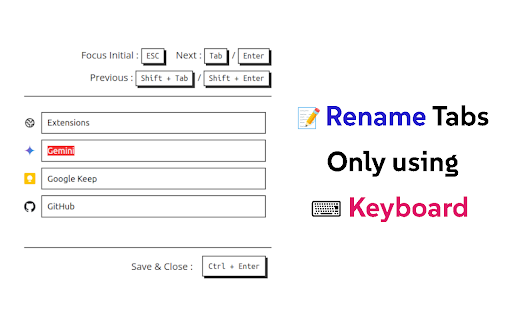
⌨️ Rename tabs without using a mouse!
- Press 'F2' to Open Rename Page at any tab
- 'Tab' or 'Enter' / 'Shift+Tab' or 'Shift+Enter' to Move around tab titles
- 'Ctrl+Enter' to Apply changes and Close
- 'Shift+R' to reload connectable tabs
- 'F5' or 'Ctrl+R' to Reset changes (browser original)
- 'Ctrl+W' or 'Ctrl+F4' to Close without applying (browser original)
📌 'F2' shortcut and Renaming is ⚠️not available⚠️ at some pages (e.g. ⚠️ chrome web store page ⚠️, chrome:// pages, new tab page, etc) due to security reasons of the browser.
📌 When extension is 'first installed ⬇️', you need to 'refresh 🔄' tab to use 'F2' shortcut because extension cannot connect to tabs that are created before its installed.
v1.2
- Added descriptions about unavailable tabs
- Reload all reconnectable tabs with 'Shift+R' shortcut
- All buttons are now clickable
v1.1
- Added settings
- Change shortcut
- Darkmode
- Adjust list width
Source code of this extension is opened : https://github.com/vhv3y8/rename-tabs-with-f2
Feature Request, Language Support, Bug Report : Github Issue or [email protected]
Latest reviews
- Love Needle
- Excellent
- Brett Barker
- Extension doesn't do anything. Nowhere to click. None of the buttons do anything.
- Kai Jaeger
- Works perfectly with ordinary Tabs. Does not work with Tab groups as of 2025-03
- Anjan Oleti
- Minimal. Fast. Efficient. Unobtrusive.