
Udemy Enhancer
Extension Actions
A useful tool to improve the user experience of Udemy.
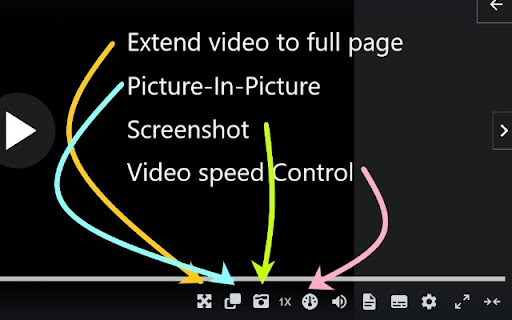
This extension offers features to improve your user experience on the Udemy website.
Attention: These features only appear on the lecture page.
Current features:
1. The user can extend video size to fill the entire webpage, similar to Youtube's theater mode.
2. Picture-in-Picture
3. The user can use the mouse to capture an area and then take a screenshot of the selected area. Press Ctrl+C to cancel.
4. The user can adjust the video play speed. To set the minimum and maximum speed and the slider interval, right-click the extension icon and select the option page to update.
Udemy may update its code and make the extension features not working. If you encounter any issues or want to contribute to the extension, please visit the repository and open an issue.
https://github.com/a90100/udemy-enhancer
If this extension greatly improves your experience, please consider giving it a five-star review! If you encounter any issues, please let me know. Thank you!
Latest reviews
- Tyler Fulk
- Exactly what I needed, default udemy controls 1 -> 1.25 is too big of a jump, allows me to choose 1.1x. Thanks!
- Steve Furches
- Wonderful!
- Edwin Mui
- Use to take screenshots without having to annoyingly disable GPU acceleration in chrome
- Oliver Snowden
- I only wanted the playback speed to be faster than 2x. Thanks for your "select 'Options' to open the settings page" suggestion, please make the default max ~4x.
- Raimundas Sakalauskas
- This is nice, but wish it would go to at least 3x the speed. Sometimes it's a nice alternative to simply skipping the content you feel like you don't need to see/hear.
- Huy Lê (Haizz hướng nội cởi mở)
- Thanks, I very love the speed feature. Cuz we can adjust the speed more specific than the built-in one.
- Fathy Elgazzar
- great extension, helped me a lot, thanks!
- Abhishek Kapoor
- Great!!
- Lipan Biswas
- Very good extension...just try
- Leandro Battista
- This is what I was looking for. Perfect extension to switch between Udemy and Visual Studio Code easily, while learning and coding.
- Aymen Denoub
- - Speed controll and picture-in-picture are working as expected. - Screenshot has some problems, you can't drag the selection from left to right. Also bottom controlls open when I try to select the area to screenshot. - I wish there was a button to take full video image screenshot without selecting an area.