
Tab History
Extension Actions
View the recently visited tabs
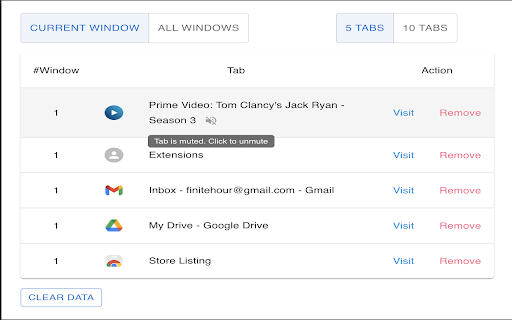
One of the features in Chrome that I really like is the ability to create and customize groups of tabs. It helps me in arranging the tabs based on different parameters.
Despite this feature, lately I found myself drowning in sea of ‘tabs’ in Chrome. I used to open one tab and forget what were the last tabs I was working on opened. I’m sure you must have faced the same issue.
To solve this pain-point, I have created this Chrome extension. It will show the 5 most recently (can be configured to 10) visited tabs for each window. You can directly open the tab from the extension screen itself as well as close them.
How to use the extension ? It's actually very easy.
1. After installation, Pin the extension in the browser.
2. On clicking the extension icon or Keyboard Shortcut (Mac: Command+U, Windows: Ctrl+U), Popup will show top 5 (default) most recently visited tabs for each window.
3. The number of recent tabs to show can be configured to 5 or 10.
4. Select "All Windows" to view tabs from all windows. Window ID are identifiers. They will be same for a single window.
5. Select "Pinned" to view pinned tabs from all windows. Click on Pin icon to toggle between pin/unpin.
6. "Visit" action will make the Tab active (even if it's in a different window) and switch the user to that tab.
7. "Remove action" will close the tab.
8. Mute/Unmute tabs playing audio. Muted Tabs can be manually reloaded to unmute as well.
9. Privacy: No data (Username, password, email, etc) is collected or shared with external sources. The extension doesn’t work with ‘Incognito mode’.
I intend to make it more user friendly and add more relevant features. Do give it a try and let me know your thoughts. Please share your reviews. :)
Keyboard Shortcut to open ( Mac: Command+U, Windows: Ctrl+U )
Latest reviews
- Felidae
- Seems to be a good solution for my ever-continuing problem situation: Squeezing every last drop of my laptop's life-juice, ie, some 30(!)+ open windows (one of the 'joys' of having ADHD, ugh..😒), and each maxed-out in number of tabs. Despite my setting that pauses inactive tabs to save memory, and marking them with a dotted circle, it's still difficult (=impossible) to spot the one I was at before, whenever I switch to another maxed-out window (and the "tab search" list is a mile long but also tends to fail in clarity after a while). I already had to use window-savers to make room by temporarily storing them (and oc repeat the problem again by filling out all that freed space), and also make use of "groups", but I'm hopeless (it's a miracle I haven't been slapped with any BSD situation - knock on wood!). Anyhoo... I'll give this a try and be back later/in a few days to post my experience-review (🤔is that even a word?); the median-3 rating stars are just to allow for posting of this comment. Later Gator!