
Auto Tab Discard (suspend)
Extension Actions
- Extension status: Featured
Increase browser speed and reduce memory load when you have numerous open tabs.
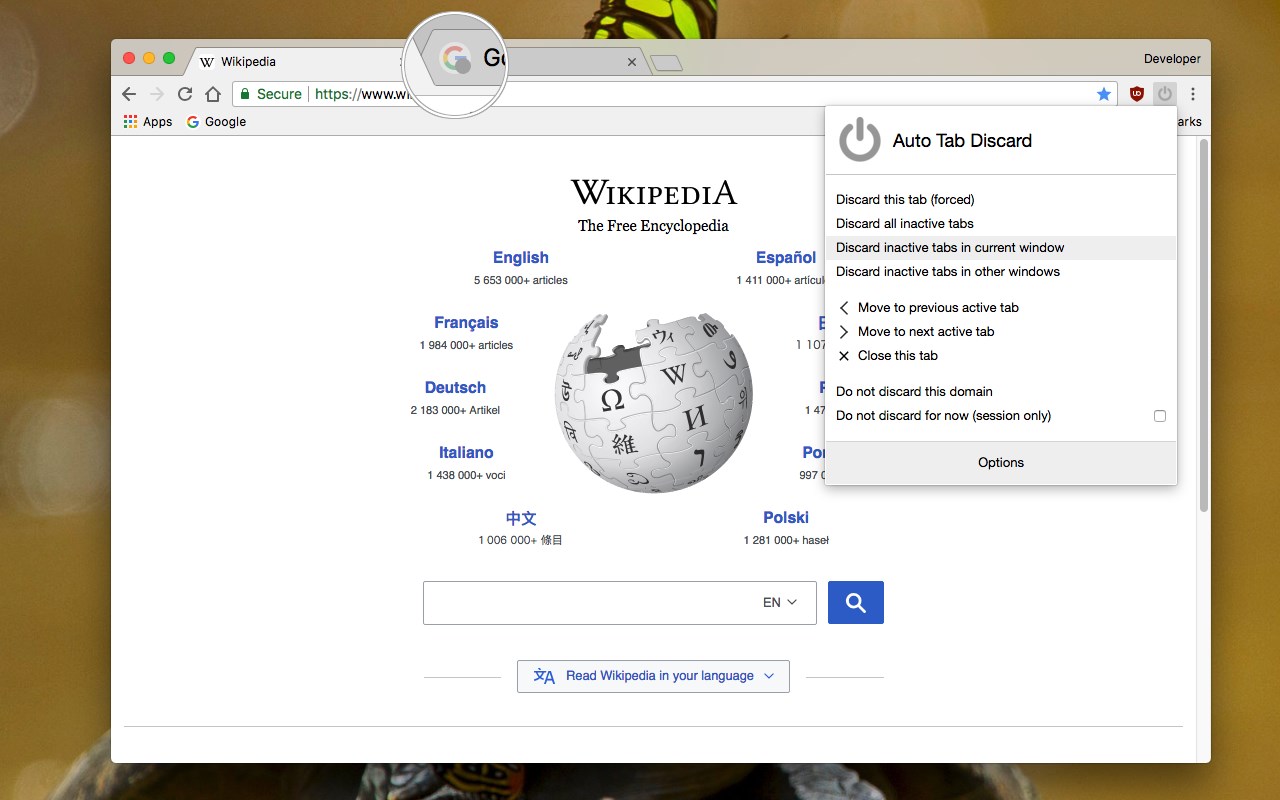
"Auto Tab Discard" is a lightweight browser extension that automatically reduces the amount of memory used by open but inactive tabs, helping to conserve battery life on portable devices by disabling JavaScript code and DOM events on discarded tabs.
Preview:
https://www.youtube.com/watch?v=ityhxUPp3y8
Instruction:
There are two options on the extension's interface to either discard tabs or release discarding (the "x" buttons)
The features of "Auto Tab Discard" are:
* Improves browser performance and reduces memory usage by automatically or manually discarding inactive, idle, or forgotten tabs.
* Includes a list of hostnames or regular expressions that can be excluded from auto-discarding.
* Preserves the discarded state of tabs when the browser is closed and reopened.
* Indicates the discarded state of a tab through the favicon or title.
* Restores the state of a tab, including scroll position and text box content, after it is released from being discarded.
* Allows for the forced discarding of specified hostnames.
The options for configuring whether tabs should be discarded or not include:
* Pinned tabs
* Tabs that are playing media
* The presence of a power source
* Unsaved content or user input in a tab
The available plugins for "Auto Tab Discard" are:
* Release the discarded state of the next or previous tab.
* Release the discarded state of all tabs in the active window.
* Automatically discard all newly opened inactive tabs.
* Store YouTube's timestamp before a tab is discarded.
* Permanently delete (remove) old discarded tabs that are inactive.
Notes:
* Unlike the "The Great Suspender" extension, this extension uses the native method for discarding tabs, which means that even if the extension is removed or the browser crashes, your browser will automatically restore everything for you.
Privacy Policy:
https://webextension.org/privacy-policy/extension/tab-discard.html
Latest reviews
- Jacob
- Been using this for the last 4 months, I literally had 90 tabs opened which inactive were asleep thank,s to this extension, literally one of my favorites, the sites load fast after discarded, and I really reccomend this, a quality of life feature Edge should've added cause the timed out ones take too much time to load but also to be asleep, this extension is amazing really! I even added a keyboard shortcut for it, made it work way smoother I put it to CTRL+Q
- Stanislav
- Funguje jak má.
- Alter
- Update: 11/03/24 "Discard Other Tabs in this Window" is poor and very rarely works. Instead I have to switch window and use "Discard Tabs in Other Windows" or "Discard All Other Tabs". Even then the extension is hit and miss. Needs lots of improvement for consistency. ----->>------------OLD Review ---->>------------>>-------------------->>------------------>> Excellent tab suspender. However please add the ability to only retain a certain number of active tabs without the condition of time. And also a manual tab unsuspending page, where the user is required to click on the page of an inactive tab to unsuspend rather than just opening the tab. A similar implementation to the workona extension.
- AliReza
- "suspend" by Error Message from Edge.!!!
- J
- El mejor, lo uso en todos los navegadores desde que tengo conocimiento de su existencia, precisamente para sustituir y escapar de the great suspender.
- Filipe
- Falta duas funções, sendo a 1, a mais importante: 1 - Não restaurar a página assim que muda para a aba, deve ter uma opção de só restaurar quando clicar na aba ao invés de ser uma restauração automática. 2 - Nos mostrar um screenshot da página desativada igual o The Great Suspender também faz (e é opcional, inclusive a qualidade da imagem e se será da página inteira ou não), no Google Chrome.
- Ng,
- The automatic discard works well. Is there a way to Auto CLOSE tabs? It looks like there is a 1-hour wait to close tabs. Thank you.
- VINCE
- one the most convenient extension easy and good to use.
- Maxime
- Seem to do the job but in same time the extension sucks. When I discard a tab, it focus a tab that has been discarded.
- Mad
- Still one of the first extensions that I install on my pc.
- Vaibhav
- Unable to discard Tabs at startup. The options worked in Chrome and Brave, but here it just doesn't work. Edge keeps Loading Tabs when started.
- Amr
- Excellent
- Adam
- works great once you configure all the settings!
- Dan
- Juste parfait, vraiment excellent . important, utile et économique ; un grand succès à venir, pour tous type d'utilisateurs (PRO) . Merci beaucoup ! :)
- Nik
- Excellent suite of options if the default edge sleeping tabs with only heuristics isn't enough for your needs.
- Andreas
- Works as promised
- DeKok,
- Works great! However I noticed tabs automatically discarded don't have the emoji indicator.
- Danial
- no longer working, tabs that clearly have no media content or forms filled are ignoring all of the discard options except for "discard this tab"
- Bruno
- Muito bom, e cumpre o que promete, recomendo muito!
- Panna
- alternative of great suspender.
- Sergio
- An excellent alternative to 'The Great Suspender' extension. I highly recommend giving it a try and play with the settings to make it behave similarly.
- David
- Es muy útil cuando posees una ventana con muchas pestañas abiertas. Sin embargo, lo que es incómodo es que se reactiven cada ves que abres la pestaña, ya que a veces paso ahí por accidente y tengo que desactivarlo nuevamente.
- Peter
- The best
- Holly
- Really useful and simple. Better options than just edge://flags.
- Dayton,
- This is unnecessary. Go to edge://flags , search for "sleep", turn it on, and go to the Edge settings > System tab to change the settings. Works better.
- Muhammad
- Excellent extension. Works perfectly and does what it is supposed to do.
- Robert
- This needs more reviews, really useful.
- Thangaraj
- Looks good so far!
- Dima
- Does the job!
- Shane
- WOW! I did not expect this, and to be honest, I am not sure how I feel about it. I am revisiting Microsoft Edge for the first time in a long time. I was surprised to learn it supported Extensions, and even more so that there is a community of author/devs working to implement plugins for the browser. Upon initial use of the browser, I felt a sense of stable completeness that Internet Explorer was never able to quite reach. Yet Edge still has many uphill battles to wage in order to compete with the top contenders. My research/browsing style is a wild A.D.D.-fueled exploration, entangled deep in a web of my own design, over-shadowed by ever-shifting promises, plans, & priorities. Ultimately exhausting my last bits of remaining resources known to memory... When I see a sign that frees me of the madness which, if memory serves, reads "Close programs to prevent information loss." I installed Auto Tab Discard, and INSTANTLY, no more memory issues! I now actually like using MS Edge!