
CRX id
ngjndhfppbmlpgfmchefjkbhigbhpphi
ngjndhfppbmlpgfmchefjkbhigbhpphi
Description from extension meta
Chrome-extension For Downloading E-commerce Product Images
Image from store
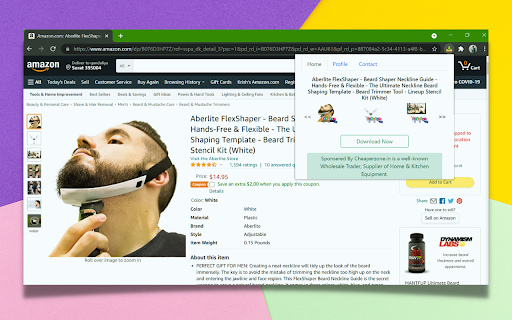
Description from store
With this Extension, you will be able to download the E-commerce Products Images with one click.
Amazon, Flipkart, Alibaba, AliExpress, and many more are supported by this extension.
Your browser will be 100% safe with this extension.
Here's how to use it
1. You must first install the Chrome extension from the Google Web Store.
2. Go to any of the E-commerce websites that are mentioned in the list of supported websites and go to the product page.
3. Once the product page has loaded, click on the extension icon.
4. Using the Download button, you can download the .zip file.
Latest reviews
- (2024-07-01) Harsh Patel: just loading
- (2024-06-05) Oretin Enterprise: just loading only - 2kar extension ban it
- (2024-04-18) Sulaiman Afridi: just loading
- (2024-01-21) Vansh Shah: Working Fine in my browser. Thank You so much for the extension.
- (2024-01-21) Dev Kotak: VEry good working fine
- (2024-01-07) Chintan Patoliya: it works fine.
- (2023-12-20) fancy nine: not working
- (2023-10-18) Dixan Kay: wastee
- (2023-10-18) Dixan Kay: wastee
- (2023-09-08) ahmad rajput: It does work if you use it properly. Give some time to this amazing extension before leaving a bad review for developer.
- (2023-09-08) ahmad rajput: It does work if you use it properly. Give some time to this amazing extension before leaving a bad review for developer.
- (2023-04-05) agvan sohel: total waste of time
- (2023-04-05) agvan sohel: total waste of time
- (2023-02-07) Gnanavel Sakthi: Waste
- (2023-02-07) Gnanavel Sakthi: Waste
- (2022-11-24) Ali Ahmad: it didn't work.
- (2022-11-24) Ali Ahmad: it didn't work.
- (2022-09-21) Md Ashifuzzaman Chowdhury: don't work properly
- (2022-09-21) Md Ashifuzzaman Chowdhury: don't work properly