
Image Downloader - Save All Images
Extension Actions
Download all images from any webpage. Preview, filter by size, and bulk download images with one click. Free image saver tool.
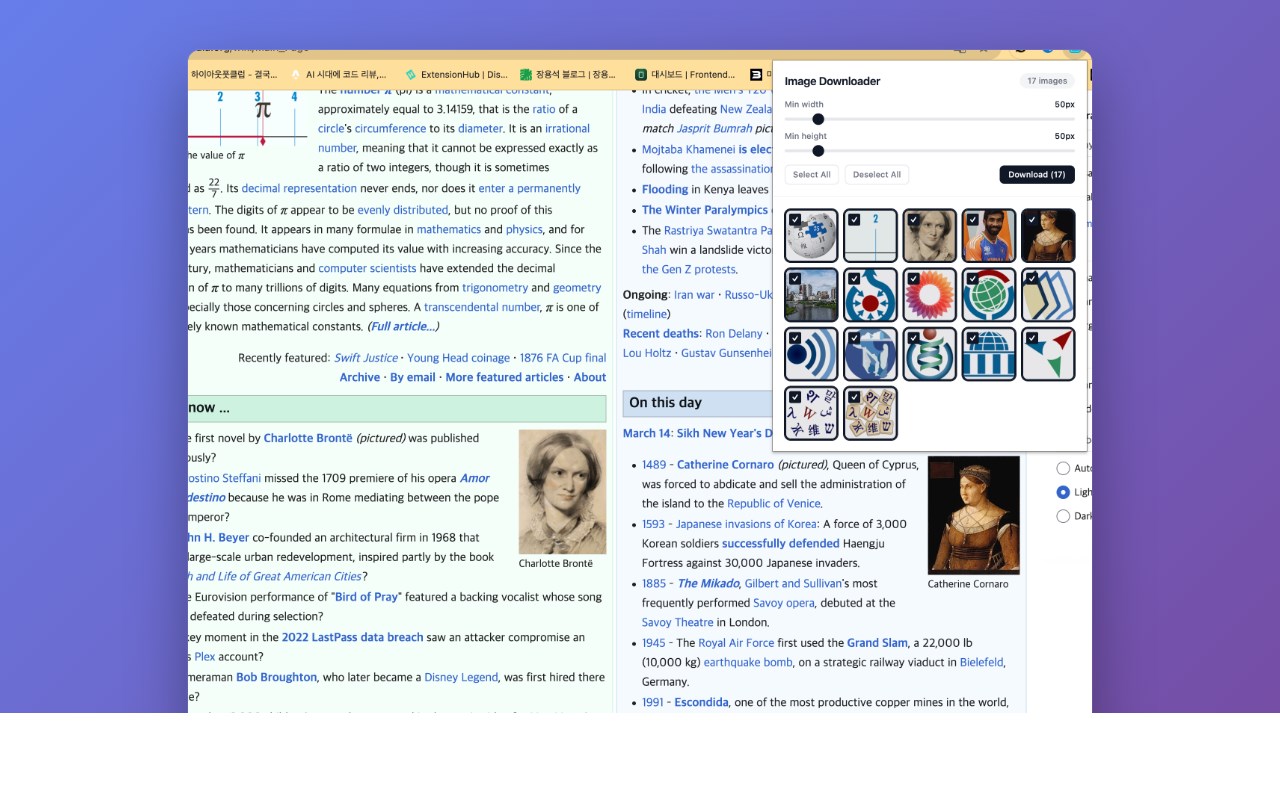
Image Downloader scans any webpage and lets you browse, filter, select, and bulk download all images in one click. View every image on the page in a thumbnail preview grid, filter by size, select the ones you want, and download them all at once.
**Key Features**
- **Full Page Image Scan** — Automatically detects and lists all images on the current webpage, including background images and dynamically loaded content.
- **Thumbnail Preview Grid** — Browse all detected images in a clean, visual grid layout before downloading.
- **Size Filter** — Filter images by minimum width and height to quickly find the images you need and skip tiny icons or spacers.
- **Select / Deselect All** — Quickly select or deselect all images, or pick individual images from the grid.
- **Bulk Download** — Download all selected images at once with a single click. No need to right-click and save each image individually.
- **Direct Download** — Images are downloaded directly from their source URLs to your default download folder.
**How to Use**
1. Navigate to any webpage with images you want to download.
2. Click the Image Downloader icon in the Edge toolbar.
3. Browse the thumbnail grid of all detected images.
4. Use the size filter to narrow down results if needed.
5. Select the images you want (or use "Select All").
6. Click "Download" to save all selected images.