
Docs Hotkey
Extension Actions
- Extension status: Featured
- Live on Store
Create hotkeys for Google Docs
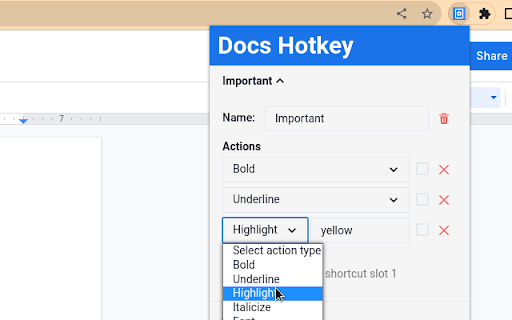
Docs Hotkey allows for complex hotkey setups with simple configuration. Hotkeys can be created to do the following:
- Highlight in any color
- Bold
- Underline
- Italicize
- Change text color
- Change fonts
- Change font size
- Set heading type (e.g., Heading 1, Normal Text, Title)
- Strike through text
- Change alignment and indentation
- Add emoji reactions
- Add bulleted lists and set their spacing
- Clear all styles and remove specific styles
- Execute add-ons
- Insert search menu components (e.g., building blocks)
A single hotkey can be configured to do several of these at once.
Docs Hotkey was originally created solely for the addition of a highlight shortcut, but it has since expanded to many others. If you need a shortcut for something that is not available, feel free to contact me.
Now supports Google Slides and Google Classroom!
Documentation: https://docs-hotkey.zackmurry.com
Latest reviews
- Szymon Info
- Strikethrough doesn't work in Edge/Windows 11. Instead of crossing a word the shortcut opens the "Format" menu in Google Docs. Can you please fix it or advise how to fix it?
- Pranjal Shrestha
- Works so well, I had some problems at the start, but I kept making new ones and it somehow worked. I love this extension and its very easy to highlight. You should add a code that allows other people to use multiple different shortcuts. Thanks for making my life easier. W mans
- Anlin ZZ
- I found this extension via Reddit. Works really well. Thank you!
- Adrianna Felder
- LOVE THIS! feature request! can you add an add on for adding tables? even if its just two boxes ones its there you can double click and do anything but i create so many tables for school and i just want to make the work flow a bit faster please and thank you!
- Shannon Chambers
- Exactly what I was looking for - don't forget to set up the shortcuts in Chrome or else this won't work. Follow the steps here: https://docs-hotkey.zackmurry.com/#getting-started. I'd rate this 5 stars but I'd love to see line spacing options. I like to format my docs with 3pts of spacing after each line and it takes many clicks to do this so an extension option would be wonderful.
- S. Alvin
- Big help
- 周紜竹Julia
- sooooo helpful for debate!!
- Jisoo
- please add superscript and subscript :/ installed this specifically bc my keyboard wont recognize ctrl , and . for some reason and we should be able to customize the actions as well instead of being locked into ctrl shift h
- odoriphic
- I've been using this for highlighting and it's been great, but lately some hex codes don't work and they all become grey highlight instead.
- Ashekul Mustafa
- I am using chrome in linux and its not working for me
- L
- Have been looking for exactly this!! Thank you--super easy to use, such a time saver.
- Danielle Jonah Mendoza
- The hero we did not expect. Love it!!
- Rose Rubec
- Thank you so much for this great extension
- Shinichi Kogi
- Awesome stuff!
- Michael
- Makes quickly changing colors on text boxes so much more easier!
- S S
- Works great, remember to follow the steps on the website to set-up the hotkey functionality. This needs to be created through Chrome settings itself, not the extension! (https://docs-hotkey.zackmurry.com/creating-hotkeys)
- Emma Quick
- I can't figure out how the commands for the hotkeys bruh please help me
- Falaniko Tofa
- Real useful. Would you consider adding a command for "add space after list item"? When I make bullet points I want them to be spaced but no shortcut for this rn.
- Don Stewart
- Love it! FINALLY can make google docs bullet list same shortcut as my other apps!
- Soulx Stowell
- I just cant get it to work, idk if its user error or if its outdated but its not working.
- Emanuel Jhutti
- Works great on Mac. It's also open source, so that's why I give 5 stars!
- Jermaine Lee
- Does this work on macbook? Not working on google docs on macbook
- JNTUH UCES
- Thanks Buddy It helping a lot during notes preparation.
- Nat Welles
- amazing tool. can't imagine it took this long to create but thank God!
- Neo Gan
- Simple but very effective extension
- Joshua Canlas
- a must have for studying and taking notes, so simple and effective
- Adam J
- Thank you! This is perfect.
- Emily Zhu
- This is so great. I wish there was an extension just like this for OneNote as well :')
- Raymond
- Amazing, thank you.
- Micaela Ruiz
- Ill be great if the extension had the option to convert an entire text into lowercase or uppercase. looking forward to it
- Satyam Kesari
- extremely good
- Summer Fonseca
- works as advertised. a very useful extensions that adds functionality to google docs by being able to access tools quickly.
- Chantelle
- amazing!
- Sylas V
- this is so helpful when it comes to work! when I need to quickly need to do something all I have to do is hold ctrl+shift+0 and I have highlighted AND underlined what was inportant! I tell you if you get this your life will change!
- JQ Whitcomb
- Excellent extension. It takes a few steps to get set up but once you do, prepare to save a ton of time if you do repetitive text formatting changes in GDocs. I use it mainly when grading students' writing work, in order to highlight text in different colors according to their mistakes.
- Joel Chitunda
- Is there a way to CAPITILIZE / UNCAPITALIZE an entire phrase?
- Han Yan
- Amazing, does exactly what it's supposed to do! truly such a time saver and a really helpful extension for writing speeches for debate. thank you so much; this saved so much time and strife!
- watson Xi
- Command-option-H won't work, which tripped me up at first but its unlikely due to this extension. Command-shift-H works great. Excellent extension! Thank yoU!
- Graeme Z Johnson
- Simple and does what it says it will.
- Daniel Van Bibber
- Very helpful!
- Furniture Store
- thx
- Furniture Store
- thx
- Ioan Andrei Pascu
- This was almost perfect but we need indent editing shortcut pleaseeee
- Ioan Andrei Pascu
- This was almost perfect but we need indent editing shortcut pleaseeee
- ProAndySong
- This has to be one of the top extensions. Found diamonds 👍
- ProAndySong
- This has to be one of the top extensions. Found diamonds 👍
- Sebastian Geutebrueck
- One of the rare treasures. Helpful, functional, simply, understandable, working.
- Sebastian Geutebrueck
- One of the rare treasures. Helpful, functional, simply, understandable, working.
- Clare Westerman
- I used this article for instructions in setting it up: https://appsthatdeliver.com/app-tutorials/google-docs/google-docs-highlight-shortcut/. It works really well so far!
- Clare Westerman
- I used this article for instructions in setting it up: https://appsthatdeliver.com/app-tutorials/google-docs/google-docs-highlight-shortcut/. It works really well so far!