
MS Edge TTS (Text to Speech)
Extension Actions
- Live on Store
MsEdge TTS Extension (Text to Speech)
✨ NEW FEATURE: Dark mode is finally here!
This is a text-to-speech browser extension that utilizes Microsoft Edge's Online TTS service. It offers several notable features:
1. Natural Sounding Voices: The extension provides high-quality, natural-sounding voices for a more engaging and enjoyable listening experience.
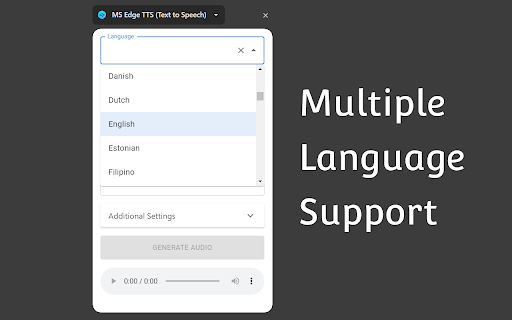
2. Multiple Language Support: It supports a wide range of languages, allowing users to listen to text in their preferred language or translate text into different languages.
3. Context Menu Item: The extension integrates a context menu item, enabling users to quickly and easily convert selected text into spoken audio with just a right-click.
4. Download Generated Audio File: Users have the option to download the generated audio files.
5. Advanced Controls: The extension offers advanced controls for adjusting the rate, pitch, and volume of the generated speech.
6. Free for Personal and Commercial Use: The generated audio files are free to use for both personal and commercial purposes.
7. User-friendly Interface: The extension features a user-friendly interface that is easy to navigate and use. The extension provides language and country auto-complete functionality, making it quick and convenient for users to select the desired language or country for text conversion.
Attribution:
The extension icon is created by Freepik - Flaticon:
https://www.flaticon.com/free-icons/loud-speaker
Latest reviews
- Fiyyaz Fiaz
- EVERYTIME I TRY TO GENERATE AUDIO ITS SHOW MW ERROR
- Stiaan Terblanche
- I think it's the easiest and highest-quality text-to-speech extension that I've come across. It does open an additional tab, but that's not an issue because it stays on the current tab you're using and just plays the speech while you can follow the reading. I'm very happy with it. Thank you so much! UPDATE: One unfortunate downside is that when the extension goes past a certain number of words to generate the audio, it fails. It seems like it can only generate audio for a certain number of words at a time. After that, it will fail to create the audio.
- MiX So
- It works good!
- Tamil Single35
- Fantastic
- J G
- It is very hit or miss on whether or not it will work at all. When it does work it's five stars. I really wish I could rely on this because it is my favorite when it works the narration is very natural sounding.
- Kohji Haskins
- after the 1.4 update it no longer works
- Ashish Alexander
- Cons: Opens a whole new window instead of keeping me on the same page
- AYODELE EYITAYO
- Good morning. It stopped working yesterday, December 18, 2025. Shows "error occurred while generating audio" Kindly fix the issue or let us know the situation. Good evening. Kindly help us fix this error. My work depends on this app. Please.
- Mar
- it's really my own fault for not realizing it with the pictures, but it doesn't actually read directly from the page. you have to copy-paste the text into a box for it to process and then read... you could easily do that on a website. don't need an extension for that.
- Robert Foster
- Stopped working today, but was great until then. I'm getting the error "Error occured while generating audio."
- Namo Nymus
- ⚠ Setting needed: to disable opening sidebar every time. This will make more user. Thanks
- Sebastian Videgaray
- sad, stop working, was great when was working
- Axel O.
- Perfect, that's exactly what i spent hours looking for
- JC Video
- stopped working on vivaldi after it got a major update. Keeps saying "Error occurred while generating audio".
- Diana Krutikova
- Hello! Could you tell me why I get "Error occured while generating audio"? It used to work alright some time ago. Updating didn't help.
- khaled algamdi
- Not working
- Robert
- Donwloaded for the first time on Aug 26, 2025. Currently not working gives error: "error occurred while generating audio". Let me know if you need more info to help fix this for me and others having this issue.
- Kaif
- This is a great and best voice generator i have ever seen for myself its great but currently its not working hope this will be fixed soon.
- Wontgiveup
- It doesn't work anymore for me it just says "error occurred while generating audio"
- toomi li
- so helpful
- Sijin Yang
- Using this for a long time. But now it prompts "Error occured while generating audio". Please look into this.
- callanyonefrompc
- Has potential, but badly implemented. The extension forces you to have the extension's side panel open. I just want to read aloud selected text without having a sidebar or popup panel. The settings are hard to get to as well. The rate and pitch should be on the main menu, not buried in a secondary window. And the volume option should be a long slider like the rate and pitch sliders are. One problem is that the voice volume setting is never remembered. If you change it, it will reset to 100% if you close the side panel. There should also be faster ways to play selected text. Like a button you can left-click on, and/or some shortcut hotkeys. One good thing about this extension are the voices. It looks like the extension developer somehow added SAPI-5 or similarly natural sounding voices.
- H E Erol
- With this application, I used to have my texts read aloud and I created my audios, which was a huge help to me. But since July 17th, the reading time has been limited to 10 minutes. If the text is longer than 10 minutes, it stops reading. I asked other friends who use the same app, and they all say the same thing. It’s very unfortunate because there are visually impaired or elderly people for whom this was very helpful. To the technical support team, I am writing regarding a recent limitation in your application. Since July 17th, the reading time for texts has been limited to 10 minutes. If the text exceeds this time, the reading automatically stops. This creates a real issue, especially for visually impaired or elderly users who relied on your app to listen to longer content. Several users have confirmed they are experiencing the same problem. I would appreciate it if you could look into this issue and, if possible, restore a longer reading time or explain if there is an alternative solution. Thank you in advance for your assistance. Sincerely,
- Daniel Ajoy
- Great extension. The best voices I've heard. The "download" feature is invaluable. Used it in Firefox, and now in Chrome.
- Tony Lee
- Love this extension!
- Rodrigo Lopes
- Great tool, really simple to use, and what I've wanted for a quick shadowing practice setup.
- fana vary
- Sorry to say But ...NO AI .... It's a typical old school TTS im been using for past 6 years , it has NO understanding of the material , NO emotions ... NO expression ... NO depth of understanding of the meaning ... JUST Plain typical TTS reading , it even has glitch ... If you're a professional user of ai, tts you know what I mean , BUT I'm not here to insult the hardworking jobs of the programmers who share their fruits for free for us , so thanks , sincerely
- jiawei
- Great! The voice is very natural, and it works well even when there are different languages in the text.
- Luke Himself
- This has been the best possible experience I could've imagined with an AI voice TTS extension. I've used this thing for almost a year, and it's always performed exactly as expected, with no annoying "purchase full version" ads, or ads of any kind. Kudos to the dev(s) who put this together and shared it with all of us.
- Varaprad Pitkar
- Solid TTS Option. Would love to speed up the voice even more but the presence of a download option makes it pretty easy anyway.
- Poor Cat
- great experience please also add option for to create clone voice
- El-Jay
- The extension I use the most!! Works perfect!!
- Elias Jones
- haven't had any issues, dev is awesome for this!
- Jasp Riv
- Excellent!
- Alma peterson
- The voices are very good, and I use them a lot to read my assignments, which helps make them sound better. One thing I wish it could do is open in a new tab so I can listen to text while working on something else.
- apiwat tiger
- Best TTS Application I have ever seen. Its free and perfectly use resource offline from discrete GPU or APU such as intel Arc on ship in Mylaptop. The voice speed and pitch is adjustable and have a lot of voice available.
- Mobile Phone7531
- takes a long time to load files. MS edge
- Keting Wei
- not working error red
- Jean Kloodt
- Works well. Only that extra side window that opens on the right side irritates. Why doesn't it work with just pressing ALT+P and without a side window ?
- Solar Zaffiro
- Finally a TTS worth using. Sounds pretty natural (try all the voices)
- pablo shi
- Very easy to use. One suggestion is to add a generated history and allow user to quickly replay the last 2 (or 3, or by config) voice. And user should be allowed to not auto-play the new generated audio.
- Siarhei
- It works!
- Alisa Vatoian
- super useful
- min
- great
- A O
- This extension is sick man. Thanks so much.
- ankit patil
- This very solid quality text to speech. One bug is when it does recognize headings. It does not pause and continues to talk as if heading and first sentence are all one sentence. I am selecting the whole text and right clicking to use the this extension. When the extension opens I can see why its doing that but would be a a little less annoying if this can be fixed.
- Ellen
- This thing is great. It doesn't paywall, makes a minimal footprint on browser resources, and has a broad selection of natural sounding voices with pitch and speed modifications. It allows you to select passages to read rather than reading the entire page including annoying headers and dates etc. It's the best TTS I've come across!
- cherry li
- work well
- Blaze 2.0
- pros: it supports many languages and voices, can change speed or download audio, select text Cons: Very very super slow have to wait for 30s to start for larger texts, does not highlight spoken word
- One Nun Won None
- Thank you for developing this. I have dyslexia and also ADHD, so on-screen reading is fine for me if it is 1-2 paragraphs, but I struggle when the content is longer form. I use this extension multiple times a day -- pretty much constantly. In the past I would open Edge and use it whenever I needed for something to be read aloud, so I really appreciate having this right at the touch of the finger in Chrome. Other chrome options either worked very poorly or not at all, required a monthly subscription to use TTS more than a few lines a day or to use more premium voices, and if you could find a free option that worked, I found that I had to pick from the very primitive terrible sounding voices. finding this has been a game changer for me and I have promoted it in some of the ADHD/Dyslexia forums I participate in. Thank you so much again.