
Geolocation Plugin for PhotoPrism
Extension Actions
- Extension status: Featured
Makes it easy to select the location where your photos were taken
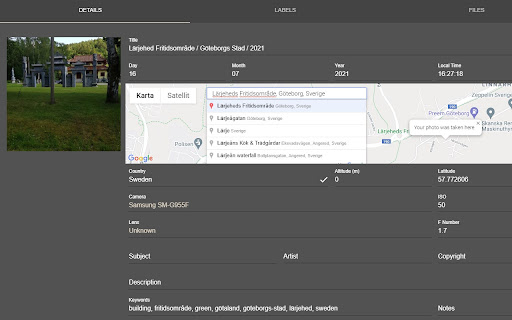
Chrome extension that makes it easy to select the location of your photos in PhotoPrism.
This extension adds a graphical map to the Details tab of PhotoPrism. The easiest way to select the location of your photos is to click on the map. Alternatively, you can search for a place from the search field; selecting a result will update the coordinates of your photo.
It is possible to change the size of the map in the extension's options.
The extension works when opening a picture from the Browse and the Library menus.
Bulk update is supported as well:
- select all the photos that you want to update,
- click on the map pin icon that appears in the bottom-right corner (where the number of selected photos is usually shown),
- a map will appear in the center of the screen,
- choose a location and then click on the save icon (again, bottom-right corner).
The map used is Google Maps and it is hosted by Valerio Technologies AB.
Release 2.3:
Solved an issue cause by the new way PhotoPrism handles authentication. Ensured backward compatibility with older versions. Write to me in case you keep getting a 401 error.
Latest reviews
- Jose Elpidio “Joel” Formacion
- I just discovered this plugin, and it works great for individual photos. However, I get an error when I attempt the bulk edit. I'm not sure what I am doing wrong.
- Anton Zamyatin
- Amazing, Great work, thank you, Andy!
- Raymond Toussaint
- Bulk editting works, but it's a hit and miss. I want to update a lot of photos without GPS encoding, but it never updates all of them. Doing those manually is a pain, but reapplying the same info on 200 photos 20 times is also a pain. 5 star if this would work flawlessly.
- Alan Garde
- This extension is amazing, I can easily set the geotag for multiple photos at once as I try to sort out my photo library. It's filled a gap in photoprism that had me seriously considering moving to a different photo library. Thankyou for all the work you've put into this.
- Tim Conze
- Works fine out of the box. I can now set location for one photo at a time to a location I can search on a Google map inside PhotoPrism details. NICE!
- Chris Sefton-Hearn
- It's a shame bulk editing isn't available, but it does the job of quickly adding a location to single images.
- George Westrup
- Work perfect. Does exactly what it is stated to do. Not sure why some say it doe snot work cause it does.
- Dippy Dolittle
- I have no idea how it works, if it does or doesnt work. which is shame as I'd like to update the GPS data in bulk, and although this is reccomend for PhotoPrism, it appears you have to know someone, who knows someone, who's mate once got it working in order to be able to use it
- Evgueni Fedorov
- Doesn't work at all, no matter what settings. PhotoPrism Build 230615-90a18f6e7
- Evgueni Fedorov
- Doesn't work at all, no matter what settings. PhotoPrism Build 230615-90a18f6e7
- Вадим Иванов
- Does not work.
- Вадим Иванов
- Does not work.
- Daniel
- How do it work?
- Daniel
- How do it work?
- David “Nicktar” H.
- Doesn't save settings, doesn't work
- David “Nicktar” H.
- Doesn't save settings, doesn't work
- Denny Weinberg
- Works great!!
- Denny Weinberg
- Works great!!
- Russell Carter
- This worked perfectly and set the location of a test photo. I will definitely be using this. 👍
- Russell Carter
- This worked perfectly and set the location of a test photo. I will definitely be using this. 👍