
Mic Check Pro — Instant Microphone Test for Chrome
Extension Actions
- Live on Store
Ensure your microphone works perfectly! Instant check, real-time volume meter, audio recording. Free, secure, and no setup required.
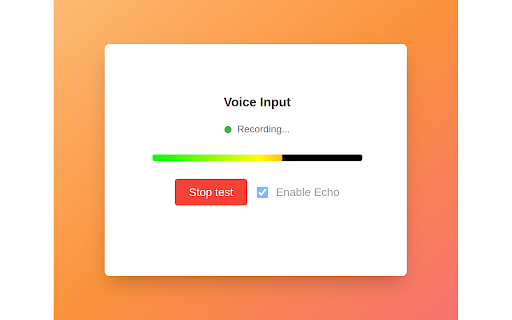
Mic Check Pro is your go-to Chrome extension for instant microphone testing.
Perfect for streamers, remote workers, gamers, podcasters, and anyone relying on clear audio!
🌟 Key Features:
- 1-Click Mic Test — Diagnose issues in seconds.
- Live Volume Meter — Visual feedback for sound level.
- Record & Playback — Hear exactly how others hear you.
- Works with Zoom, Skype, Discord, Teams — Avoid awkward “Can you hear me?” moments.
- Zero Configuration — Just install and click!
🔥 Why Choose Mic Check Pro?
- 100% Free & No Ads
- No Software Downloads — Runs directly in Chrome.
- Supports All Mics & Headsets
- Privacy First — No data saved, no cloud uploads.
📌 How It Works:
1. Install the extension.
2. Click the Mic Check Pro icon in Chrome.
3. Allow microphone access — done!
🚀 Optimized For:
- Chrome, Edge, Brave (all Chromium browsers)
- Windows, macOS, Linux
Keywords (for metadata): mic test, microphone check Chrome, audio diagnostics, fix microphone issues, free mic tester, Zoom audio test, mic volume meter, headset test, voice recorder Chrome, troubleshoot microphone.
Latest reviews
- BILL MILLER
- This is hands down the best web microphone check tool I've used! Super simple, works instantly, and doesn’t have any annoying bloat. Perfect for quick checks before meetings or troubleshooting. Love it!
- Богатый бедный
- Good. BUT! The most important - it's the simplest way to check mic in browser
- SOFIA MARCUS
- 5 Stars – A Must-Have Tool for Microphone Troubleshooting! I’ve been using this Microphone Checker extension for a while now, and it’s been an absolute lifesaver! As someone who frequently joins video calls and online meetings, knowing whether my mic is working properly is crucial. This extension makes it so easy—just one click, and I can test my microphone instantly. What I love: ✅ Simple & User-Friendly – No complicated settings, just a clean interface that does exactly what it promises. ✅ Quick Detection – It detects my microphone immediately and lets me check audio levels in real time. ✅ Great for Troubleshooting – Helped me fix mic issues before important calls by confirming whether the problem was with my hardware or software. ✅ Lightweight – Doesn’t slow down Chrome or consume too much memory. Honestly, if you rely on your microphone for work, gaming, or online classes, this extension is a must-install. It’s free, reliable, and saves so much frustration. Highly recommend! 🎙️👍 Pro Tip: If the extension doesn’t detect your mic at first, make sure Chrome has microphone permissions enabled in settings.