


FRSH PriceView
Extension Actions
Switch currencies and generate quotes on the Freshworks pricing pages.
Switch currencies, and generate customer quotes, on the Freshworks pricing pages.
The steps are simple:
1. Install the App
2. Pin the app
3. Visit any Freshworks pricing sheet
4. Click the extension to switch between prices.
Clicking the toolbar icon on any tab that isn't one of the supported pricing pages above takes you straight to the Freshservice pricing page instead of doing nothing.
Right-click the extension icon for a menu with "Generate Quote", "Help" (opens the install page scrolled to How it works), and "About FRSH PriceView" (opens the install page).
Important
When viewing the price of addons which are dependent on an option you choose, please ensure that you choose the value you want to pick and then click the extension to switch through the prices.
Support:
[email protected]
Changelog:
v2.6 - November 5, 2026
- Updated for Freshworks' redesigned pricing pages: currency switching now works inside the collapsed "View all features" section, converting each category's prices as soon as you expand it
- Newer add-ons and line items are now converted too, including MCP actions packs, Voice add-on, Day passes, Connector app tasks, Dedicated IP Address, Messaging Agent and the prices shown in feature footnotes
- Fixed add-on prices on plan cards showing the wrong add-on's price on Freshchat, and "starting at" prices being garbled on Freshsales Suite after switching currency
- Fixed the quote builder not being able to add a plan on Freshservice MSP, Freshservice Business Teams, Freshcaller, Freshsales and Freshmarketer pages
- Fixed "MCP actions" failing
v2.5.9 - September 10, 2026
- Each plan line item's name is now a dropdown - switch it to any other plan without deleting and re-adding the line. Licenses and discount carry over automatically, and any addon no longer valid for the new plan is removed for you
- The "What's new" tour now opens on a dedicated slide for the latest update, tagged with a "Latest" badge and a link that jumps straight to the full changelog
v2.5.6 — September 8, 2026
- The "What's new" modal is now tied to the extension's actual installed version instead of a separately-maintained constant, so it reliably reopens on every real update
- It only auto-opens when the page is opened by a genuine install/update — opening installed.html any other way (the "About" context menu item, a bookmark, the GitHub link) never triggers it
v2.5.5 — September 7, 2026
- "Share on Slack" now opens a modal with the install message in a text box, a "Copy to clipboard" button, and an "Open Slack" button, instead of copying silently in the background
v2.5.4 — September 7, 2026
- Replaced the single "Contact support" button on the installed page with two floating buttons that follow you down the page: "Get help" (email) and "DM on Slack"
- Added a glowing "Share on Slack" floating button that copies a ready-made install message and opens Slack so you can paste it into any channel or DM
v2.5.3 - September 7, 2026
- Fixed "Email quote" once more: v2.5.2's fix routed the mailto: link through the background worker, but still navigated the current Freshworks tab to it, which funneled the request through that page's own document/router first - showing up as a failed network request for the mailto: URL instead of ever reaching the OS's mail handler. It now always opens the mailto: link in a brand-new tab instead, with no existing page in the way
v2.5.2 - September 7, 2026
- Fixed "Email quote" still not opening the mail app: a content script isn't allowed to drive top-level navigation to a mailto: link as reliably as a normal page script can, so the link now gets handed to the extension's background service worker, which opens it without that restriction
v2.5.1 - September 7, 2026
- Moved "Compare Prices" next to the quote tabs, since it's about comparing between them
- Moved "Calculate Prorated Charges" into each quote's own card, and its toggle/dates are now remembered per quote instead of shared across the whole modal
- Fixed "Email quote" actually not opening the mail app: the table format's padding made the mailto: link's encoded length balloon past what browsers/OSes will hand off, so it silently failed. Truncation now budgets off the real encoded length instead of the raw text length, so it never builds a link too long to open
v2.5.0 - September 7, 2026
- Billing Cycle is now set once per quote instead of per line item - every line in a quote is invoiced on the same cadence, and changing it updates every row (and the prorated estimate) together
- Marking a quote as the customer's current subscription is now a ☆/★ toggle right on its tab, independent of Compare Prices - you can compare two quotes' ARR without marking either one current
- Added a duplicate (⧉) icon on each quote tab to clone a quote's billing cycle, customer type, and every line item into a new tab
- Reworked Download Excel and Email quote into a proper Product/Plan / Units / Price per License per Month / Discount / Discounted Price per License per Month / Monthly Cost / Annual (+ Annual in USD) table; the email version is a fixed-width plain-text table, the closest a mailto: body can get to real formatting
v2.4.3 - September 2, 2026
- The "What's new" welcome carousel now leads with the prorated charges calculator as its marquee slide
- Added a "What's new" thumbnail strip above How it works on the install page - click any thumbnail to reopen the full tour on that feature
v2.4.2 - September 2, 2026
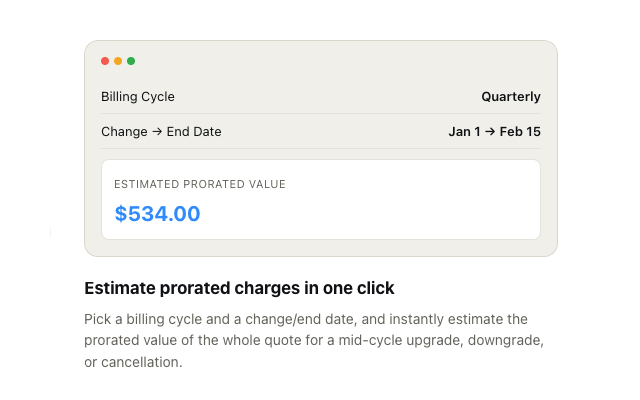
- Calculate Prorated Charges no longer asks for a line item - it now estimates a value for the whole quote's Total Invoice Value, with a Billing Cycle dropdown replacing the per-item picker
- Relabeled the result "Estimated prorated value" and added a note that actual charges depend on the exact date and time of invoicing
- Added a "Total Invoice Value" row below the line items, summing every line's Invoice Value in the quote's currency
v2.4.1 - September 2, 2026
- ARR in USD is now its own field next to Total ARR for non-USD quotes, instead of only showing on hover
- Added "Calculate Prorated Charges": pick a line item and a Subscription Change Date / Subscription End Date to prorate that item's Invoice Value by the fraction of its billing cycle that falls between the two dates
v2.4.0 - September 2, 2026
- Added "Help" and "About FRSH PriceView" to the extension icon's right-click menu - Help jumps to the install page's How it works section, About opens the install page
- Replaced "Mark as current subscription" with "Compare Prices": pick exactly two quotes and mark one as the current subscription to see an ARR delta on the other
- Added tooltips to every major field, button, and column header in the quote builder
- For non-USD quotes, hovering over Total ARR now shows the equivalent value in USD at a fixed reference rate
v2.3.4 - September 2, 2026
- Removed the "Freshservice for CX - coming soon" entry from the Supported pages list, since it isn't a page this extension tracks
v2.3.3 - September 2, 2026
- Replaced the letter placeholders in the "Available on" row with the actual Chrome, Firefox, Edge, and Safari logos
v2.3.2 - September 2, 2026
- Clicking the toolbar icon on any page that isn't one of the tracked pricing pages now redirects to the Freshservice pricing page instead of doing nothing
- Added an "Available on" row linking to the Chrome Web Store listing, with placeholders for Firefox, Edge, and Safari
v2.3.1 - September 2, 2026
- Fixed "Email quote" so it actually opens the mail app/Gmail compose window
- Fixed Unit Price to always show the flat per-month rate, even for Quarterly/Half-yearly items; Invoice Value still reflects the full amount charged for that billing cycle
v2.3.0 - September 2, 2026
- Fixed the ARR delta color: green when a quote costs more than the current subscription, red when it costs less (was inverted)
- Fixed quote numbering: deleting a quote now renumbers the default "Quote N" names of the ones after it
- Billing cycle (Annual/Monthly/Quarterly/Half-yearly) is now a dropdown on every line item that can be changed at any time
- Renamed the "Annual Cost" column to "Invoice Value" and it now reflects the line's actual per-billing-cycle charge
- Restyled the quote tabs to match the site's own category pill selector
- Replaced the CSV download with an Excel-compatible download to avoid formatting/encoding issues
- Added a dismissible "What's new" welcome carousel to the install page, shown after install/update
v2.2.0 - September 2, 2026
- Generate Quote: replaced separate Monthly/Annual cost columns with a single Annual Cost (ARR) column, and added a Monthly/Quarterly/Half-yearly invoicing cadence dropdown
- Added a quote summary panel (Total ARR, total discount applied) and a "Clear quote" button
- Fixed addon detection to also pick up addons embedded in a plan's summary text (e.g. Freddy AI Copilot)
- "+ Add plan" now includes Custom/"Contact us" plans (e.g. Enterprise), which still have a real list price
- Added support for multiple quotes per session (tabs, rename, remove) so you can compare scenarios like Direct vs Reseller, plus a "mark as current subscription" baseline
- Added CSV export and a pre-filled email option, both with a picker for which quote(s) to include
- Restyled the quote modal to match freshworks.com more closely
v2.1.0 - September 2, 2026
- Added "Generate Quote": a right-click context menu (on a price, or on the extension icon) that opens an in-page quote builder - product/plan/billing cycle/license cost, quantity, per-line discount, addons scoped to the clicked plan's actual valid addons, and a Direct/Reseller toggle with per-line partner margin % and partner cost when reselling
- Works across all 11 supported pricing pages
v2.0.2 - September 2, 2026
- Redesigned the install page to match freshworks.com's own look and feel
- Replaced the extension icon with an original mark using the same vibrant multicolor palette as Freshworks' current logomark