
TryOn AI - Your Virtual Try-On Room
Extension Actions
Preview clothes on yourself using AI — your virtual try-on room
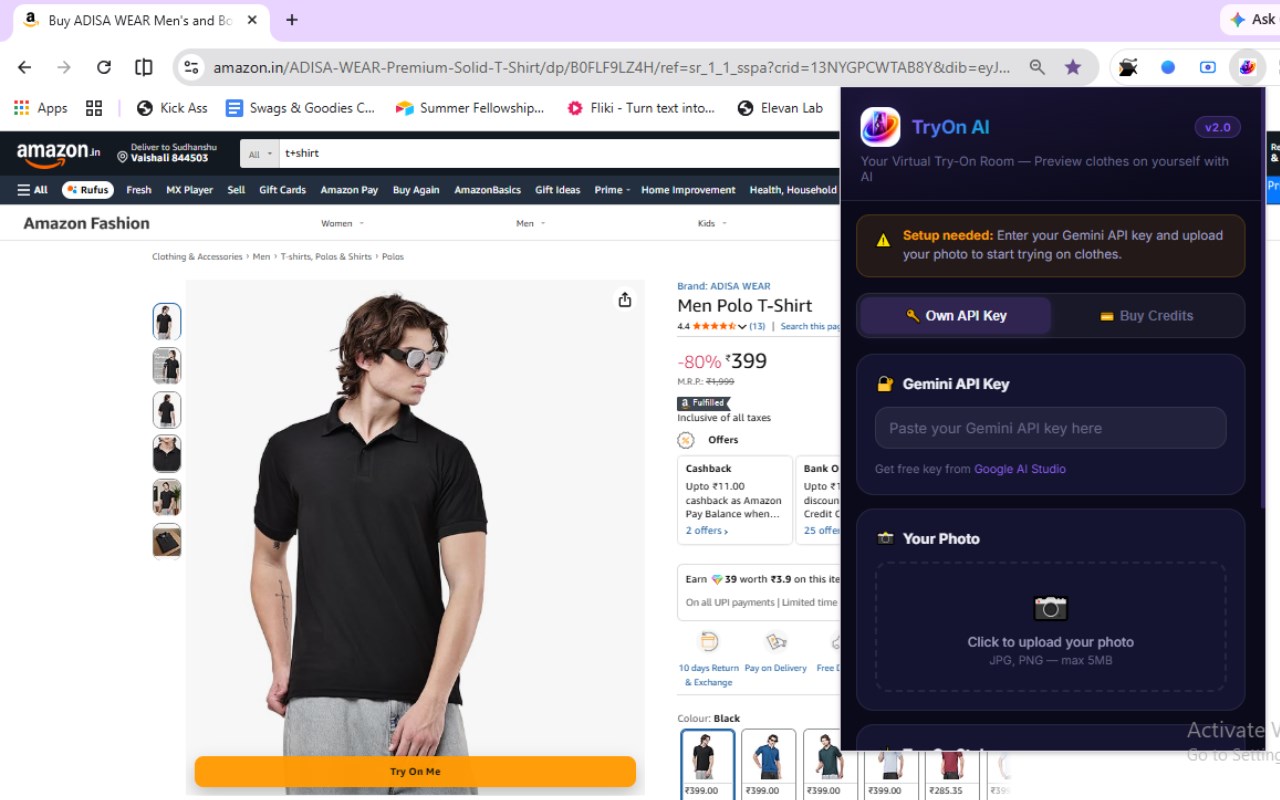
TryOn AI is an innovative browser extension that transforms online fashion shopping by integrating advanced artificial intelligence-powered virtual try-on technology directly into popular e-commerce platforms like Amazon, Flipkart, Myntra, and Meesho. This cutting-edge tool enables users to visualize how clothing items will look on themselves by generating realistic images using state-of-the-art AI engines, including Google Gemini and proprietary generative models. By bringing the fitting room experience to your browser, TryOn AI removes the uncertainty of online clothes purchases, allowing shoppers to preview garments personalized to their own photos before buying.
The extension offers two convenient usage modes tailored to different needs: users can either supply their own API key for free access—commonly through Google Gemini—or opt for a credit-based system that facilitates AI generation via affordable credits purchased securely with Razorpay. The user-friendly popup interface helps you effortlessly manage API keys, credit balances, and generate try-on previews by uploading your selfie. You can switch between three unique AI-generated try-on styles: “Your Style,” which maintains your pose and background while changing clothes seamlessly; “Model Style,” which mimics the product’s advertised angle and background for an authentic look; and “Creative Magic,” which applies artistic transformations for imaginative styling options.
TryOn AI integrates smoothly into supported shopping sites by placing a floating or static “Try On AI” button directly on product images. This button provides a simple gateway to launch the virtual fitting experience immediately. The extension intelligently identifies and selects optimal product images to ensure quality results, and robust backend processing ensures rapid AI image generation while keeping user data secure and private. You can save your generated outfits and revisit them anytime or clear all stored photos and previews with a single click to maintain privacy and control.
Designed with speed, security, and extensibility in mind, TryOn AI is a lightweight solution that effectively bridges the gap between in-store and online shopping. It empowers users to experiment with clothing styles, compare options across multiple websites, and make informed decisions—all from within their browser. The extension’s sleek dark-themed dashboard presents an overview of your credits, saved looks, and generation history for easy management and seamless user experience. Whether shopping for casual, formal, or creative attire, TryOn AI puts the future of virtual try-on technology at your fingertips.
Key Features:
- AI-powered virtual try-on technology integrated with Amazon, Flipkart, Myntra, Meesho, and other major platforms.
- Flexible usage modes: free access using your own Google Gemini API key or convenient credit purchase system via Razorpay.
- Upload your selfie to generate personalized try-on images using advanced generative AI with three selectable styles—original pose preservation, model-style adaptation, and creative artistic transformations.
- Instant “Try On AI” button on product images that is optimized per site and image type for a seamless experience.
- Smart image selection algorithm ensures the best product photos are used for virtual try-on renderings.
- Save, review, and manage past generated outfits and try-on previews directly from the extension popup.
- Privacy-first approach with options to clear all stored photos and previews instantly.
- Fast and secure backend processing that delivers near-instant AI-generated images.
- Transparent credit tracking with usage bar, version badges, and a comprehensive user dashboard.
How It Works:
1. Install the TryOn AI extension from your browser’s extension store and pin it for easy access.
2. Visit your favorite online clothing retailer (Amazon, Flipkart, Myntra, Meesho, etc.) and open any product page showing clothing items.
3. Click the floating or static “Try On AI” button on the product image to activate the virtual fitting room feature.
4. Upload a clear, front-facing selfie (JPG/PNG, max 5MB) to personalize the try-on experience.
5. Choose your preferred AI try-on style—preserve your pose, mimic the model’s pose, or apply creative AI effects.
6. Use your own API key for free unlimited access or purchase affordable credits through Razorpay to continue generating try-on images seamlessly.
7. Save your favorite looks, revisit previously generated outfits, or clear your stored selfies and previews any time via the extension interface for privacy and convenience.
8. Switch between supported e-commerce sites without losing your settings and try different items effortlessly.
Privacy: - No personal data collected. All uploaded photos and generated previews are processed securely on servers without permanent storage or use for AI training. Users retain full control with the ability to delete any saved images or try-on results at any moment. See our privacy policy for full details.
Latest reviews
- Sudhanshu
- It works perfectly. You must it try once.