
Search Tool (AI)
Extension Actions
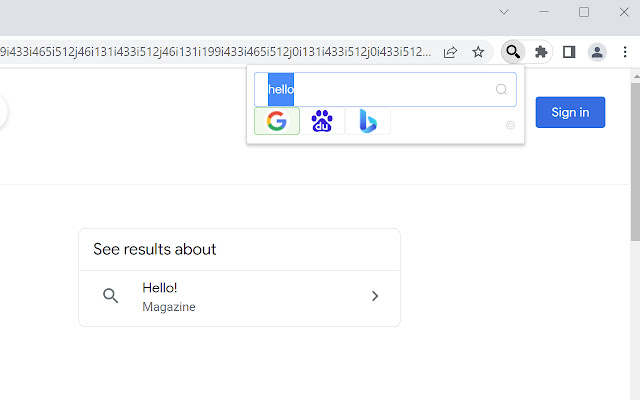
Quickly switch between customized search engines; Add a custom search engine in the right-click menu. New AI model support.
🚀 Now Powered by LLMs! Smarter, Faster, More Efficient Search
Integrated with leading global Large Language Models (LLMs)! Instantly summarize web content, ask intelligent questions, and generate quick insights—all within your browser. Effortlessly connect to OpenAI (ChatGPT, GPT-4), Azure OpenAI, Anthropic Claude, Google Gemini, DeepSeek, and more. Just add your API Key and enjoy AI-powered productivity anywhere on the web!
---
Quickly switch between customized search engines; Add a custom search engine in the right-click menu.
It supports configuring any search engine, similar to the search engine configuration in chrome settings, such as Baidu search, Bing search, JD search, Douban search, headline search, etc.
After configuration, support:
1. shortcut keys switch between search engines.
For example, on the Baidu search page, press the shortcut key (configurable) to quickly switch to Google search without reentering the search term, and then press the shortcut key to quickly switch to Bing search.
2. click the plug-in pop-up menu in the upper right corner (shortcut keys can also be configured) to quickly switch to the specified search engine.
If it is on the search engine page, it will automatically bring the search term and jump to the specified search result page; Otherwise, directly jump to the specified search results page.
3. support the configuration of search engines in the right-click menu.
If only one search engine is configured, it is in the top-level menu, or multiple search engines can be configured. After selecting a text, right-click it, and "search for" selected text "using XX" will appear in the right-click menu
Latest reviews
- edip
- çalışmıyor ALLAH BELANI VRSİN. ÇOK UĞRAŞTIRDIN. It doesn't work. GOD DAMN IT. YOU HAVE TOOK A LOT OF EFFORT.
- 祥
- 挺好用。 https://rewards.bing.com/welcome?rh=43290F27&ref=rafsrchae
- zhibang
- 用过Search All但因它功能不全, 初次用的时候差点被小的设置窗口劝退了,因为大号的设置页面藏在 popup页面的设置按钮, 划词浮窗和自动复制所选是我的最爱,如果再添加自动tts语言朗读所选,就完美无缺了,希望将来能支持导出配置文件
- zhibang
- 希望可以增加超过5个搜索引擎, 并支持导出配置文件
- seeyo
- 请问如何关闭自动联想功能?不需要联想,还是旧版的好,直接搜索就行
- zhihui
- 很好用,和Search All一样。
- Yi
- So good!
- dd
- 13:47来自香港,全球互联,8k视频随你看,注册及送永久流量,地址:http://run.weaksharedptr.com/register?share_id=686da3ae-e88d-49ac-aa77-8d448c11e826
- dd
- 13:47 亲测好用 https://go.91merry-1.top/auth/register?code=sa7S