
Snapper
Extension Actions
- Extension status: Featured
- Live on Store
An easy to use extension for taking screenshots in the browser
Easily screenshot how much of your current page as YOU want, for free!
If you want to choose how much of the current page you want to screenshot, this is the right extension for you.
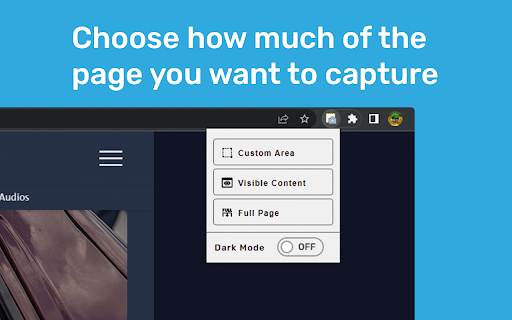
Use the extension by clicking on the icon in the top right of Chrome. You can see a selection of options for the area you want to screenshot:
- Custom Area: choose your own area to screenshot
- Visible Content: screenshot only the content currently visible
- Full Page: screenshot the whole website
Tip: If none of the options work right after adding the extension to chrome, refresh the website you want to screenshot and it should work as expected afterwards.
After the screenshot has been taken, you will be redirected to a new tab showcasing the created screenshot with an option to download the image as a PNG.
The extension is minimalistic and very easy to use without bloat, ads or unnecessary permissions.
The whole extension is created by an independent developer. You can view the open source project on GitHub: https://github.com/timii/Snapper