
Onion Browser Button
Extension Delisted
This extension is no longer available in the official store. Delisted on 2025-09-17.
Extension Actions
- Policy Violation
- Removed Long Ago
With only one click, you may instantly access the internet via a TOR proxy!
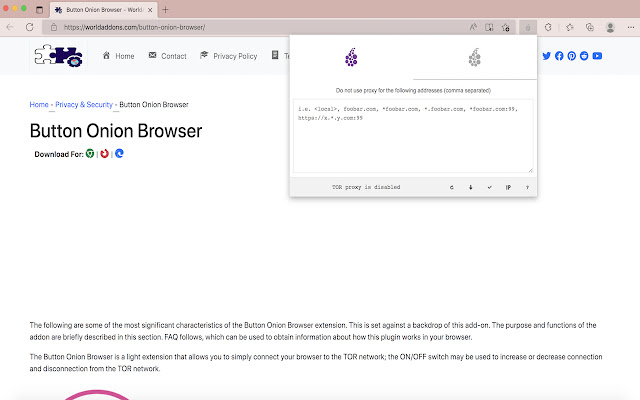
The "Button Onion Browser" is an extension that allows you to connect to the TOR network in your browser with a few clicks (use as a proxy).
This is a crucial note: the software in this add-on has no ties to the Tor® project and has none with the Tor® anonymity software or website. It's essentially an unofficial extension made and kept by its developer independently.
Please make sure your computer (PC or MAC) is connected to the TOR network before using this addon. Please see the section below if you don't know how to connect your PC or MAC to the TOR network. A patch has been created that will assist people in connecting to the TOR network easily. The patch may be obtained by visiting this (https://github.com/jeremy-jr-benthum/onion-browser-button/releases) GitHub repository and downloading (mac.zip) or (win.zip) files.
Please follow the steps below to connect your computer to the TOR network after downloading the patch.
1. For PC users, download and unzip "win.zip" to your computer, while Mac users should download and unzip "mac.zip."
2. Please execute the "run.bat" file within the "win" folder on a Windows computer. Please run "run.sh" in the "win" folder on a Mac.
3. The first time you run the program, it will guide you through an easy-to-follow procedure. You will be asked to select a destination from 6 options. Please hit 1 on your keyboard to start the TOR connection on your computer, and when "Tor is connected successfully!" appears on the screen, you can utilize the Tor Browser Button add-on to join your browser to the TOR network. Please press 2 in order to terminate the connection. To generate a new TOR identity, pick 5; while restarting Tor connection, please choose 6.
Latest reviews
- Claude Cortez
- Great!
- Daniel Fitzgerald
- Very good addon
- Lila Myers
- It's like I'm using Tor browser
- Stanly Leonel
- This is actually a really convenient extension
- Gerald Reynolds
- Good!
- Troy Welch
- This is a good tool to stay anonymous when accessing the internet
- Pedro Clarke
- Good extension
- Melinda Hart
- Nice extension
- Case Charity
- Onion browser is simple and convenient. You should use this extension.
- Dolores Mckenzie
- Very nice!
- Gray Andres
- Download the very good Onion Browser Button extension, this browser you should use.
- Gabriel Ford
- A good way to stay anonymous when accessing the internet
- Meyer Daisy
- The browser is so good you should use it.
- Nicole Schmidt
- It's like using the TOR browser
- Candice Blake
- Great addon!
- Laura Austin
- The Onion Browser Button extension is very good and needs further improvement of the proxy, will become the most perfect.
- Daniel Blackman
- Great, but some features need to be improved!
- Patsy Fleming
- I like this extension. Thank you developer
- Kellie Boyd
- It's wonderful. The only thing I'm missing is the ability to change a hotkey to switch it on and off.
- Ernesto Walker
- Arch Linux. Works! auto connection to TOR without additional. settings! +5
- Devin Walker
- This extension helps you to use the browser in a better way, you should use it.
- Bloom Toby
- I'm slowly falling in love with this Onion Browser Button add-on!
- Rebecca Salazar
- Download the Onion Browser Button extension very well, this browser you should use it.