
Auto Copy
Extension Actions
- Live on Store
Automatically copy selected text to the clipboard.
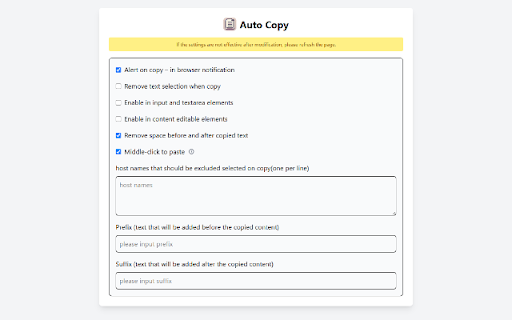
Auto Copy - Automatically Copy Selected Text
Description:
Auto Copy is a powerful Chrome extension designed to boost your productivity by automatically copying selected text to your clipboard. No more right-clicking or pressing hotkeys—just select the text, and it's ready to paste! With fully customizable settings, Auto Copy makes your workflow smoother and faster.
Features:
- Middle-click to paste: Press the middle mouse button to paste the contents of the clipboard into the input box.
- Automatic Copy: Instantly copy selected text to the clipboard, saving you time.
- Customizable Behavior: Modify settings to enable/disable notifications, remove text selection upon copying, use modifier keys, and more.
- Blacklist Websites: Prevent Auto Copy from working on specific websites where you don’t want it to interfere.
- Middle Click Paste: Paste copied text using the middle mouse button, with configurable options.
- Trim Whitespace & Remove Formatting: Copy clean text without extra spaces or formatting artifacts.
- Copy as Link: Use modifier keys to copy text along with its source URL.
- Prefix & Suffix: Add text before and after the copied content.
Why Choose Auto Copy?
🚀 Easy to use and completely free.
🔧 Highly customizable to suit your needs.
🌐 Works on most websites without hassle.
Get Started Now!
Add Auto Copy to Chrome and enhance your productivity today! It's completely free to use.
Latest reviews
- Sergiu Burduja
- Good extension, works as expected, not like others.
- idont tellya
- Works as intended. No unnecessary or extensive configuration options and no extra bells and whistles. It just does what it is supposed to do and nothing else.
- Xiao Yang
- I like the ability to erase the distance before and after the content has been copied.