Web Audio Recorder - Record Browser Audio to MP3 & WAV
Extension Actions
- Extension status: Featured
- Live on Store
Record browser audio from any tab to high-quality MP3 or WAV - ideal for podcasts, lectures & streaming. Offline, no uploads.
Web Audio Recorder — Your Ultimate Browser Audio Capture Tool
Quickly and effortlessly record browser audio from any tab directly into high-quality MP3 or WAV files — no external software needed. Perfect for creators who need a simple, privacy-focused way to capture streaming audio, internet radio, webinars, lectures, podcasts, and music.
🎙️ Perfect for:
▸ Podcasts & Interviews — record live shows or remote discussions directly from your browser.
▸ Lectures & Webinars — save online classes and training with a single click.
▸ Music & Streams — capture streaming audio, internet radio, or sound effects.
▸ Tutorials & Voice Notes — create voice memos, guides, and quick demos without exporting.
🔧 Key Features (what you can do):
▸ Tab audio capture — record audio from any active tab (system/browser audio).
▸ MP3 & WAV output — choose compressed MP3 (low/medium/high bitrate) or lossless WAV for highest fidelity.
▸ High-quality audio — control MP3 quality and preserve stereo channels when available.
▸ Custom duration — set a maximum recording time (e.g., 20 minutes).
▸ Mute tab while recording — automatically silence the recording tab for private sessions.
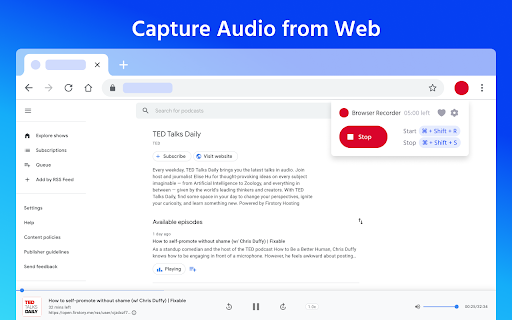
▸ Hotkeys — start/stop instantly with Shift + R / Shift + S.
▸ Local saving, no uploads — all files are saved locally; no server uploads, ensuring privacy and offline use.
▸ Lightweight & real-time — records in real time with minimal CPU usage and no delays.
🚀 How it works:
1.Install Web Audio Recorder from the Chrome Web Store.
2.Open the tab with the audio you want to capture.
3.Click Record or press Shift + R.
4.Stop with Shift + S and download your MP3 or WAV file.
⭐ Why choose Web Audio Recorder?
✅ Simple, intuitive interface for fast recording.
✅ Record streaming audio and save locally in MP3/WAV.
✅ High-quality, low-latency capture — suitable for podcasts and music.
✅ Privacy-focused: no ads, no sign-ups, 100% offline.
✅ Free to use and lightweight.
📌 Pro tips: use WAV for lossless archives and MP3 (high) for podcast publishing. For webinars or recordings where you need maximum clarity, enable the highest MP3 quality or choose WAV.
🌟 Start capturing audio from your browser — fast, private, and under your control.
Install Web Audio Recorder now and turn your browser into a powerful audio capture tool.
Latest reviews
- Marco
- Fantastic tool! I use it all the time. Thumbs up for the developers!
- Dana
- Brilliant. Thank you for adding this extension! I love it, It's so helpful.
- Andrea Vitolo
- AWESOME TOOL! I loved it
- Lukáš Höfer (HiFiMasteR)
- Top
- Godwin Nwokolo
- Attempt to save recording crashes the entire browser :(
- Shan J
- Great app, easy to use, always reliable. Love it!
- Lena Ansorgová (Lennonka)
- Good, simple interface, but crashed my browser on save (Linux problem maybe?).
- Pratheepan Ramanathan
- Perfect for what I need and no paywall
- Naimur Rahman Nirob
- nice
- gideonsward
- Works Grate
- Thomas Dalton
- Dude all the people here complaining about 20 mins are lame as hell. this app is hype don't listen to the nonsense.
- Thomas Camus
- Great extension, but 20 minutes is sometimes not enough :(
- ruiyuan
- only record 20 mins? i want to record audio of english channel on youtube ,and 20 mins is so short !!!!
- Abdul Rehman
- nice quality
- Mildred Guy
- works. thanks!
- Erik Cornwell
- works
- Naeem Zekrallah
- It is not working for me ,not recording at all
- Chris Pook
- Can't record for more than 20mins. Pretty useless.