
CRX id
pdlbgfbmijdmejbmjababcdblgpipgdn
pdlbgfbmijdmejbmjababcdblgpipgdn
Description from extension meta
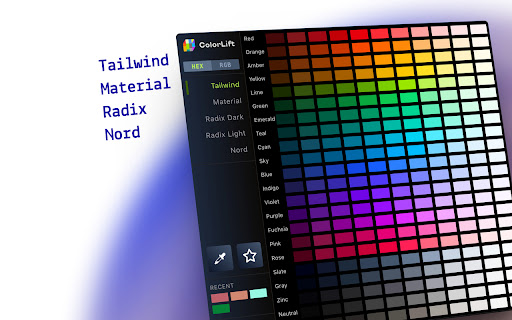
🏆 Color palettes from Tailwind, Material, Radix, Nord and more — in HEX and RGB formats.
Image from store
Description from store
Access popular design system colours like Material UI, Tailwind, Radix and Nord directly in your browser. Perfect for developers and designers working with Figma, VS Code, or any design tool.
**Why You'll Love it**
🔹 Preloaded Presets
Access curated palettes from popular systems like Tailwind, Material UI, Radix, and more.
🔹 ColourPicker Tool
Pick any colour from your screen, whether it's inside your browser or anywhere on your desktop, with pixel-perfect precision.
🔹 Favourites & Custom Palettes
Save colours you love and build your own palettes for future projects.
🔹 Copy in One Click
Instantly copy colour values in HEX or RGB formats to your clipboard.
🔹 Open Source
Feel free to contribute or request a feature to this community driver project.
🔹 Drag and Drop
Hold <Shift> + <Left Click> and drag the colour to your VS Code, Figma or anywhere you like. No need to copy to your clipboard.
Free, lightweight, and privacy-focused – no account required.
Have feedback or want a new feature? Reach us at [email protected]
Latest reviews
- (2025-08-06) Kristian Diana: Finally, a color tool that doesn’t overcomplicate things. Pixel-perfect picker + curated palettes = my new design shortcut. Open-source is a huge plus!
- (2025-06-05) Ethan Lee: A very useful tool for developers, especially if you're dealing with CSS styling. Really like the different color schemes like Material, which I use very often. Should have gotten this tool earlier!
- (2025-06-02) James Robinson: Using ColorLift was a breeze. The tool is responsive, and the color corrections are subtle but effective. Whether you’re a beginner or pro, this extension is a valuable addition to any workflow.
- (2025-06-02) Jenny Cooper: Really simple to use and effective at making colors pop. Great for quick edits.
- (2025-06-02) Osvaldo Reggie: ColorLift saved me time with its intuitive interface. Perfect for enhancing colors without any hassle.
- (2025-06-02) Rita Andrews: Impressed with how simple it is to adjust and enhance color tones. A great tool for designers!
- (2025-06-02) Doris Davis: I’ve been using ColorLift for this week now, and I’m really impressed with how easy it is to adjust colors. The interface is smooth, and the results are always exactly what I need. It’s definitely improved the quality of my designs.
- (2025-06-02) Cordelia Auden: A fantastic extension! Color correction feels seamless. It’s a must-have for anyone working with visuals.
- (2025-06-02) David Cleveland: ColorLift made a noticeable difference right away. The color adjustments are quick and smooth. Easy to use.
- (2025-05-28) לירן בלומנברג: Super handy! Tons of great color palettes ready to use, and the color picker works like magic. No sign-up, just simple and useful.
- (2025-05-15) Abdou Red: this is absolutely insane extension , i can't let it go of my work , very helpful!
- (2025-05-11) James Wong: Clean, fast, and works exactly as expected. Great tool !!