
YouTube Playback Quality Control
Extension Actions
CRX ID
pdldflmoghejmdcdpibfgncpbpjbdogg
Status
- Live on Store
Description from extension meta
1クリックで操作可能なYouTube画質調整機能
Image from store
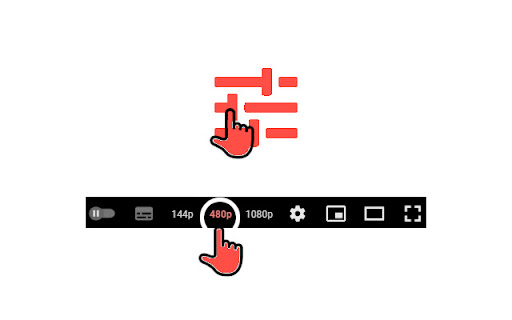
Description from store
YouTubeプレーヤーにワンタップで再生品質を変更できるボタンを追加するChrome拡張機能です。
タッチ操作に最適化されていますが、キーボードショートカットにも対応しているため、YouTubeの設定メニューを開かなくても画質を切り替えることができます。
## 機能
- YouTubeプレーヤーのコントロールに画質ボタンを追加
- 144p、240p、360p、480p、720p、1080p、1440p、2160p、自動設定に対応
- 拡張機能のポップアップから各ボタンの有効/無効を切り替え可能
- Chrome拡張機能のコマンドによるキーボードショートカットに対応
## 使用方法
1. `https://www.youtube.com/` で任意の動画を開きます。
2. プレーヤーのコントロールに追加された画質ボタンを探します。
3. 画質ボタンをクリックして再生品質を切り替えます。
4. 拡張機能のポップアップを開いて、特定のボタンの表示/非表示を切り替えます。
## キーボードショートカット
Chromeのショートカットは`chrome://extensions/shortcuts`でカスタマイズできます。
Latest reviews
- Bruce UMUCUNGUZI
- great, but why it's not working any more, how to reset it to work again please?
- KasQad
- Excellent! Very convenient
- KirK Lazarus
- thanks Developer.. is so easy and quick to change quality instead of clicking setting button and choosing from menu. One request please add playback speed buttons also quick change.
- Md. Shahjalal
- this extension is helpful for switching quality by click but the quality is only 144p , 480p and 1080p,, if it include keyboard shortcuts features it will be awesom