
CRX id
peglphdebebicogkcpinemlaanfabeip
peglphdebebicogkcpinemlaanfabeip
Description from extension meta
Look up the Chinese words of English words as well, and other great tools for learning Mandarin Chinese
Image from store
Description from store
Words separator for dictionary and page
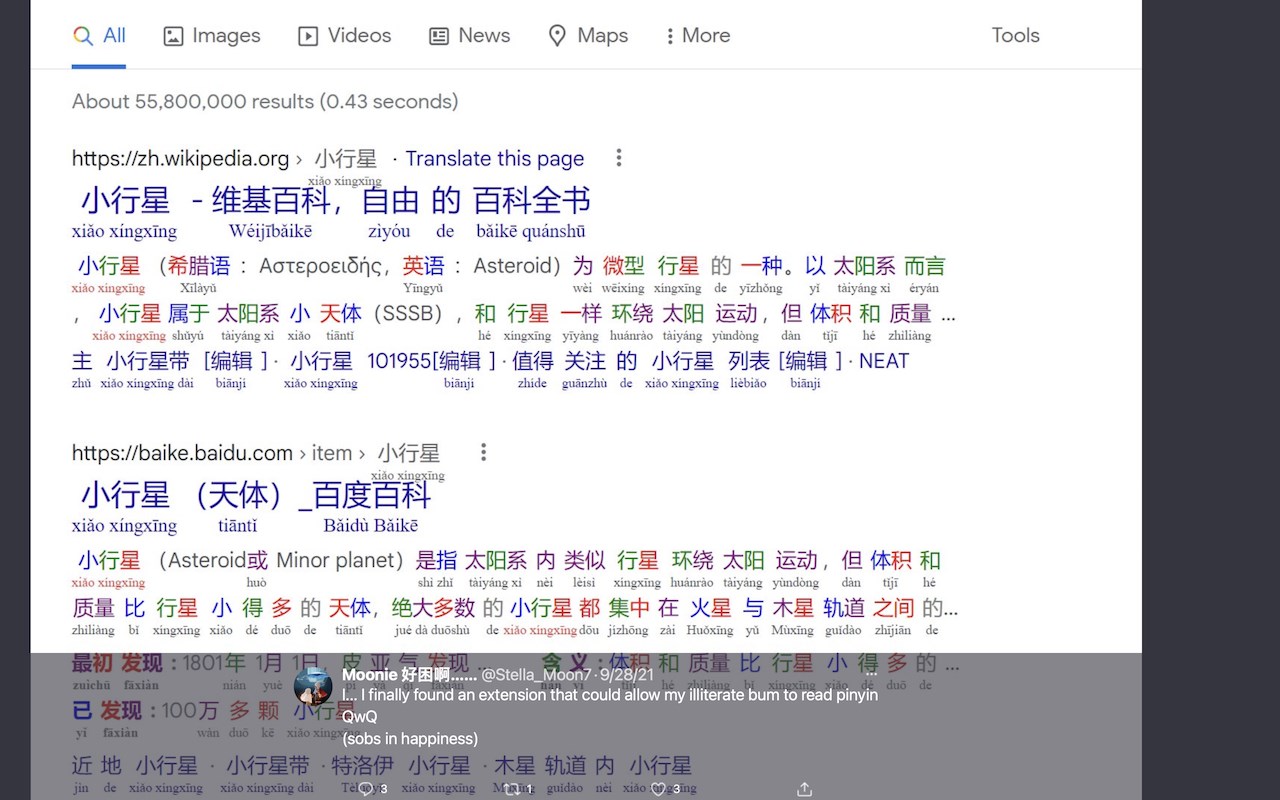
Annotate pinyin, zhuyin/bopomofo, tone, HSK, color, space to Chinese text
Sentence mining
Hover less, read more using the extension's sentence mode dictionary, saves a lot of time
Instantly makes any websites in Chinese as your learning resources
Look up Chinese / Zhongwen words and phrases while browsing the web
Easily change the hanzi's size and font of the page to make reading more relaxing
Configurable, and easy to use
Can be made to remember 3 websites visited for each word on Recall and Rewrite modules
Can be used by native Chinese speakers to learn English as well
To make the extension work on Android, install Kiwi browser on your Android device, then install CWS from chrome web store
https://play.google.com/store/apps/details?id=com.kiwibrowser.browser
To use the extension on Safari on iOS, iPadOS, and macOS, install CWS from:
https://apps.apple.com/app/chinese-words-separator/id1598790017
Latest version (optimizations):
* Optimized the words separator's processor, it is now using just a 160 KB memory lookup to perform a task.
In the past, it was reading the word's HSK level from a big file which causes the words separator memory consumption to spike up to 100 MB; now the words HSK level info is embedded directly into the code, which is just 160 KB in size
* Optimized memory footprint for Chinese words separator's dictionary, it can now be just 26 MB.
CWS's dictionary can now be made significantly more lightweight than other dictionaries despite CWS having over 180K words (others have 120K words). This can be made possible by making CWS read the dictionary from the database instead of from file. To configure CWS to read the dictionary from the database instead of from file, go to CWS's Options screen and click the button labeled *Save the dictionary to database*. With database use, the dictionary's memory footprint will be reduced from 108 MB down to 26 MB
Other file-based dictionaries' memory footprint:
* Zhongwen: 42 MB
* LiuChan: 82 MB
* Inkah: 76 MB
* Zhongzhong: 45 MB
Versions: https://chinese-words-separator.github.io/versions.html
HOW TO USE THE DICTIONARY:
Simply go to a web page in Chinese. Then to use the dictionary, hover the mouse cursor over any Chinese characters to pop up the sticky note-like dictionary showing the English translation along with the pinyin (or zhuyin/bopomofo) romanization; on phone or tablet, just tap a word or sentence
HOW TO USE THE WORD OR CHARACTER SEPARATOR IN THE DICTIONARY:
Right-click the word or character in the dictionary. On phone/tablet, swipe the word or character to the right
HOW TO USE THE WORDS SEPARATOR IN THE PAGE:
Choose any of the following: Beginner, Lower-intermediate, Intermediate, Advanced, or configure it in Settings screen
Page features:
* Words separator, use rotating colors or space to separate the words
* Color-coded tones
* Color-coded HSK level (汉语水平考试 (Hanyu Shuiping Kaoshi))
* Hanzi size
* Underline possible garden-paths from multiple hanzi combinations
* Brackets around separable verbs
* Annotation
* Pinyin
* Zhuyin/bopomofo
* HSK level
* Tone marks
* Annotation size
* Annotation under or above the character
* Can be configured to only show annotations when hovered
* Can be configured to show annotations for the selected HSK levels only
* Opacity for annotation
* Italicized guide for words with multiple meanings/pronunciations
* With no underline = 2 meanings/pronunciations
* With one underline = 3 meanings/pronunciations
* With two underlines = 4 or more meanings/pronunciations
* Links/buttons can be configured to be excluded from colors, hanzi size, annotations
* Customizable colors for rotating colors, HSK-based colors, tone-based colors
* Parallel text: Hovered sentence/phrase will show its parallel English text on the sidebar
* Spaced Repetition System that is based on words you frequently read or encountered
* Recall: SRS for reading hanzi
* Rewrite: SRS for writing hanzi
* Page conversion
* Traditional to Simplified
* Simplified to Traditional
* Revert to original characters (some pages have a mix of traditional and simplified)
* Notes, quick lookup for Chinese language rules. This is editable
* Learning tracking sheet: Hearted words are saved to a Google Sheet
* Calligraphy printer
* Read offline or from sources other than web
* Sentence mining: Look up example sentences from configurable sentence mining sites
* Clipboard functionality
* Separate Chinese words in the clipboard
* Convert Chinese words in clipboard to traditional
* Convert Chinese words in clipboard to simplified
* Scroll to commonly occurring words
* This functionality also shows the number of words you already learned on each HSK level
* Scroll to sentence/phrases by each HSK level
* Tag-less word dictionary: Use this when you won't need pinyin/zhuyin page annotation and will use CWS's dictionary only
* Pre-configured settings
* Beginner: Hanzi size 2x, color-coded tones, space, automatic read-aloud
* Lower-intermediate: Hanzi size 1.75x, show pinyin only when hovered, color-coded tones, space
* Intermediate: Hanzi size 1.5x, tone marks, separate words by rotating colors, no more space between words
* Advanced: Hanzi size 1.25x, no more tone marks, separate words by rotating colors, no more space between words, show only one line definition for each word
* Expert: Hanzi 1x (original size), hide definitions by blurring it. Definitions can be unhidden by clicking it or by pressing keyboard shortcut 'e'
* Mark learned words by doing any of the following:
* Click the word, then type the learned word using pinyin
* Click the word, then speak the learned word using microphone
* Just click the word
* Translate highlighted text by showing a pop-up window of any of the following:
* Google
* DeepL
* Bing
* Can show Google, DeepL, and Bing's translations as notification
* Can make Google, and Bing translator read its translation automatically
* Read-aloud (text-to-speech) highlighted text
* Copy highlighted text as URL with anchor to its location in the page
* Copy selected text with space between words
* Copy selected traditional text as simplified
* Copy selected text as pinyin
* Copy selected simplified text as traditional
* Copy selected text as zhuyin/bopomofo
* Overridable word segmentations and splitting
* Characters are converted to their unified unicode value so that more characters and words can be looked up by the dictionary
* Hoverless video dictionary for Netflix, YouTube, Viki, WeTV, iQIYI
* English annotation can be positioned under or above the character
* Configurable ideo speed
* Mimic the dialogues by using the microphone. CWS will tell you if you got it right
* Sidebar dictionary
Dictionary features:
* Sentence dictionary: Hover less, read more
* Can be configured to use maximum height
* Word dictionary, use this when there are more familiar words in a page than unfamiliar ones
* Character dictionary, use this when you want to focus on learning how to write characters and be more focused on learning each character. This can be activated by pressing letter 'x' when either sentence dictionary or word dictionary is active. Can also be activated by right-clicking the red dictionary icon
* Separate the word to its component words by right-clicking (swipe right on phone/tablet) the word
* Separate the character to its component characters and radical by right-clicking (swipe right on phone/tablet) the character
* Look up the English words of Chinese words
* Look up the Chinese words of English words
* Configurable dictionary font size
* Can show both traditional and simplified
* HSK level can be shown beside the word
* Tone-based colors for hanzi
* Configurable background color
* Pronunciation guide using either pinyin or zhuyin/bopomofo
* Color blue by default, can be set to no color
* Word dictionary navigation keyboard shortcuts:
* Press 'a' to advance to next word
* Press 'A' to go back to previous character
* Press 'z' to go to next hanzi character
* Copy the word definition to clipboard. Clipboard format is spreadsheet-compatible, e.g., can be pasted to Excel
* Keyboard shortcut 'c' for copy
* Remember the word to learning tracking sheet (a Google Sheet)
* Keyboard shortcut 'r' for remember
* Can be configured to include the link of the source website of the copied/remembered word
* Further lookup for the word:
* On computer, further lookup is using youdao.com. Can be changed to other sources
* To disable CWS on a site, add #no-cws to website's link. You'll use this if your further lookup source (or sentence mining site) have their own pinyin/zhuyin annotations
* On phone/tablet, further lookup is using Pleco app. Can be changed to other sources, source can be either web or app
* Show grammar and usage notes (as well as vocabulary notes) from AllSet Learning, can be changed to other sources
* Can show one line definition only
* Can blur the definition for more Chinese immersion
* Use keyboard shortcut 'e' to unhide the blurred definition
* Read-aloud hovered word
* Can use voice type of:
* Mainland China
* Taiwan
* Speech's speed can be configured
* Can be set to automatically read-aloud when hovered
* Can use keyboard shortcut 's' to manually use read-aloud
* Keyboard shortcut 'a' and 's' can be pressed simultaneously, this will advance the word dictionary to the next word and read it aloud at the same time
Dictionary sources:
* CC-CEDICT - Over 120K words
* CedPane - Over 70K words, plenty of names and proper nouns
Contribute word definitions:
https://cc-cedict.org/editor/editor.php?handler=ListChanges
Contribute names and proper nouns:
https://github.com/ssb22/CedPane
Latest reviews
- (2024-01-12) Braulio: This extension is absolutely clutch. I just found out that if you anti-click a character in the dictionary, it breaks down the character into its components, which you can then further anti-click all the way to its base components. It also works on videos with subtitles that can be toggled on or off. It would be nice if it could translate sentences within the same page. The audio doesn't work on the mobile version. And for some reason the mainland Chinese voice is different on my home computer than it is on my school's library computers.
- (2023-05-18) 勇: 是否可以添加edge自带的语音,目前只有两种语音可以选择
- (2022-04-27) Diana: This tool is unexpectedly incredible. Serious kudos to the designers.
- (2021-11-22) Ian: it is more useful than I expected. Saves a lot of time
Statistics
Installs
1,501
history
Category
Rating
4.6 (10 votes)
Last update / version
2024-11-08 / 8.24.84.2520
Listing languages