
Minimalist Markdown Editor
Extension Delisted
This extension is no longer available in the official store. Delisted on 2026-03-16.
Extension Actions
CRX ID
pghodfjepegmciihfhdipmimghiakcjf
Status
- Unpublished Long Ago
Description from extension meta
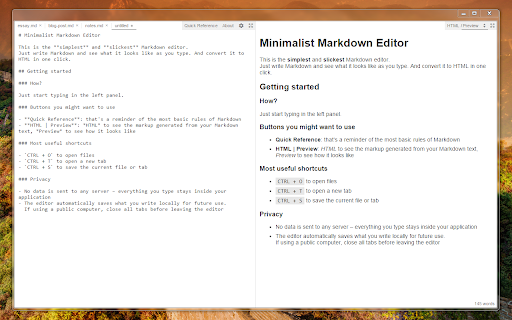
This is the simplest and slickest Markdown editor. Just write Markdown and see what it looks like as you type.
Image from store
Description from store
The Minimalist Markdown Editor also comes with one-click HTML conversion, file support, persistent tabs, and other discreet gems.
MME is privacy-friendly, open-source, and works totally offline.
The editor is also available online as a web app, although with no file/tab support: http://markdown.pioul.fr
Latest reviews
- Acerola
- wonderful
- Ali Khosro
- Excellent! It does what it should do. Feature requests: - To have access to the config file that is editable for example changing colors and fonts
- xi si
- This really is a good app- thank you. I dont use md, ever. but this works well for HTML and Javascript editing. Preview is essential and it functions great here without having to hit a button. I wish I didnt have to open caret to do a regex find and replace. Local file access and tabs that persist make up for that.
- Howard Roark
- Awesome
- jose juan isaac taveras
- Excellent. Looking at how to set up my chromebook to "open with..." by default using this app. Yay markdown!
- Echo Liu
- love to have some image paste saving to local functions. like what retext has on linux.
- Frank van Tol
- The preview does not show anything as I type. The html tab shows the text is there but preview stays blank. restarting/resizing, off,online makes no difference. Hopefully easy to fix because editor looks promissing.
- Swapnil Khare
- To the word. Following KISS principle in UI. App does exactly what it needs to do. Thanks, Good Job!
- Eric Schnipke
- Excellent app. Use it to keep properly formatted project notes that are capable of being backed up using version control (because markdown files are plain text). Simple and functional. Good job!
- Magic Taffer
- Runs very smoothly, which is helpful when working on longer texts. The preview function is also useful, and I'm somewhat glad of the old school 'have to download files from cloud storage' before opening them aspect - as I have had trouble with apps like this editing files in the cloud in the past. Could be improved by having search functionality and a heading window showing just the headings - this would make it easier to navigate longer texts.
- 沐
- very good
- RamGRam
- This app saved me from a ton of markup work. A must have tool for Front-End-Dev.
- Kevin “webketje” VL
- Great app, been using it for a long time. Even when you close the app and have unsaved documents, the 'untitled' files remain in your editor the next time you open it. Dark theme is very nice on the eyes. I would give 5 stars if it had keyboard shortcut support for italic & bold text.
- Brandon Lang
- Not standard.
- Jonathan Littlewood
- Excellent Markdown editor with just the right mix of features. Fast, simple and practical. Great for use on Chromebooks.
- Me V
- Easy, simple, reliable - it works! Thanks a LOT!
- Heiso Smith
- nice
- zhcode
- Add change font-famliy
- Don Mullis
- Unlike the Extension alternatives, this supports tables. Love the support for private, off-line local files!
- Psyhyde Luo
- Best md to html converter I have found so far. Serve the idea that you input something simple and get some thing a bit complicated. Great for productivity
- Luke Newmeyer
- Just getting started but everything looks good. Great app!
- Hamid K
- Perfect ! I wish it has custom css for the HTML preview
- Tasty Minerals
- Looks good so far, Latex support is missing. Something like $\frac{1}{2}$ is not parsed now.
- Arnulf Heimsbakk
- Loved it! Only thing missing is the search replace function.
- Pete Jones
- Lite and easy to use. Recommended.
- Heinrich Wentzel
- Looks en works well
- Viswa KSP
- Loved it. I'm running a jekyll based personal blog and I always wanted a handy mardkown / html preview editor. Minimalist MD editor made my day. It is by far the best offline editor I had ever found till date.
- Holf Yuen
- Simple but super useful app! But recently the icons on the top right corner disappear and causes a bit of inconvenience
- Erez Zukerman
- Has a bug where you lose content when hitting Ctrl-T. Wrote for 15 minutes, lost everything.
- Anonymous
- Perfect for the task!
- Edward Beckett
- Lives up to it's name - Does it's job very well... five stars.
- Shane Simmons
- Very handy! If you just want a light editor made for writing Markdown, you've found it.
- Ben Klaasen
- Just brilliant. Find it in your Chrome Apps, navigate with keyboard shortcuts. Be sure to read the 'Quick Reference' and take a look at the keyboard shortcuts under the cog icon.
- Ambient
- Quite a brilliant piece of software. All the others pale in comparison. No bells and whistles, does exactly what I need.
- Paweł Uchida-Psztyć
- Really nice!
- Saroj Pant
- I just wanted to preview markdown while I type and after trying this I am not going to bother searching for other markdown add ons :) Simple and efficient.
- jsion Winchesters
- i need custom fonts and some general options~~
- new zhang (zhangnew)
- pretty good
- Luke Barker
- be nice to have some print or save PDF option of the preview view
- Emils Delle
- Beautiful and simple app. Does one thing and does it well! Use it quite often for work & studies. 4 stars because would be nice to see a "night" version - maybe a dark theme for using it at night. Also some files get a bit a large so find/find&replace feature would be great!
- Nicholas Johnson
- Does just enough.
- curycu
- if there is a function for image insert(i mean image link) current cursor + dialog style to .md file will very helpful for easy .md doc editing
- Ivan Mornar
- Thanks, this is great tool!
- Donald Mendelson
- Excellent app. The rendering is compatible with GitHub flavor markdown, so it gives an accurate preview. (Who knew there were different flavors? Yet another non-standardized standard.) One feature wish: find, find and replace.
- Joyce Kung
- Simple and works great for what I need.
- Jose Carlos “JC” Monteiro
- Standalone application, with a quick reference and open / save features ( through keyboard shortcuts ). The author also provides an online version. To be excellent, for me, it would have to handle UTF-8 encoding mode, because of Portuguese accented characters.
- Anibal Aguila
- wonderful!!
- Kristoffer Garshol
- Fantastic editor, for Notes, and articles.
- Anonymous
- Simple and well implemented.
- Richard Andrew
- Excellent. Only four stars as I think it needs print dialogue and PDF export to make it truly great.