
Renk Seçici & Damlalık Aracı
Extension Actions
- Extension status: Featured
Damlalık ile web sayfalarından renk seçin. Renk seçici, gradient oluşturucu, renk paleti. Hızlıca HEX, RGB renklerini alın.
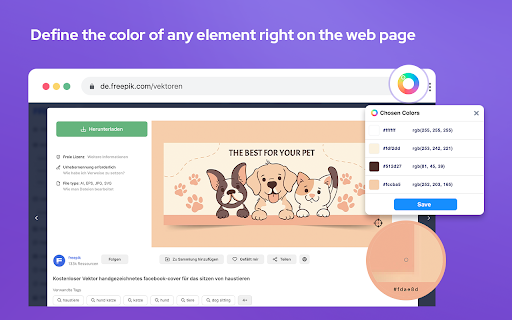
Renk seçici ve damlalık aracı, web geliştiricileri, tasarımcıları ve bir web sayfasından renk seçmesi veya bir web sitesinin renk paletini çıkarması gereken herkes için sahip olunması gereken bir tarayıcı uzantısıdır.
İster bir web sitesi oluşturuyor olun, ister grafik tasarlıyor olun, ister dijital bir proje üzerinde çalışıyor olun, Renk Seçici, renk seçimi sürecini daha kolay ve daha hızlı hale getirecektir.
Özellikler:
- Herhangi bir web sitesinden birden fazla rengi seçmek ve saklamak için yakınlaştırma teknolojisini kullanın;
- Ayarlarda renk seçici klavye kısayolunuzu özelleştirin (varsayılan: Cmd/Ctrl + Shift + e);
- Seçeneklerde renk seçiciyi varsayılan seçenek olarak ayarlayın;
- Tercih ettiğiniz renkleri ve degradeleri arşivleyin; herhangi bir renge tek bir tıklama, o rengin HEX değerini panonuza kaydeder;
- Seçilen herhangi bir renk için gölgeler, renk tonları, tamamlayıcı tonlar ve diğer renk kombinasyonları gibi çeşitleri keşfedin;
- Sınırsız sayıda durakla doğrusal veya radyal degradeler oluşturun;
- Mükemmel degradelerden oluşan geniş bir koleksiyonu keşfedin, bunları değiştirin, kaydedin ve gerektiğinde CSS kodlarını kolayca kopyalayın;
- Oluşturduğunuz herhangi bir degradeden renk paletleri elde edin;
- Site paleti özelliği, herhangi bir web sayfasında bulunan tüm renkleri alır;
- Otomatik kopyalama için renk türünü kişiselleştirin.
Her tasarımcı için harika olan Renk Seçici (Damlalık), farenizi üzerine getirdiğiniz herhangi bir kullanıcı arayüzü öğesinin Hex renk kodunu kolayca tanımlamanıza olanak tanıyan bir Chrome uzantısıdır. Çevrimiçi gezinirken ilham aldığınız renklere hızlı erişim için harikadır.
Damlalık
Sayfayı sağ tıklayıp "Sayfada bir renk seç"i seçerek Damlalık'ı kullanın. Uzantının açılır penceresinin Damlalık sekmesindeki Damlalık düğmesini de kullanabilirsiniz.
Renk seçici
Paletin etrafındaki işaretçilere tıklayıp sürükleyerek renk seçiciyi kullanın. Renk seçimleri paletin altındaki kutularda Hex kod değerleriyle birlikte gösterilmektedir.
Renk seçici ayrıca renkleri farklı formatlarda (ör. HEX, RGB, HSV, HSL, CMYK) görüntüler.
- Damlalık
- Stil rehberi oluşturucu
- Renk seçici
- Renk paleti oluşturucu
- HEX/RGB/HSL değerlerini alın
- Rastgele renk paleti oluşturucu
- Renk geçmişi
- Renkleri panonuza kopyalayın
- Her renk için renk tonları ve gölgeler
- Açık ve koyu renk tema seçenekleri
- Paletlere referans vermek ve paylaşmak için benzersiz URL'ler oluşturma yeteneği
Bu uzantı, seçilen son altı rengi saklar ve rengi HEX, RGBA, HSVA, HSLA ve CMYK formatlarında temsil eder. Vcurrent renk değerini panoya kopyalamak için bir düğmeye basabilirsiniz.
İster dönüşüm odaklı reklam öğeleri oluşturmak için bir uzantı kullanıyor olun, ister yalnızca günlük gezinmenize biraz renk katmak istiyor olun, ColorPick mükemmel bir araçtır.
Bugün herhangi bir pikselin renk kodlarını bulmak için Renk Seçici yazılımımızı kullanmayı deneyin.
Latest reviews
- Yasen Stoev
- works fantastic really happy this exists
- Peder Maas-Olsen
- I am not able to select colors on any website. Not even its own?
- Muneeb Saeed
- Can't pick colors
- Scott Patrick
- Works good. You can easily find a colour in Hex or any other colour code in your tab. I use it quite alot and yeah it's good lol. No complaints are of now of me just downloading it.
- troiesmes serd
- This is the best Chrome tool for color recognition.
- Denice Clyde
- Beautiful extension. Well thought out and designed. This is the color...everything... app/extension I was looking for. Will save so much time
- Eura Cinderella
- I’ve been using this extension for about a year now, and I haven’t encountered any bugs. Definitely a 5★ from me
- Didi Ranmedas
- Exactly what I was looking for. No more need to save an image from a web page, then upload to a website. Just click the icon, click 'pick', click the place on the web page - and BOOM! You're presented with a menu in which you can copy the code.
- Ajmat Minting
- It is so helpful. It can be use in any color pick in chrome
- osbald0073
- Seems to be the best all around color picker extension. works well and looks good. you can add keyboard shortcuts to pick colours right away.
- Surekha Surekha
- color picker doesnt work at all
- Mike Elias
- How does this have more than one star? Nothing works.
- Jayden Lawson
- Doesn't let you use Eyedropper, so it's false advertising.
- Shubham Palmate
- worst tool , Eyedroper function doesn't work
- King Legitto
- Not working. "Eye dropper is not allowed on this page"
- Deepak sinha
- the best eyedropping tool and colour picker with ease, one of the best on world.
- Dineth Liyanage
- Literally inserted a png into the browser to load the local file and it still says "Eyedropper not available on this webpage"
- Rachel Kaplan
- This app is worthless, useless, and all of the above. Anytime I try to select the eyedropper on ANY webpage, I get the "404" cartoonish error that says it can't access the colors. On ANY webpage? What good is the tool if it can't work?
- Gustavo Rubio
- When I go over to "save" the chosen color from the eyedropper, the extension pop-up disappears.
- Brad H
- Color picker doesnt work on this page.
- Robert Schwager
- Not sure if bug but years ago things just worked! Developing on local server on local IP and I get "Sorry, but eyedropper is not allowed on this web page". Color picker settings -> "Allow access to file urls" displays greyed out view permissions. Chrome browser is setup with "Allow access to file URLs". For years these extensions and plugins worked fine. In recent years, most are broken as are a lot of things now days!
- Sean Thompson
- "colour dropped is not allowed on this page" - then what good are you!?
- Oliver Mayer
- completely useless
- Raghad Hafez
- useless
- Edy Pau
- this is good
- Ashley Sowerby
- Also kind of wild that an extension named "eyedropper tool" doesn't actually let you eyedrop on ANY site. I've tried my own website, I've tried multiple different open source sites, etc - and it's a 404 for all of them. Which is wild because the previous picker extension I had never had that issue, shame that the UI on this is great - but functionally useless.
- Dream Watches Brigitte Bardot DrW
- Doesn't let me use the eyedropper tool in my local or any website
- Icon Chua
- What a useless extension. Eye dropper and site colors tool doesn't work. The only SPECIFIC things people would want to use a color picker extension in the first place.
- Danish ali
- Doesn't let me use the eyedropper tool in my local or any website
- Stuart Rose (viper9x)
- does not work, cannot pick colours from current running page.
- Alex Gade
- "not allowed on this page" what a load of garbage. At this point I'm better off using the color picker built into windows.
- george balboa
- this wins them all! ive tried too many to admit...dont waste your time...get this one!
- Giacomo Sepe
- Makes it super easy to work with colors
- Costin Dragomir
- Eyedropper doesn't work for me, the page just "freezes" and I need to hit Esc to get back to it.
- Zohair Mansoor
- Color Picker is not working
- Nishka A
- Horrid
- Dan Semaya
- Can't distinguish between Gmail PWA and Google Chat PWA. If I want my Gmail title bar to be red and my Chat title bar to be green it's not possible with this extension. It treats them both as the same app.
- Leandro Perdomo
- Nice extension, easy to use and good amount of features.
- Claire Archer
- It's generally a helpful too. BUT, it needs ability to access multiple saves or at least a place to store them so we can access them again. Currently, you must save, then copy/paste for each one. When I changed the settings to have the color picker eye dropper tool be the first to appear, my browser kept locking up. I had to undo this. So now, I must select the color picker extension, select the eyedropper tool, copy, go to my notes and paste, then come back and do it again. On a positive note, it does read website colors well.
- sharfu
- very helpful amazing
- Guilherme Vilas Boas
- Top
- Moustapha Sakho
- works fantastic !
- Waffiq Aziz
- Sadly not working on several sites, it says "Sorry, but eyedropper is not allowed on this web page."
- Christyn Walker
- Overall, this is probably the best color picker extension currently available. Cons are very minor and largely just complaints about it being tedious to use at times, but probably still less tedious than other options. Pros: Select multiple colors on a page without having to reselect the eye dropper after choosing each color Saved color swatches Gradients and color combonations for each saved color CSS code for color gradients Cons Can't batch download or copy/paste list of saved color info (rgb or hex codes) Can't batch remove saved colors If you turn on the option to auto use the eyedropper when opening the extension, you have to pick a color first. If you open the extension and want to access a different menu, you have to choose a color, go to the swatch list and delete the color you just chose first (if you don't care if that color stays on your list of saved colors, this probably won't bother you)
- Michael Lu
- nice tool
- eshal
- nice
- Brittney Zellner
- Doesn't work for most websites. Just says "Sorry but eyedropper is not allowed on this webpage". Blehh
- Ayon Bit
- Good
- Robert Hu
- worthless. didn't work for most sites i wanted to use it for
- Flash 5
- Using it now and very useful tool. Completely free. Love it