
Twitter2PDF- Convert Twitter to PDF
Extension Actions
- Live on Store
Twitter2PDF --Efficiently Convert Twitter Data to PDF
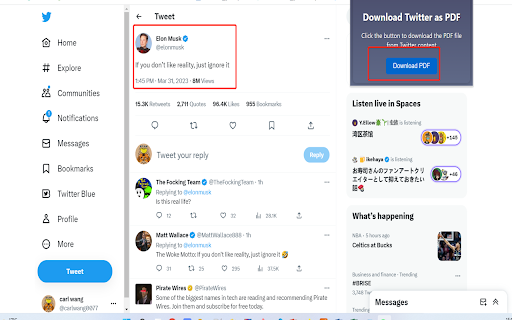
Firstly, you need to search and download the "Twitter2PDF" Chrome extension in the Chrome web store.
After installation, visit Twitter and find the content you want to save.
On the page where the content is located, click the "twitter to pdf" extension icon in the top right corner of your browser. This will open a new browser tab.
On the new tab, you can customize the style of the page you want to save by using different options. You can change font sizes, colors, etc. Once done, click on the "Download PDF" button.
Wait for a few moments until the PDF file is downloaded. You can find the file by clicking the "Finished" button on the browser's download progress bar and then opening it through a PDF reader.
Latest reviews
- babieyoonii ᴖᴥᴖ
- the extension won't let me do anything without a "sign up", but it also won't let me sign up. it just freezes when I try. absolutely useless :(
- Udaya G
- stupid..not working
- TJ Ladzinski (Ladman Studios)
- Does not do what is advertised. You click on the download PDF, and it downloads a blank PDF.
- Frédéric HAUGUEL
- Ne fonctionne pas