
YouTube Downloader
Extension Actions
Download YouTube videos and Shorts with audio or audio only. Save videos in available quality directly from YouTube using Edge
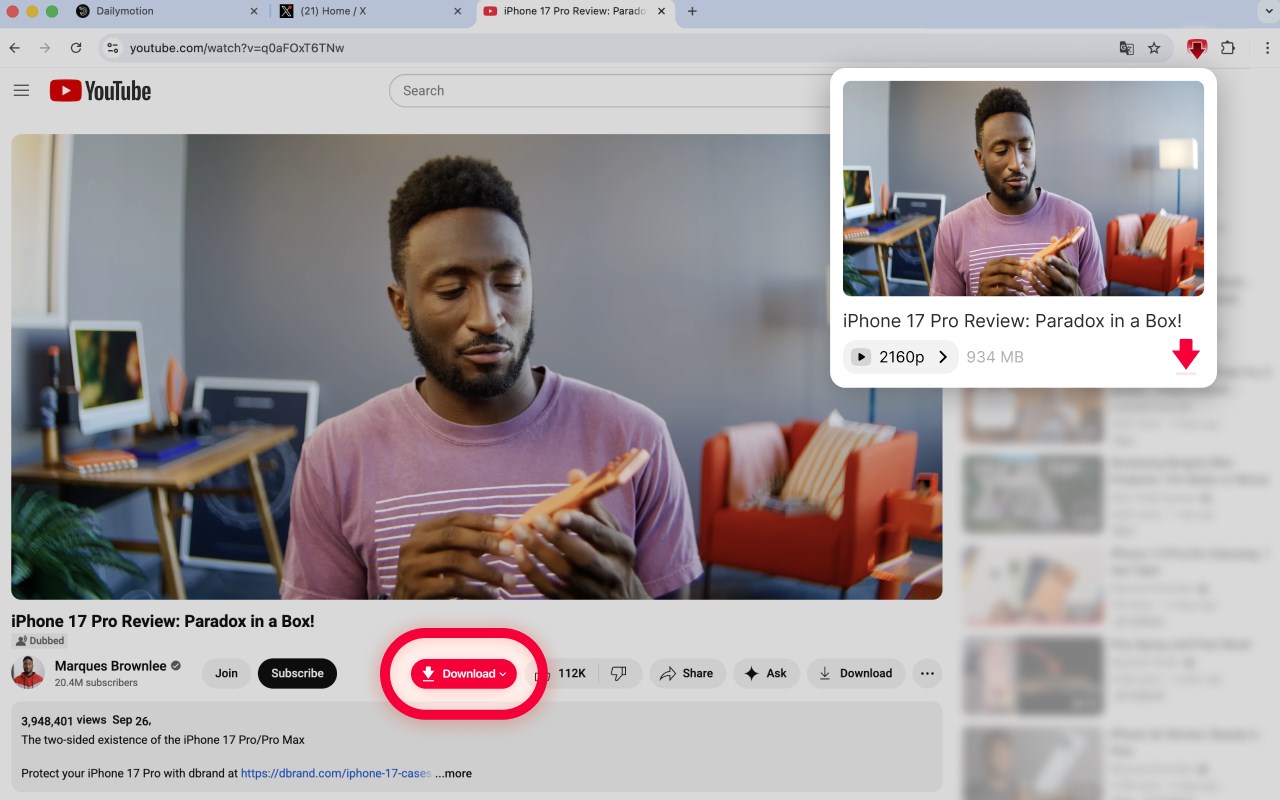
🎬 Overview
Youtube Downloader is a lightweight Microsoft Edge extension that lets you download videos from YouTube directly to your device. You can save full videos with sound, extract music or audio from videos, or download YouTube Shorts in the available quality.
The extension is useful both for downloading full video content and for saving audio from videos, such as music tracks, interviews, or podcast episodes, so you can listen offline whenever it's convenient.
🚀 Key features
* Download YouTube videos with audio
* Extract music and audio from YouTube videos
* Download audio from music videos, interviews, and podcasts
* Download YouTube Shorts
* Support for available video quality options
* One-click download button under videos and Shorts
* Quick access through the extension popup
* Built specifically for Microsoft Edge
⚙️ How it works
1. Open any supported YouTube video, music video, podcast episode, or Short
2. Click the download button below the video or open the extension popup
3. Choose whether you want to download the full video with audio or audio only
4. Save the file directly to your device
All downloads are initiated by the user and processed directly in the browser.
🎧 Music & audio from videos
Many users come to YouTube to listen to music, live sessions, or audio-focused content. Youtube Downloader allows you to extract audio from videos and save music from video content for offline listening.
This is useful if you want to:
* Save music from YouTube videos
* Download audio from live performances or mixes
* Keep soundtracks, lectures, or spoken content as audio files
* Listen to music offline without keeping the full video file
🎙️ Podcasts & spoken content
Youtube Downloader is also helpful for podcast-style content hosted on YouTube. You can download full podcast videos or extract audio only to listen later.
Common use cases include:
* Download podcast episodes for offline listening
* Save long-form interviews as audio
* Listen to podcasts while walking, traveling, or spending time outdoors
* Keep spoken content without needing to stream video
📌 General use cases
* Save YouTube videos for offline viewing
* Download music from video content
* Extract audio from podcasts, interviews, and talks
* Download Shorts for offline access
* Collect video or audio content for personal use
🧩 Designed for Microsoft Edge
This extension is built specifically for Microsoft Edge and integrates smoothly with the browser. It works directly on YouTube pages and provides a simple way to download video or audio without external tools.
🔒 Privacy & permissions
Youtube Downloader only processes data required to perform downloads initiated by the user. It does not require accounts, does not modify website content, and does not collect personal information. Permissions are used strictly to enable downloading and to detect supported YouTube pages.
⚠️ Limitations & technical notes
Due to technical limitations of the browser environment, very large videos may not always be processed as a single file with audio.
If a video exceeds the available memory limit in the browser, the extension may download the video stream without audio instead of combining video and sound. The exact limit depends on the amount of memory available in the browser and on the user's device. For most users, the practical limit for downloading videos with audio is around 1.5 GB, though this can vary.
Downloading audio-only files remains available even when this limitation applies.
Latest reviews
- Eve
- It works! Thank you!
- MARIO
- IT IS NOT WORKING AND IF THERE IS NOT A REMEDY FOR THIS EXTENSION I WILL REMOVE IT IN FEW DAYS. LAST I TRIED TO DOWNLOAD THIS SHORT JUST FOR FUN AND NOTHING HAPPENED, APPARENTLY, IT SEEMS LIKE IT IS DOWNLOADING IT AND THE, DISSAPEARS. (https://microsoftedge.microsoft.com/addons/detail/youtube-downloader/ppjpdcmjaibjjdmfjcabhpnniamapaof)
- Joseph
- does not work
- Abdullah
- it's working and it's totally what I was searching for easy, simple, direct, high quality, one click Thanks a lot