Rainbow DevTools Theme
Extension Actions
CRX ID
bafncadmgpabpojoohpejlmdbligjjlb
Status
- No Privacy Policy
- Live on Store
Description from extension meta
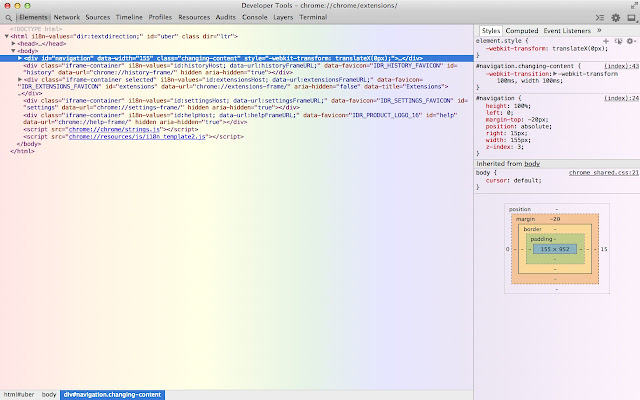
Sample DevTools theme. Enable DevTools experiments in about:flags, then open DevTools and toggle "Allow UI themes" experiment.
Image from store
Description from store
This is a sample extension to add a theme to Chrome DevTools.
Rough details here: https://code.google.com/p/chromium/issues/detail?id=318566#c33
Source: https://github.com/paulirish/sample-devtools-theme-extension
Latest reviews
- Grace Paquette
- I hate it sooo much! who can be so stupid to envent this stupid crapy app! I hate how it highlights every move I make! Ugh. (Stupid, stupid, stupid, stupid, STUPID!!!)
- Grace Paquette
- I hate it sooo much! who can be so stupid to envent this stupid crapy app! I hate how it highlights every move I make! Ugh. (Stupid, stupid, stupid, stupid, STUPID!!!)
- Rocco Georgi
- canary 33.x. also remember to restart chrome after setting "about:flags" and reopen dev tools after changing settings unter "experiments"
- Rocco Georgi
- canary 33.x. also remember to restart chrome after setting "about:flags" and reopen dev tools after changing settings unter "experiments"