
iCloud 密码
Extension Actions
CRX ID
pejdijmoenmkgeppbflobdenhhabjlaj
Status
- Live on Store
Description from extension meta
iCloud 密码可让你在 Chrome 中登录网站时,从 iCloud 钥匙串填充密码。
Image from store
Description from store
iCloud Passwords lets you securely fill passwords from iCloud Keychain when signing in to websites using Chrome. Any new passwords you create in Chrome are saved to your iCloud Keychain so that they are also available across your Apple devices. The extension can also generate verification codes, which you can set up by right-clicking on a QR code.
The iCloud Passwords extension is compatible with macOS Sonoma or later, and Windows versions supported by the iCloud for Windows app. To enable the extension on a PC, download the iCloud for Windows app from the Microsoft Store and enable iCloud Passwords.
Latest reviews
- David Ackley
- Doesn't work.
- Akar Jaza
- The extension works well and performs reliably. However, the user experience needs improvement. There's no need to request biometric authentication or password verification on every occasion when filling login credentials into form fields. A single verification should suffice, allowing seamless autofill for the following 15 minutes without repeated prompts.
- Dan Grimm
- it's awesome when it works.. but often doesn't work... and wants me to enter numbers in order to use stored passwords... Come on now.. please fix these bugs.
- Lewis Gray
- Good when it works, but it is often buggy. Doesn't offer passwords when it should. Sometimes authentication code for Passwords doesn't show any way to enter the code, making it unusable.
- Vahid Hajiabadi
- When this extension is active, the CAPTCHA image gets cached and I can’t log in or sign up.
- Furkan
- The password prompt does not disappear after input. I am already logged in, but the window still remains active. Please fix this!
- Alexey Kram
- Just disturbs with pop-up windows and opens apple password app by entering code. I can open this app by my own. Didn't see any benefit in this extension.
- Humorce
- buggly
- Hubert Kubot
- for me it's working, has never failed me. Glad it exists
- Ralph Valdellon
- poorly integrated
- Nimal Singh
- Functional however, however with a dark theme on chrome you can't see the icon extension if it's pinned. Alternate colours would help A setting for never remember password for this site is also welcome
- Jordan Wiens
- For those running into the bug where it prompts you to update the username every time, the bug was fixed in version 3.3.0 but for some reason my browser didn't auto-detect the update. I had to manually remove the extension and re-install it and now it's fixed!
- Francesco Dammacco
- It stopped working after 3.3.0 update, keeps saying it cannot connect to helper app on Mac.
- Иван Родин
- I have no problems with this extensions, it works OK for me. UNTIL after some update (idk if it's extension update or OS update), TOTP input now works incorrectly. From developer mode, I managed to confirm this behavior. e.g. if totp is 412494 is starts printing 422422 instead. ??? what And now I have to manually go to passwords keystore and copy the totp myself. FIX THIS PLEASE
- Alex Wilkes
- Poor implementation
- Kelton Johnson
- There is a bug where it will prompt a password and the password prompt box cannot be dismissed but it covers content. Once this bug is resolved, it would be 5 stars. But I have had to remove this from the browser as covering content without ability to dismissed is very bad.
- Scott Taylor
- why does it have to cover the entire password box?
- Chris Mountzouris
- Asks to update/save password after filling it. The persistent message won’t go away no matter what.
- Eren Tanriverdi
- Asks to update/save password after filling it. The persistent message won’t go away no matter what. This extension needs to be taken seriously by Apple.
- Vincent Rob
- Offering to save a password even if it was saved already.
- Jo
- This extension does not generate any profits for Apple or Google, so why even care, right? My 13 yo would've vibe coded a better extension.
- Manoj Vekaria
- MacOS Tahoe update broke the extension. It thinks the username is updated everytime and asks for it. For a $4T company, it's a shame they can't even get an extension working. Goes to say once companies become big, they don't care about their customers.
- Rambilash Yadav (Ram)
- Not working
- Tony
- This was completely useless. Nothing worked.
- daniel karl
- i am only new to this so i will update the review when the time comes. thank you.
- Phillip Harrington
- It's nice when it works, but that seems to happen less and less often. Offering to save passwords you've already saved. Simply not showing up. The awful UI. Having to select the password account being used on the username/email field AND the password field. Tons of javascript errors in the console. Actually breaks login forms that work when the extension is disabled. I can't paste the password from the passwords app and hit enter to log in. This extension breaks that. Lots of problems and it could be so much better, and NO I'm not switching browsers for 1 extension.
- James Sugrue
- This extension is awful. Autofill barely works and detects everything as a password field, except most password fields.
- maczet
- 1 star because you have to install icloud on a company laptop, which may not always be allowed.
- Gabriel Jorby
- Could do so much more, but it's a good start. I hope there are still devs working on it. I've tried 1password but since they increased their price, I'm comparing different solutions.
- cakma hesap
- linux desktop users? :/
- Apostolos T.
- The lack of quality on this product is astounding! No updates for months when glaring issues exist! Total dissapointment.
- Ben Tambling
- Now broken as it will constantly ask to save logins that you've already saved. Please fix.
- Carl Jacobs
- It does what it does, but it's cluncky, shows popups in the wrong moment and isn't very userfriendly. Not really the Apple way.
- Mario Ortiz
- if I could do negative stars, I would
- Robert
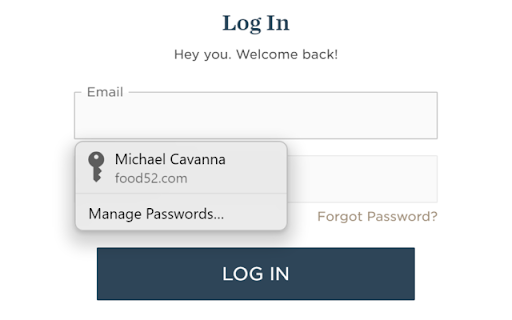
- It kind of works - but if not in Safari (where you don't need this), you have to fill in an authentication code every time you use it. But the bigger issue is shown in the screenshot: its dialogs show up right in front of the fields you are trying to fill, so in cases where you don't need or want to use it, it's in the way and is immovable, prevents you from doing what it's supposed to be helping you do.
- Michał Wojewoda
- Works great!
- Joe G
- Disappointing.
- movsq rep
- I suggest handing this project over to AI. This is the worst code in the Apple ecosystem.
- James Helgason
- Doesn't work on Chrome for Debian (Linux Mint). Just says "designed for Win 10" when I click on it. Ugh.
- Alexandru Nicola
- This extension simply does not work. After clicking it, all you get is 'Enable Passwords in iCloud for Windows' — even though iCloud is installed, running perfectly and syncing everything without any issues. The 6-digit pairing code screen never appears. Ever. I spent days trying to fix this. I verified every single technical component manually: the Native Messaging Host manifest files correctly placed in Chrome and Chromium directories, registry entries correct, the helper process iCloudPasswordsExtensionHelper.exe confirmed running, Windows Firewall with explicit Allow rules for every iCloud executable, all required Windows services running, system clock synchronized, WindowsApps folder permissions correctly set, no VPN or proxy active, all Apple servers reachable. Reinstalled iCloud from Microsoft Store. Reinstalled the extension. Nothing helped. The most frustrating part is that everything appears correctly configured — the extension and iCloud can see each other (clicking 'Open iCloud for Windows' inside the extension popup actually opens the app correctly), but the handshake to display the 6-digit verification code never completes. The two applications simply refuse to finish the pairing process. iCloud itself works flawlessly on Windows — all services are green and syncing correctly. The problem is exclusively this extension and its communication with the helper process on Windows. Apple needs to fix the handshake mechanism between the Windows helper and Chromium-based browsers. There is nothing the user can do from their side after exhausting every possible technical solution. Until this is fixed, the extension is completely useless for a significant number of Windows users. Do better.
- Martijn Loderus
- Asks for username and storing pwrd after using autofill.. this is garbage
- Råshäd suSana
- the constant logging in - uuuggghhhh!
- Николай Мозговых
- Aks touch id every time
- G A
- I don't understand how can Apple hire such low quality developers
- Willie Abrams
- constantly is popping up the password autofill enable dialog in claude code web
- Fredrik Malmqvist
- absolutely dogsh*t, doesnt work as intended
- Richard Copperthwaite
- Fails way more times than it works. Can't give zero stars otherwise I would. One star is probably over-generous.
- Andrew Conley
- Autofill mostly doesn't work. some websites do, but most don't.
- David Zhang
- Please add support for Atlas browser
- AC
- Sometimes it works, often times it doesn't. Is no longer functional with the Atlas browser, but may work in Chrome or other Chromium browsers.