
Auto Pan by Window Position
Extension Actions
This extension enables audio panning to the left or right based on the window's position relative to the display center.
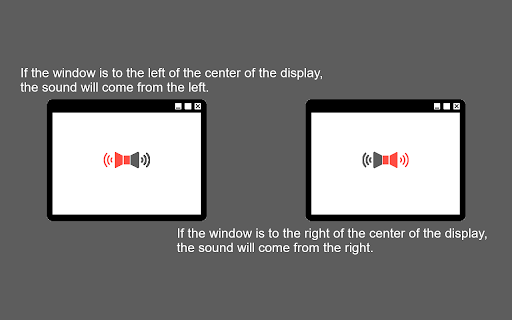
This Chrome extension automatically pans the audio of media elements (`<video>` and `<audio>`) to the left or right channels based on the horizontal position of the browser window relative to the center of the display.
## Features
- Automatic Audio Panning: Hear audio from the direction where your browser window is located. If the window is on the left side of the screen, the audio will pan to the left speaker/headphone, and vice versa.
- Adjustable Pan Rate: Control the intensity of the panning effect.
- Vertical Panning Support (PannerNode): By default, it uses standard stereo panning. You can enable vertical panning to also affect audio based on vertical window position and simulate distance.
- Multi-Monitor Support: You can configure the panning to be calculated relative to:
- The single display the window is currently on.
- The primary display (if you use multiple monitors).
- The aggregate center of all connected displays.
## Usage
Once installed, the extension works automatically in the background. It will attach to any `<video>` and `<audio>` tags on the web pages you visit and adjust the audio panning based on the window's position.
### Settings
Click on the extension icon in the toolbar to open the popup and configure:
- Enable/Disable: Toggle the auto-pan functionality.
- Pan Rate: Increase or decrease how strongly the audio leans to one side.
- Vertical Panning (PannerNode): Use an advanced vertical spatialization model instead of simple stereo panning.
- Multi-Monitor: Calculate pan position relative to the primary display.
- Multi-Monitor (All): Calculate pan position relative to the entire bounds of all combined displays.
Latest reviews
- Stanley Cheng
- Great extension! Very underrated. It would be nice to have an influence slider. For example, if I have a video on the right most side, it plays 70% out of my right and 30% out of the left. Would be a nice addition. Still, great job!
- B P
- Extension works exactly as promised. It's great if you want to have two separate content in the BG at the same time. Thanks dev.
- Max Boonzaayer (Litruv)
- Works well! Mainly tried out with Youtube, would like to see.. a whitelist for sites, a smooth pan as you drag would be amazing (was already implemented whoops Thanks!) if it's possible to follow the position of pop out windows.