
Video Speed Controller - Speed Up Video
Extension Actions
- Extension status: Featured
- Live on Store
Video speed control for all HTML5 video players. Works on Youtube, Netflix, Amazon PV. Video speed manager with playback control.
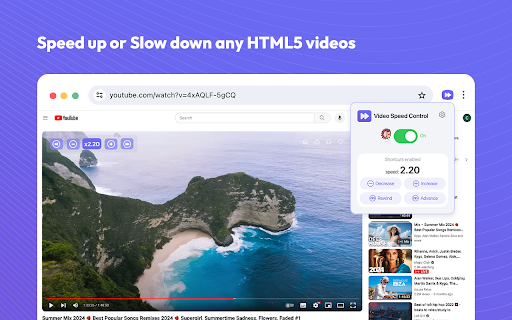
Video speed controller for online videos. Speed up, slow down playback on any website. Speed up or slow down video playback on websites such as Youtube and all other websites with video in.
Do you struggle with adjusting the speed of video playback on various websites, including popular streaming platforms like Netflix, Amazon Prime Video, and YouTube?
Introducing the video speed controller, a Google Chrome extension that enables you to finely adjust the playback settings on your favorite streaming websites. With options ranging from 0.25x to 4x, the extension supports a wide range of playback speeds.
How to use Video Speed Controller Extension:
- Install the extension and pin to your browser (one-time process).
- Open any video on your desired streaming website.
- Click on the extension’s icon.
- Use the extension’s pop-up to specify the video playback settings.
- The chosen settings are applied to the video.
The HTML5 video speed controller is an application that allows you to either increase or decrease the playback speed of video content.
Easily manage the playback speed while watching videos. Video Speed Controller enables you to speed up or slow down any video during playback, without any set standards or limitations. You have the freedom to increase or decrease the playback speed, as well as fast forward and rewind the video as many times as needed.
The main features:
- The HTML5 video speed controller is compatible with almost all video sites that you use every day;
- Unique accuracy of up to 1% in setting the playback speed that is suitable for you;
- Very intuitive interface, so the application will definitely not cause difficulties in using;
- Keyboard shortcuts that allow you to instantly change the playback speed.
Thankfully, Video Speed Control lets you speed up or slow down videos quickly and easily. Save time today when you are watching videos by slowing them down or speeding the videos up.
We hope you find our Playback Video Speed tool useful! We are waiting for your feedback and ratings! If you’re experiencing problems or speed controller isn't working on, please contact us.
Latest reviews
- Layth Mustafa
- so good
- Chirag Jain
- fabulous app, saved a ton of time
- Jonathan Valerie Lara
- yeah
- littletide
- Very easy to use, fantastic.
- Bobur
- goof
- Ibrahim Yassin
- good
- Jadiel Ortiz
- good
- Anthony LaSita
- good
- Saurav Kumar
- Besr, For YouTube :0
- Zeus Maknojia
- okay
- Gowtham Medam
- very good , If you use youtube much it's pretty usefull
- James Gordon
- good
- Fiona Viñas
- helpful
- Deepak Ghorla
- best
- Eesha Sadhu
- Good, but stop POPPING the review sign
- Bilal Noor
- work on almost every site
- ปรีชา รุ่งรัศมีธรรม
- good
- Shaik Rafi
- super
- Kondaveti Tejaswanth
- it is working
- Apexguytheworld!!
- works
- Ravi Kumar
- good
- Navya
- nice
- SK MUKTHAR BASHA
- good
- Nakshatra Pandey
- good
- _MK
- Top
- Mickaël Lecolazet
- indispensable
- Mian Hanan
- VERY BAD ASK EVERYTIME FOR REVIEW
- Adithya
- good
- abi
- ok
- J P
- good
- Muhammad Shaheer
- Its pretty useful
- Rafa Syafiq
- very good
- Diarmuid Sexton
- works well and way better than the other shite one i was using!
- Death or life?
- Great
- Lucas Vilhena
- Does not work on prime video.
- Dartanyen Geick
- Good
- Jasmine Jiang
- Love it, thank you very much.
- Ian Renn
- If it works after this i wont change it to 1
- Obada Al Khayat
- Was working fine, but a month ago it was broken. After increasing the playback speed on youtube, it directly go back to normal speed.
- Aravind Raj
- Good
- Bhavya Kedar
- only reviewing it cause it keeps sending me a pop up
- Raja Asad Khan
- good only writing a review because it keeps asking me too so theres that
- Tao Luo
- very nice
- Dr.ADITYA
- only reviewing it cause it keeps sending me a pop up.
- Aditya
- only reviewing it cause it keeps sending me a pop up.
- Doc Green
- Yeah its aight, only reviewing it cause it keeps sending me a pop up.
- _RM_ Qizhe
- Everything work as expected, but if you don't review it every time when adjust the speed it will pop up a annoying review pop up, and is the reason I give it one star
- labdhi chopda
- Works seamlessly and time savor :)
- Abdulla Al Ameri
- Works Perfectly
- P P
- Works well