
ตัวควบคุมความเร็ววิดีโอ
Extension Actions
- Extension status: Featured
- Live on Store
การควบคุมความเร็ววิดีโอสำหรับโปรแกรมเล่นวิดีโอ HTML5 ทุกประเภท เพิ่มความเร็ว ลดความเร็ววิดีโอหรือเสียงด้วยแป้นพิมพ์ลัด
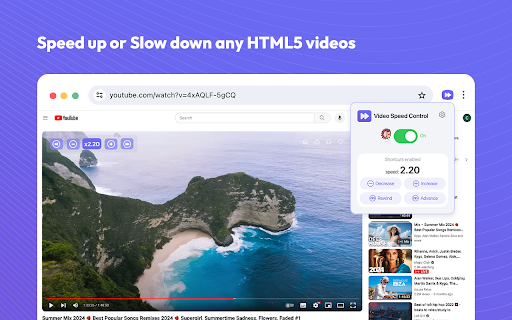
ตัวควบคุมความเร็ววิดีโอสำหรับวิดีโอออนไลน์ เพิ่มความเร็วและลดความเร็วการเล่นวิดีโอบนเว็บไซต์ต่างๆ เพิ่มความเร็วหรือลดความเร็วการเล่นวิดีโอบนเว็บไซต์ต่างๆ เช่น YouTube และเว็บไซต์อื่นๆ ที่มีวิดีโอ
คุณประสบปัญหาในการปรับความเร็วการเล่นวิดีโอบนเว็บไซต์ต่างๆ รวมถึงแพลตฟอร์มสตรีมมิ่งยอดนิยมอย่าง Netflix, Amazon Prime Video และ YouTube หรือไม่?
ขอแนะนำตัวควบคุมความเร็ววิดีโอ ส่วนขยายของ Google Chrome ที่ช่วยให้คุณปรับการตั้งค่าการเล่นวิดีโอบนเว็บไซต์สตรีมมิ่งที่คุณชื่นชอบได้อย่างละเอียด ด้วยตัวเลือกตั้งแต่ 0.25x ถึง 4x ส่วนขยายนี้รองรับความเร็วในการเล่นที่หลากหลาย
วิธีใช้ส่วนขยายตัวควบคุมความเร็ววิดีโอ:
- ติดตั้งส่วนขยายและปักหมุดไว้ในเบราว์เซอร์ของคุณ (ขั้นตอนเดียว)
- เปิดวิดีโอใดๆ บนเว็บไซต์สตรีมมิ่งที่คุณต้องการ
- คลิกที่ไอคอนของส่วนขยาย
- ใช้ป๊อปอัปของส่วนขยายเพื่อระบุการตั้งค่าการเล่นวิดีโอ
- การตั้งค่าที่เลือกจะถูกนำไปใช้กับวิดีโอ
ตัวควบคุมความเร็ววิดีโอ HTML5 คือแอปพลิเคชันที่ให้คุณเพิ่มหรือลดความเร็วในการเล่นเนื้อหาวิดีโอได้
จัดการความเร็วในการเล่นวิดีโอได้อย่างง่ายดายขณะรับชมวิดีโอ Video Speed Controller ช่วยให้คุณสามารถเพิ่มหรือลดความเร็ววิดีโอระหว่างการเล่นได้โดยไม่มีมาตรฐานหรือข้อจำกัดใดๆ คุณมีอิสระในการเพิ่มหรือลดความเร็วในการเล่น รวมถึงกรอวิดีโอไปข้างหน้าและย้อนกลับได้บ่อยเท่าที่ต้องการ
คุณสมบัติหลัก:
- ตัวควบคุมความเร็ววิดีโอ HTML5 สามารถใช้งานร่วมกับเว็บไซต์วิดีโอเกือบทุกเว็บไซต์ที่คุณใช้งานทุกวัน
- ความแม่นยำเฉพาะตัวสูงสุดถึง 1% ในการตั้งค่าความเร็วในการเล่นที่เหมาะสมกับคุณ
- อินเทอร์เฟซที่ใช้งานง่าย แอปพลิเคชันจึงไม่ทำให้เกิดปัญหาในการใช้งานอย่างแน่นอน
- ปุ่มลัดที่ให้คุณเปลี่ยนความเร็วในการเล่นได้ทันที
โชคดีที่ Video Speed Control ช่วยให้คุณเพิ่มหรือลดความเร็ววิดีโอได้อย่างรวดเร็วและง่ายดาย ประหยัดเวลาในการรับชมวิดีโอด้วยการทำให้วิดีโอช้าลงหรือเร่งความเร็ว
เราหวังว่าคุณจะพบว่าเครื่องมือ Playback Video Speed ของเรามีประโยชน์! เรากำลังรอความคิดเห็นและการให้คะแนนจากคุณ! หากคุณประสบปัญหาหรือตัวควบคุมความเร็วไม่ทำงาน โปรดติดต่อเรา
Latest reviews
- Layth Mustafa
- so good
- Chirag Jain
- fabulous app, saved a ton of time
- Jonathan Valerie Lara
- yeah
- littletide
- Very easy to use, fantastic.
- Bobur
- goof
- Ibrahim Yassin
- good
- Jadiel Ortiz
- good
- Anthony LaSita
- good
- Saurav Kumar
- Besr, For YouTube :0
- Zeus Maknojia
- okay
- Gowtham Medam
- very good , If you use youtube much it's pretty usefull
- James Gordon
- good
- Fiona Viñas
- helpful
- Deepak Ghorla
- best
- Eesha Sadhu
- Good, but stop POPPING the review sign
- Bilal Noor
- work on almost every site
- ปรีชา รุ่งรัศมีธรรม
- good
- Shaik Rafi
- super
- Kondaveti Tejaswanth
- it is working
- Apexguytheworld!!
- works
- Ravi Kumar
- good
- Navya
- nice
- SK MUKTHAR BASHA
- good
- Nakshatra Pandey
- good
- _MK
- Top
- Mickaël Lecolazet
- indispensable
- Mian Hanan
- VERY BAD ASK EVERYTIME FOR REVIEW
- Adithya
- good
- abi
- ok
- J P
- good
- Muhammad Shaheer
- Its pretty useful
- Rafa Syafiq
- very good
- Diarmuid Sexton
- works well and way better than the other shite one i was using!
- Death or life?
- Great
- Lucas Vilhena
- Does not work on prime video.
- Dartanyen Geick
- Good
- Jasmine Jiang
- Love it, thank you very much.
- Ian Renn
- If it works after this i wont change it to 1
- Obada Al Khayat
- Was working fine, but a month ago it was broken. After increasing the playback speed on youtube, it directly go back to normal speed.
- Aravind Raj
- Good
- Bhavya Kedar
- only reviewing it cause it keeps sending me a pop up
- Raja Asad Khan
- good only writing a review because it keeps asking me too so theres that
- Tao Luo
- very nice
- Dr.ADITYA
- only reviewing it cause it keeps sending me a pop up.
- Aditya
- only reviewing it cause it keeps sending me a pop up.
- Doc Green
- Yeah its aight, only reviewing it cause it keeps sending me a pop up.
- _RM_ Qizhe
- Everything work as expected, but if you don't review it every time when adjust the speed it will pop up a annoying review pop up, and is the reason I give it one star
- labdhi chopda
- Works seamlessly and time savor :)
- Abdulla Al Ameri
- Works Perfectly
- P P
- Works well