
ChatGPT Sidebar by cloudHQ
Extension Actions
- Extension status: Featured
Barra lateral de ChatGPT como su asistente de IA en cualquier página
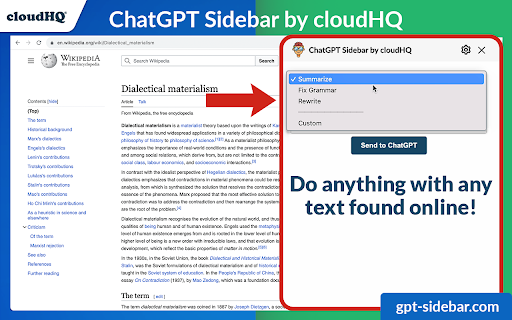
Bienvenido a ChatGPT Sidebar por cloudHQ, un asistente AI que emerge del lado de cualquier página web que explores.
La información que obtienes con esta útil barra lateral te proporciona conocimientos directos sobre lo que sea que estés explorando. Permanece como un aliado siempre presente, proporcionando perspectivas con solo un clic.
¿Cómo usar ChatGPT Sidebar?
1. Ve a cualquier sitio web.
2. Selecciona el texto.
3. Haz clic en el icono de ChatGPT Sidebar en el lado derecho de tu pantalla, selecciona el mensaje y haz clic en "Enviar a ChatGPT".
~~~~ 4 Beneficios de ChatGPT Sidebar por cloudHQ ~~~~
1. Usa las indicaciones de ChatGPT en sitios web para tareas como:
✔️ Resumir la página web.
✔️ Traducir la página.
✔️ Verificar la gramática.
✔️ Aclarar código.
✔️ E incluso encontrar páginas relacionadas.
2. Accede a nuestra biblioteca de mensajes listos para usar, donde puedes personalizar aún más cualquier mensaje para aplicar en cualquier lugar en línea.
3. Soporte tanto para ChatGPT-4 como para ChatGPT-3.5.
4. Soporte completo para la API de OpenAI - GPT-4 y GPT-3.
Redefine tu experiencia web con ChatGPT y ¡hazte más inteligente y mejor informado hoy! 🌟
Sitio web de cloudHQ: https://www.cloudhq.net/
Sitio web de la aplicación: https://www.gpt-sidebar.com
Precios: https://www.gpt-sidebar.com/pricing
Página de soporte: https://support.cloudhq.net/category/browser-extensions/chatgpt-sidebar/
Página de preguntas frecuentes: https://support.cloudhq.net/chatgpt-sidebar-faq-frequently-asked-questions/
Blog: https://blog.cloudhq.net
Latest reviews
- Aligah Gabriel
- The best AI assistant I’ve added to Chrome seamless and practical.
- Fela Kuti
- I can’t believe how much time this saves. Whether it’s summarizing or rewriting, it just works.
- Isreal Jackson
- Excellent for brainstorming social media captions while working on scheduling tools.
- Avery John
- The design fits naturally on the side of my screen and feels like a built-in assistant.
- GEDEON Blaine
- I use it alongside my usual workflow it’s like having ChatGPT everywhere I browse!
- Storm Bang
- The prompt-saving feature is brilliant I reuse my prompts all the time.
- James Clark
- This sidebar has become essential for quick grammar checks and content improvements.
- Willintin Anderson
- Perfect for writing blogs. Makes rewriting, summarizing, and polishing text effortless.
- Trogan Michael
- This extension is incredibly handy. I save all my favorite prompts and use them across sites huge time-saver.
- Aisha Lordy
- Having ChatGPT right in my browser makes research and writing tasks so much faster I use it every day!
- Savvy
- Amazing experience
- Rita Andrews
- Being able to use ChatGPT across websites, emails, and documents in one click feels like having a smart assistant always by my side.
- Jesse Gray
- I love how seamless it is to summarize, rewrite, or translate text without leaving the page. It’s a huge productivity boost.
- Evans Anthony
- This sidebar is incredibly convenient, having AI help instantly available on any webpage makes researching and reading so much faster and easier.
- Joshua Robby
- The ready-to-use prompt library is a great touch. It saves time and makes the tool useful even if you’re not sure what to ask.
- Osvaldo Reggie
- Nice tool, install it and thank me later!
- King Joob
- Really great for drafting professional messages directly from your Gmail.
- Ella Morgan
- The sidebar loads quickly and the response are accurate.
- Kendra Brasfield
- Works well for marketers who need quick copy ideas while viewing competitor's website.
- Blessing Mahmood
- I keep it open all day while writing blog posts and articles.
- Rex John
- I highly recommend this extension!
- James Robinson
- This tool is such a powerful tool
- David Cleveland
- Nice tool
- Doris Davis
- I love this tool
- Iko-ojo Ej
- Great!
- Jason Jeffrey
- I can translate short passages instantly without opening another tab.
- Sloth Jimmy
- Helps me create email drafts that sound polished and clear.
- Robert Higgins
- I like that it remembers context from what I am reading on the screen.
- Evelyn Gideon
- Very convenient tool for students who need to summarize study materials or generate essay outlines.
- Herderson Alpha
- I use it while working in Google Docs to refine my writing and brainstorm ideas.
- Mike Edwin
- It is a game changer for productivity and writing clarity.
- Andy Bent
- Excellent for creating quick outlines and checking facts without losing focus.
- Moser Keen
- The design is clean and fits naturally on the right side of the screen.
- Tina Daniels
- I love how it can summarize PDFs and long web pages instantly.
- Great Edward
- Works perfectly with my workflow. I do not have to switch tabs to ask ChatGPT questions anymore
- Dominic Zeabur
- I use it every day to draft responses and check grammar inside Gmail
- George Rands
- Having ChatGPT right in my browser makes research and writing much faster.
- Sam Craman
- Quite handy and useful extension. Not sure why all this hate....
- Elizabeth Jobe
- Very useful extension. I love that you can save your prompts. For example, I have a prompt called "2 sentences excerpt" that I use to summarize whatever I'm writing.
- Gregory Bussell
- Very handy extension. I use it with WordPress. It sits on the side of my screen and lets me generate HTML code or improve my English.
- Milton Fields
- Very handy extension - it adds chatGPT sidebar so you can access chatgpt from anywhere.
- Smith More
- It makes writing tasks feel effortless. I no longer need to jump between chatgpt and other tabs
- Cromwell Henry
- I appreciate how it integrates with almost any website i visit
- Mark Richard
- Great for drafting professional messages directly from Gmail.
- Grace Developer
- I use it to brainstorm social media captions while scheduling posts.
- Denny Gracelyn
- The sidebar loads quickly and the responses are accurate.
- Nancy Sandra
- I keep it open all day while writing blog posts articles.
- Lisa
- Perfect for proofreading text before posting online
- Babara Marah
- I often use it to turn complex technical content into plan English Explanation.
- Moses Heritage
- Works well for marketers who need quick copy ideas while viewing competitors 'websites.