
ChatGPT Sidebar cloudHQ
Extension Actions
- Extension status: Featured
Barra lateral do ChatGPT como seu assistente de IA em qualquer página
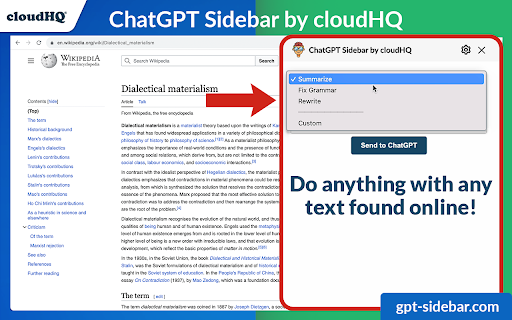
Bem-vindo à Barra Lateral ChatGPT da cloudHQ, um assistente de IA que emerge do lado de qualquer página web que esteja a navegar.
A informação que obtém com esta prática barra lateral fornece-lhe conhecimento direto sobre qualquer coisa que esteja a explorar. Permanece uma aliada sempre presente, fornecendo insights com apenas um clique.
Como utilizar a Barra Lateral ChatGPT?
1. Vá a qualquer website
2. Selecione o texto
3. Clique no ícone da Barra Lateral ChatGPT no lado direito do seu ecrã, selecione o prompt e clique em "Enviar para o ChatGPT".
~~~~4 Benefícios da Barra Lateral ChatGPT da cloudHQ ~~~~
1. Utilize os prompts do ChatGPT em websites para tarefas como:
✔️ Resumir a página web
✔️ Traduzir a página
✔️ Verificar a Gramática
✔️ Esclarecer código
✔️ E até encontrar páginas relacionadas
2. Aceda à nossa biblioteca de prompts prontos a usar, onde pode personalizar ainda mais qualquer prompt para aplicar em qualquer lugar online.
3. Suporte tanto para ChatGPT-4 como para ChatGPT-3.5
4. Suporte completo à API OpenAI - GPT-4 e GPT-3
Redefina a sua experiência na web com o ChatGPT e torne-se mais inteligente e bem informado hoje! 🌟
Website da cloudHQ: https://www.cloudhq.net/
Website da App: https://www.gpt-sidebar.com
Preços: https://www.gpt-sidebar.com/pricing
Página de Suporte: https://support.cloudhq.net/category/browser-extensions/chatgpt-sidebar/
Página de Perguntas Frequentes: https://support.cloudhq.net/chatgpt-sidebar-faq-frequently-asked-questions/
Blog: https://blog.cloudhq.net
Latest reviews
- Aligah Gabriel
- The best AI assistant I’ve added to Chrome seamless and practical.
- Fela Kuti
- I can’t believe how much time this saves. Whether it’s summarizing or rewriting, it just works.
- Isreal Jackson
- Excellent for brainstorming social media captions while working on scheduling tools.
- Avery John
- The design fits naturally on the side of my screen and feels like a built-in assistant.
- GEDEON Blaine
- I use it alongside my usual workflow it’s like having ChatGPT everywhere I browse!
- Storm Bang
- The prompt-saving feature is brilliant I reuse my prompts all the time.
- James Clark
- This sidebar has become essential for quick grammar checks and content improvements.
- Willintin Anderson
- Perfect for writing blogs. Makes rewriting, summarizing, and polishing text effortless.
- Trogan Michael
- This extension is incredibly handy. I save all my favorite prompts and use them across sites huge time-saver.
- Aisha Lordy
- Having ChatGPT right in my browser makes research and writing tasks so much faster I use it every day!
- Savvy
- Amazing experience
- Rita Andrews
- Being able to use ChatGPT across websites, emails, and documents in one click feels like having a smart assistant always by my side.
- Jesse Gray
- I love how seamless it is to summarize, rewrite, or translate text without leaving the page. It’s a huge productivity boost.
- Evans Anthony
- This sidebar is incredibly convenient, having AI help instantly available on any webpage makes researching and reading so much faster and easier.
- Joshua Robby
- The ready-to-use prompt library is a great touch. It saves time and makes the tool useful even if you’re not sure what to ask.
- Osvaldo Reggie
- Nice tool, install it and thank me later!
- King Joob
- Really great for drafting professional messages directly from your Gmail.
- Ella Morgan
- The sidebar loads quickly and the response are accurate.
- Kendra Brasfield
- Works well for marketers who need quick copy ideas while viewing competitor's website.
- Blessing Mahmood
- I keep it open all day while writing blog posts and articles.
- Rex John
- I highly recommend this extension!
- James Robinson
- This tool is such a powerful tool
- David Cleveland
- Nice tool
- Doris Davis
- I love this tool
- Iko-ojo Ej
- Great!
- Jason Jeffrey
- I can translate short passages instantly without opening another tab.
- Sloth Jimmy
- Helps me create email drafts that sound polished and clear.
- Robert Higgins
- I like that it remembers context from what I am reading on the screen.
- Evelyn Gideon
- Very convenient tool for students who need to summarize study materials or generate essay outlines.
- Herderson Alpha
- I use it while working in Google Docs to refine my writing and brainstorm ideas.
- Mike Edwin
- It is a game changer for productivity and writing clarity.
- Andy Bent
- Excellent for creating quick outlines and checking facts without losing focus.
- Moser Keen
- The design is clean and fits naturally on the right side of the screen.
- Tina Daniels
- I love how it can summarize PDFs and long web pages instantly.
- Great Edward
- Works perfectly with my workflow. I do not have to switch tabs to ask ChatGPT questions anymore
- Dominic Zeabur
- I use it every day to draft responses and check grammar inside Gmail
- George Rands
- Having ChatGPT right in my browser makes research and writing much faster.
- Sam Craman
- Quite handy and useful extension. Not sure why all this hate....
- Elizabeth Jobe
- Very useful extension. I love that you can save your prompts. For example, I have a prompt called "2 sentences excerpt" that I use to summarize whatever I'm writing.
- Gregory Bussell
- Very handy extension. I use it with WordPress. It sits on the side of my screen and lets me generate HTML code or improve my English.
- Milton Fields
- Very handy extension - it adds chatGPT sidebar so you can access chatgpt from anywhere.
- Smith More
- It makes writing tasks feel effortless. I no longer need to jump between chatgpt and other tabs
- Cromwell Henry
- I appreciate how it integrates with almost any website i visit
- Mark Richard
- Great for drafting professional messages directly from Gmail.
- Grace Developer
- I use it to brainstorm social media captions while scheduling posts.
- Denny Gracelyn
- The sidebar loads quickly and the responses are accurate.
- Nancy Sandra
- I keep it open all day while writing blog posts articles.
- Lisa
- Perfect for proofreading text before posting online
- Babara Marah
- I often use it to turn complex technical content into plan English Explanation.
- Moses Heritage
- Works well for marketers who need quick copy ideas while viewing competitors 'websites.