
Walmart Invoice Exporter
Extension Actions
- Live on Store
Download Walmart order details in xlsx format
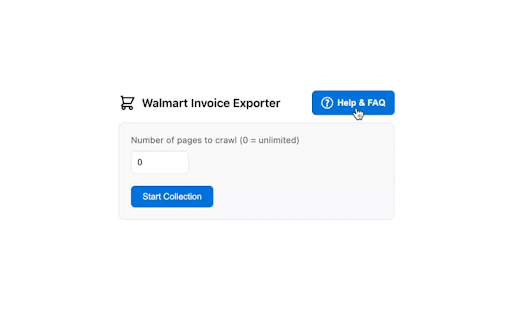
Transform your Walmart order management experience with the Walmart Invoice Exporter, a powerful Chrome extension that now allows you to download multiple orders at once in Excel format. Perfect for expense tracking, business records, and personal finance management.
★ Key Features:
• Batch Download: Select and download multiple orders at once, compatible with Walmart's built-in filters (date range, order status, returns, and search).
• Order History Crawler: Automatically collect order numbers from your purchase history.
• Order Description Tooltips: Hover over order numbers to see delivery date.
• Comprehensive FAQ: Built-in help guide with troubleshooting tips and setup instructions
• Detailed Excel Export: Get comprehensive order information including:
- Product details (name, quantity, price)
- Delivery status tracking
- Product links for easy reference
- Complete order information (number, date)
- Shipping address and payment method
- All charges (delivery, tax, tip - accurately parsed)
- Order subtotal (before fees and taxes)
- Order total (final amount)
• Export Mode Selector: Choose between:
- Multiple Files: One XLSX per order
- Single Combined File: All selected orders in a single XLSX workbook for easier management
• Caching: Invoice data is cached locally after the first download. Subsequent downloads automatically use cached data when available, speeding up repeat downloads.
• Privacy-Focused: Runs only on Walmart order pages with minimal permissions.
• Open Source: Available on GitHub for transparency and community contributions.
★ Usage Instructions:
☆ Single Order Download
1. Navigate to a specific Walmart order page
2. Click the extension icon
3. Check the box with order number
4. Click "Download Invoice"
☆ Batch Download
1. Go to your Walmart order history page (https://www.walmart.com/orders)
2. Click the extension icon
3. Set the number of pages to crawl (0 = unlimited)
4. Click "Start Collection"
5. Wait for the order numbers to load (may take a few seconds)
6. Hover over order numbers to see their descriptions (delivery date, status) if needed
7. Select the orders you want to download
8. Choose your Export Mode in the side panel:
- Multiple Files: downloads one XLSX per order
- Single Combined File: downloads all selected orders in a single XLSX workbook
9. Click "Download Selected Orders"
10. Wait for the download to complete (may take a few minutes)
⚠️ IMPORTANT NOTE FOR BULK DOWNLOADING ⚠️
Required Chrome Settings for Bulk Downloads:
1. Update Download Settings:
• Turn OFF "Ask where to save each file before downloading"
• Turn OFF "Show downloads when they're done"
These settings can be found in Chrome's download settings (chrome://settings/downloads)
2. Enable Automatic Downloads (Method 1):
• Paste this link in a new Chrome tab:
chrome://settings/content/siteDetails?site=https%3A%2F%2Fwww.walmart.com#:~:text=Automatic%20downloads
• Find "Automatic downloads" option
• Set it to "Allow" (instead of Ask or Block)
Alternative Method (if above link doesn't work):
• Paste this link in a new Chrome tab:
chrome://settings/content/automaticDownloads
• Under "Allowed to automatically download multiple files", click Add
• Enter "[*.]walmart.com" and click Add
☆ Need help? Click the "Help & FAQ" button in the extension side panel for detailed guides and troubleshooting tips.
☆ Need to merge multiple Excel files? Visit: https://hppanpaliya.github.io/excel-merger
☆ Pro Tip: When batch downloading, use Walmart's order page filters (search, date range, order status, returns) before clicking "Start Collection" to download exactly the orders you need!
★ Privacy & Security:
• No data collection
• Local processing only
• Minimal permissions required
• No external server communication
• Storage permission used only for temporary caching of your order numbers on your device
• Cached data automatically expires after 24 hours
★ Open Source:
• This extension is open source and available on GitHub: https://github.com/hppanpaliya/Walmart-Invoice-Exporter
★ Perfect For:
• Expense tracking
• Business accounting
• Budget management
• Purchase history organization
★ What's New:
✦ Version 6.3 - March 25, 2026
• Improved order-detail reliability with dual extraction (`__NEXT_DATA__` + DOM fallback)
• Removed duplicate/non-essential export fields: Order Number (Display), Barcode Data, Fee Breakdown, Charge History
• Cleaned payment output: Payment Method no longer repeats Payment Messages text
✦ Version 6.0 - March 17, 2026
• Fixed extraction of all financial fields (tax, delivery, tip, subtotal, total, payment method) broken by Walmart's DOM update
• Improved image blocking stability and error handling during order collection
✦ Version 5.2 - February 3, 2026
• Added shipping address and payment method to exported invoice details
• Added Order Total column to multiple files export mode for consistency
• Improved clear cache button visibility logic with dynamic UI updates
• Fixed tax and tip parsing in multiple file exports
• Enhanced cache system with better persistence using local storage
• Updated to Chrome 120 minimum version for better compatibility
✦ Version 5.1 - January 31, 2026
• Added Order Subtotal column to both single and multiple invoice export modes
• Multiple files export now displays both subtotal and order total.
✦ Version 5.0 - January 22, 2026
• Migrated UI from popup to a persistent Chrome Side Panel and integrated the FAQ inline
• Include the FAQ directly in the side panel for easier access and better user experience
• Improved user interface for better usability and navigation
• Performance optimizations (reduced timeouts, faster order collection, optimized image blocking)
✦ Version 4.0 - November 16, 2025
• Implemented caching for invoice data in Chrome local storage after the first download
• Subsequent downloads now check cache first, dramatically improving speed on repeat downloads
• Refactored internal codebase to use centralized constants for selectors, text, and CSS classes in utils.js for better maintainability and easier updates
✦ Version 3.3 - November 15, 2025
• Fixed an issue with order number extraction caused by changes in Walmart’s order history page structure
✦ Version 3.2 - August 9, 2025
• Added Export Mode Selector — choose between:
- Multiple Files Mode: one XLSX per order
- Single Combined File Mode: all selected orders in a single XLSX file
• Combined export runs sequentially in one background tab for reliability
• Powered by ExcelJS for generating combined workbooks
• Added structured data retrieval (no download) for enhanced combined export performance
• Multiple-file download flow remains unchanged
✦ Version 3.1 - March 25, 2025
• Added order description tooltip functionality
• Hover over order numbers to see order delivery date or if it's canceled or returned order
• Makes identifying and selecting specific orders much easier
✦ Version 3.0 - March 25, 2025
• Implemented intelligent local storage caching system for faster repeat usage
• Added cache timestamp and management options
• Improved memory management during order collection
• Updated FAQ with information about the caching system
✦ Version 2.5 - January 5, 2025
• Enhanced performance by blocking image loading in background tabs
• Faster page loading during order collection and invoice download
✦ Version 2.4 - January 5, 2025
• Added comprehensive FAQ page with troubleshooting guides
• Step-by-step instructions for setup and usage
• Chrome settings configuration guide for bulk downloads
• Guide for merging multiple Excel files
✦ Version 2.3 - December 19, 2024
• Resolved an issue with failed invoice downloads for new in-store orders.
✦ Version 2.2 - December 5, 2024
• Walmart.com/orders page link clickable in the popup.
✦ Version 2.1 - December 1, 2024
• Enhanced user interface with progress tracking
✦ Version 2.0 - November 27, 2024
• Added support for downloading multiple invoices at once
• New order history crawler feature
• Improved invoice downloading system
✦ Version 1.4.1 - August 30, 2024
• Improved order number extraction to handle various formats, including in-store purchases.
✦ Version 1.4 - August 29, 2024
• Improved invoice parsing with refined print-bill classes for accurate order delivery status.
• Added details like tips, taxes, and delivery charges to the exported invoice.
• Product names and links now appear in separate columns in the Excel file.
✦ Version 1.3 - August 27, 2024
• Fixed an issue preventing the download of xlsx invoice files.
• Extension name updated.
Streamline your Walmart purchase tracking today with this powerful, user-friendly extension!
Note: This extension works only on walmart.com.
Disclaimer: This extension is NOT created by or affiliated with Walmart Inc. Walmart Invoice Exporter is an independent tool developed by a third party. Walmart™ and all related trademarks are property of Walmart Inc. All rights reserved.
Latest reviews
- Woody Baker
- Worked fine for my purposes. Created a spreadsheet detailing everything that was purchased in 2025. Wish it broke down the price total per order instead of repeating the total in each column for each item in the order. Other than that it was great and detailed.
- Jay Bad
- Works great! Downloaded all my orders, just as I needed.
- Jay Simon
- great tool but each record should have the line item cost vs the total repeated for each item in the individual order. Great work!
- Chewy Spedoodle
- It did exactly what it said it would do. Now I can take this and plug it into ChatGPT to make a food list for myself. Thanks to whoever made this!
- tiffani mcmurdy
- Works really well when working. I have tried multiple times to download ALL my purchase history from Walmart, unfortunately when downloading it downloads a few then just stops. I will give better rating if the problem gets fixed.
- Damon Moseley
- What a time saver. Walmart makes it so difficult to sort through orders on their site but this extension quickly and effectively simplifies that process. Works much better than the pay wall options out there as I have tried those prior to finding this gem.
- Cole Fuller
- This used to work, but it no longer functions properly (no orders are collected).
- Heny132
- Doesn't work for Walmart Canada. By chance could you push a quick update to choose between which Walmart region the user is in? This would be a very useful tool if the entire world had access!
- Jessica Barwick
- Worked great last year for my taxes. However, as of right now, it is not collecting tax or final order totals.
- Mia Huck
- Excellent tool! Love that it links the products, too. Thanks so much! Great for tax season.
- Vahan Balekian
- Works great! I downloaded an entire year's worth of orders. The extension pulled out every item from each order and gave me this data: Order Number, Order Date, Shipping Address, Payment Method, Subtotal, Order Total, Product Name Quantity, Price, Delivery Charges, Tax, Tip, Delivery, Status, Product Link
- Nate Larson
- Huge time saver - thank you so much for creating and sharing this!!! Works great!
- M P
- I really like the plugin and look forward to future improvements. Currently, there seems to be an issue with the order total being calculated (always shows 0.00 instead of adding the subtotal and tax)
- Lowcountry Lift
- Please make a version that also works for Sam's Club. The Sam's club Purchase history website is very similar to Walmart's
- Justin Demiter
- Incredibly easy to use! Great for taxes!
- Ashley Wagner
- Thank you!!!!! Saved me several hours! And worked well.
- Jeff Karl
- This is a great start. It's so hard to be able to figure out what credit card charges link to which orders. Walmart hides those under charge history. Is there a way to scrape the charge history like final order charges and include it in the file too?
- Fernando
- It is extremally useful! Thank you very for making this tool.
- Basat TAYFUN
- What a life saver. It is shameful for Walmart to not have this feature built-in. It is not that much of work, especially for a massive multi-billion Dollar company. Similar to bank/credit cards, a simple page with date or simple text filtering is all you need to produce a list of orders with a simple export/download button. How hard is it to produce a CSV or PDF from a table of product names, order numbers, dates, price, etc. Formatting is not important. Walmart needs to catch up with reality and the 21st century.
- Angela Corvaia
- Love it! Thank you for making such an easy to use tool, fast to download the data as well. Makes it easier to watch my expenses.
- Marcelo Loayza
- AMAZING! Thank you so much. Works perfectly with the instructions. Folks, dont forget to check out the FAQ's for the batch downloads!
- Sundae Knight
- Please add a column for sales taxes paid, otherwise an excellent time saving resource!
- Jeff Earls
- PERFECT THANK YOU
- Keenan Gradoville (Pack 174)
- Harshal - great extension. Is there anyway for you to make an option with downloading the invoice as a PDF? I need to submit receipts
- Aj Bott
- Fantastic tool that solves a niche need. This extension makes it incredibly simple to crawl your entire purchase history and pull all the details (item, quantity, price, delivery status, product link, order number, order date, delivery charges, tax, tip, and order total) into a spreadsheet. Big time saver and probably the only public tool to do it. Just a heads up for new users. For the bulk download feature to work correctly, you'll need to follow the simple one-time setup in the extension's FAQ to allow multiple file downloads in Chrome. Overall, a 5-star extension that is the saving grace for the niche people that want to export their Walmart purchase history.
- Eran Eran
- Free. Other programs charge
- Char Olson
- EXCELLANT tool...if I could I would give 10 stars.....be patient though, it downloads one invoice at a time so don't click on it until it finishes downloading all invoices. Then you have to "Combine Multiple Excel Workbooks into One"
- Electric
- Partially works - I really like the functionality and concept of this, but some things just aren't right. On the exported .xlsx, the format of the "Quantity" section is defaulted to remove any decimal places. So for anything that is weighed (grapes for example), 2.28lbs gets turned into "2" on the sheet until you check the actual value which can be very confusing. Also, it seems like some meats like ground beef, sausage, and chicken show on the Walmart orders site without a quantity, which this tool then puts "0" on the quantity section in the excel sheet even though they were paid for. This pretty much defeats the purpose of being able to automate it since I have to go in and manually check the quantities. If it could have a "Unit Price", "Quantity" (correct quantity), and "Total Price" column that would be perfect.
- Jonathan C
- This combined with Chat GPT is absolutely awesome! First follow the instructions with the extension on how to configure your browser so you can download the files or else it will create the files and you won't be able to download them. But if you follow the instructions they'll download just fine. Also apparently it works best in Chrome I first tried it in Edge but it didn't seem to work. But it works great in Chrome. I downloaded 50 pages of invoices which came to 250 invoices over the last few years. But it put like 50 sheets/tabs in each file. And it seemed like an impossible task to combine everything the way I wanted it into one file and one sheet. then it occurred to me to try chatGPT. I started out with four Excel files and I uploaded them to chat GPT. The files are very small so it was no problem. Then I asked ChatGPT to combine them. It did so but it only combined the first sheet in each file So it gave me about one month's worth of information. I then asked it if it could combine all the sheets in all the files and it worked on it for a bit and came back and did a perfect job with it! but it did not put dates with any of the products that I purchased. So it was impossible to know when each product was purchased which was something I want to know because I want to see how my habits have changed over time with certain products. So I asked it if it could put the date and it said it couldn't because there was no date column. Then I told it to look at column A there would be a line called order date and then column B that would be the date of the invoice. so it turned on that for a minute or so and it came back and gave me a perfect spreadsheet with every product purchased by date with prices product descriptions everything! and it's all in one file on one sheet! Now I can either sort things myself and do calculations myself or since chat GPT has all of this in its memory for me I can just ask it questions like what product have I bought the most quantities of and what products have I spent the most money on. It's really amazing when you combine this extension - which works perfectly, with chatGPT which makes the job of cleaning up and consolidating the data - a breeze!!
- Mark Paschal
- Amazing extension for budgeting, thank you for writing this and providing it to us.
- ANTHONY D
- Updated to 5-stars! This is working very nicely now! Please do not change a thing! Kudos!
- Clinton Thomas
- Ruined by "Robot or human?". Used this a few times and loved it. I didn't care that they were downloaded to separate Excel files, a quick Python script made short work of combining all the data. But, now, Walmart has put in a robot check so the tool only downloads about 5 orders and then will not download more because the site is asking "Robot or human?" and to perform a task, in my case it is holding a button.
- Yitz Zanziper
- concept is great, but it doesnt work 1 when u select multiple orders it gets downloaded in separate files which is kind of useless merging the files only combines them into 1 file but still on different tabs, not really useful 2 when selecting too many (even 10 pages) it doesnt even download everything
- Patrise Henkel
- this is a lifesaver for the accounting project I'm working on, thank you!! it really works. the extension is downloading a years worth of order data right now. thank you
- --
- Real time saver, I cant understand why walmart wouldnt have this feature built in. But this takes almost all the work out of this chore. Thanks for your hard work on this. God Bless.
- Glen Young
- A lifesaver for helping me categorize purchases in my budgeting app. Thank you!
- Andrew Olynec
- Looks promising, although is it possible to merge all data into one spreadsheet? Each order is appearing separately. I'd like to be able to manipulate, sum up only certain data fields in one sheet. Thank you!
- Darren Clark
- This works incredibly well. I cannot thank the dev enough, it has saved me SO much time.
- Chris Batchelor
- Great for a single order, but even with all of the appropriate settings, trying to use bulk just downloads the single file and doesn't display me any errors or any reason as to why it wouldn't continue. EDIT: Upon further review, if I turn on developer mode in my browser's extensions screen, and then right click the addon's popup and inspect, then it works fine. It ONLY works while I'm actively inspecting. Closing the window makes it, once again, stop working. It's also worth letting people know that you have a hard-coded 100 order limit.
- Amy Charlton
- This extension is a total game-changer for handling Walmart orders! I love the batch download feature, it’s so easy to grab multiple invoices at once in Excel format. I was having trouble with the automatic download at first, but I reached out to the developer, and they responded super fast and helped me fix the issue. The instructions they provide are really clear, which made all the difference. It’s honestly saved me so much time and hassle with expense tracking. Highly recommend if you shop at Walmart often!
- Emily Fulkerson
- I am having the same problems as below....I am willing to "If the problem persists, please share a screen recording of the steps you’re following and any errors you encounter." - I need instructions on how and where to send this
- Isaac Rajala-Johnson
- It works pretty well! I can see Developers address some of the previous reviews. :)
- Computer Repairs
- It's a good start but needs some work. - It works for downloading single orders but not for batch orders (only downloads the first order). - Extension also doesn't persist state, if I start checking a large batch and click outside of the pop-out, there's no way to get back. Next time I click on the extension I have to start from scratch. - It would be more useful to have the option to insert all orders into a single excel file instead of one order per file. If you're like me and have 100+ orders from last year alone, that's a ton of files to try and manage / merge.
- Brian Lyman
- Easy installation and simple interface, however I've been unable to download multiple/batched orders. Whether I use the "Select All" checkbox or manually select multiple individual orders, the resulting .xlsx download file only includes information on a single order. For context, nearly all of my orders are Walmart Grocery orders for delivery through our Walmart+ membership. The single order .xlsx file that downloads is for a grocery/delivery order so it doesn't seem like that order type is the issue. Using Chrome 131.0.6778.140 on MacOS Sonoma 14.6.1
- Jordan Lavigne
- Any chance it will be updated to work with walmart.ca? That would be awesome!
- Thomas JONES
- Works fantastic. But, as a caveat, remember to have any blocking tools, such as Ghostery, turned off. Blocking tools will prevent the program from doing the download. Tested on Chrome 131.0.6778.70 Win 11 Home
- Kaisar Zaben
- doesnt work at all
- Hugo Toledo
- Excellent! Yes, I wish it could start at the walmart.com/orders and traverse all orders but, hey, this has saved me so much time I cannot complain. Thanks, Harshal! Very much appreciated!
- Edward Nunn
- Amazing!!!!! You have to go into the order itself but it works amazingly! Thank you!
- Shubham Pawar
- Game-changer!