
Skaitytojo linija
Extension Actions
- Live on Store
Naudokite Reader Line programėlę, kad galėtumėte vadovautis skaitymo linijos taisykle ir pagerintumėte savo skaitymo patirtį,…
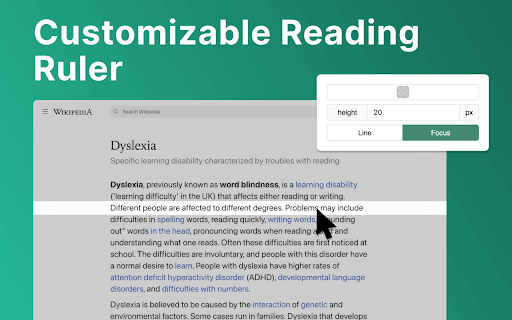
Įvadas į Skaitytojo Liniją: revoliucionalizuokite savo skaitymo patirtį! 📕
🚀 Greito paleidimo patarimai
1. Spustelėkite "Pridėti prie „Chrome“", kad įskiepis būtų įdiegtas į naršyklę be pastangų.
2. Atidarykite bet kurį tinklalapį ar dokumentą, kuriame norite patobulinti skaitymo patirtį.
3. Prisitaikykite spalvai, aukščiui ir permatomumui pagal savo poreikius.
4. Slatintuvą perkeldami pelės žymeklį sutelkite dėmesį į konkretų eilutes ar skyrius.
5. Pradėkite skaityti savo medžiagą su pagerinta aiškumu ir dėmesiu, dėka skaitymo pagalbos!
💎 Patobulinkite savo skaitymo kelią su skaitymo slatintuvu
Skaitytojo linija veikia kaip jūsų patikimas skaitymo draugas, siūlantis įvairias funkcijas, atitinkančias jūsų unikalius skaitymo poreikius. Nesvarbu, ar esate studentas, specialistas ar tiesiog mėgaujatės geru skaitiniu, fokusavimo slatintuvas čia, kad pakiltų jūsų skaitymo kelionė.
⚙️ Priderinamas skaitymo vadovas
Čia yra galimybės, kurias galite lengvai pritaikyti įskiepių nustatymuose:
✴️ Spalva ir permatomumas. Keičiant skaitymo slatintuvo spalvą pagerinamas skaitomumas svetainėse su skirtingais fonais.
✴️ Slatintuvo aukštis. Nustatę skaitymo vadovo aukštį, vartotojas gali prisitaikyti prie skirtingų šriftų dydžių ir eilučių tarpų, kad patirtis skaitytų būtų optimali.
✴️ Skaitymo režimas. Skaitytojo linija siūlo du skaitymo režimus: eilutės ir fokusą. Šie specializuoti režimai teikia pritaikytas sprendimus, siekiant patobulinti jūsų skaitymo patirtį.
✨ Be jokių trukdžių integracija ir prieinamumas
💡 „Reader Line“ be vargo integruojasi į jūsų „Chrome“ naršyklę, užtikrinant prieinamumą ir patogumą visų įgūdžių vartotojams.
💡 Įjunkite arba išjunkite įskiepį vienu paspaudimu, suteikdami jums visą kontrolę virš savo skaitymo patirties.
💡 Suinstruktuotas, turint tikslus, „Reader Line“ pirmumo tvarka skiria prieinamumą, todėl tai yra vertingas įrankis asmenims su įvairiais skaitymo poreikiais.
🛠 Ateities funkcijos
1️⃣ Fokuso režimas. „Fokuso“ režimo funkcija padeda sutelkti dėmesį, išryškindama vieną skaitymo liniją, idealu disleksijai. Ji naudoja skaitymo slatintuvą, kad nukreiptų dėmesį į skaitytojo liniją, todėl skaitymas stebimas ir sumažinamos atsiribojimai, gerinant skaitymą disleksijai kenčiantiems vartotojams.
2️⃣ PDF palaikymas. Be vargo integruokite skaitymo slatintuvo funkcijas į pdf failus, siūlant nuoseklų skaitymo patirtį skirtingose formose ir platformose. Nesvarbu, ar studijuojate akademinės knygos, peržiūrite ataskaitas ar mėgaujatės laisvuoju laiku, skaitymo pagalba visada bus prieinama ir teikianti neįkainojamą palaikymą ir pagalbą.
❓ DUK - Dažnai užduodami klausimai
📌 Kas yra skaitytojo linija?
Skaitymo linija yra „Chrome“ naršyklės plėtinys, skirtas pagerinti jūsų skaitymo patirtį suteikiant pritaikomą linijos gidas, padedantį jums naršyti tekstą. Įdiegus, skaitymo pagalbininkas prideda virtualų skaitymo linijalį į jūsų naršyklės langą. Galite pritaikyti jo spalvą, aukštį ir skaidrumą pagal savo pageidavimus. Ar gali padėti su konkrečiais skaitymo iššūkiais? Taip, skaitymo linija siūlo specializuotus režimus, pavyzdžiui, disleksijos pagalbininką ir fokusavimo liniją, padedančias asmenims, susiduriantiems su skaitymo sunkumais. Ar lengva naudoti skaitymo liniją? Be abejo! Skaitymo linija turi intuityvų sąsają ir gali būti įjungta arba išjungta vienu paspaudimu, todėl ji yra prieinama visų gebėjimų vartotojams. Skaitymo pagalbininką galima lengvai išjungti ar vėl įjungti vienu paspaudimu, suteikiant jums visišką kontrolę per skaitymo patirtį. Ar galiu pritaikyti skaitymo gido išvaizdą? Taip, galite prisitaikyti spalvą, aukštį ir skaidrumą skaitymo linijalį pagal savo pageidavimus ir skaitymo aplinką. Ar skaitymo linija veikia visose svetainėse? Skaitymo linijalį galima naudoti daugelyje svetainių ir internetinių dokumentų, suteikiant nuoseklią skaitymo patirtį įvairiose platformose. Kaip gali skaitymo gidas pagerinti mano skaitymo greitį ir supratimą? Suteikiant vizualinę gairę ir sumažinant atitraukimus, skaitymo linijalas padeda vartotojams sutelkti dėmesį į tekstą, vedantį prie pagerinto skaitymo greičio ir supratimo. Ar skaitymo linija tinkama studentams? Taip, skaitymo linija yra puiki priemonė studentams, padedanti jiems išlikti susikaupusiems mokantis, tyrinti ir skaityti akademinę literatūrą.
Latest reviews
- J
- It simply does what it says it does. Good for focus, video presentations, dyslexia. The color filters are nice.
- Mark Thornton
- It provides a line to help me read documents as promised, and let me say it is one heck of a line.
- Luis Arellano
- Very good help to keep track while reading. Thank you!
- Michelle Vega
- This is amazing, thank you so much. It truly helps me focus, and it's user-friendly.
- Angus Kelly
- The simple ideas are usually the best, so glad somebody has actually taken time to develop this. Very useful.
- daniel burnell
- This is a user friendly and straightforward ruler/highlighter that has certainly helped my concentration and eye strain. What a great accessaibility feature!
- Maya
- Go-to for reading accessibility.
- Carla Bamesberger
- Works in PDF viewers! This reading ruler is straight-forward and easy to use. It's the only one I have found so far that works when I am viewing an un-downloaded PDF file in my web browser. Like many other rulers, unfortunately, this one does not behave properly when using an in-browser spreadsheet, which is really where I need a reading ruler.
- Otto Lee
- its good
- Giada :p
- Helps soooooo much. A literal godsend for me and my eye tracking issues. I do like a lot of other reviews wish they were able to add a PDF function but other then that I love it
- Emily Rose
- SO helpful for reading on my computer with my dyslexia.
- ADRIANA ZORAYA FLÓREZ SANDOVAL
- It is an excellent tool: easy to use and perfect for reading without distractions and with comfort. I really recommend it! However, I usuallly read PDFs, and it doesn't work there. Please fix that; I love it! Having a good experience across different formats would make it fantastic.
- Rimas Dodriguez
- very good and easy to use :D
- Spiderman 36
- Really helpful and almost exactly what I was looking for. I do a lot of reading for my major and this has helped me stay focused on my studies. One thing that does bug me is that it doesn't work on PDF documents, which I also have to read a lot of. I hope that there will be a feature for PDF compatibility in the future! Other than that, it's a great extension
- Xiao Hofer
- This is beautiful and exactly what I needed! my online textbooks drive me crazy and I've been trying to come up with ideas to help me read them. I was using physical pieces of paper, the blue highlight option, even text-to-speech, and none of them were effective enough to combat being very annoying (or embarrassing) to use. Using a colored strip of paper is what I do for my physical textbooks (it also serves as a good bookmark), and I was thinking about somehow making my mouse into something like that to put under the line of text. I can't code so it was pretty hopeless, but this is pretty much exactly what I wanted. It works amazing and I wish more people knew about it!
- Afshin Zolfaghari
- Best ever chrome extention for ADHD people. finally i feel comfortable and focused while im doing my job. im using it on every site and not only for reading text.
- Michael Hyde
- Perfect - thank you!
- Junaid Arif Farooqui
- Why Dyslexia of all things in the extension preview? 😭
- Johan Widén
- Very useful. But I would like it to have some (user configurable) keyboard shortcuts: - To activate/deactivate the reader line on a web page. - To move the reader line up or down on the web-page, without scrolling.
- Jason Soto
- Really helpful Chrome extension. Allows for one to focus on the text.
- angel frances
- really helpful when in-depth reading is involved. no other comments, just anticipating a seamless activation for each site. amazing, amazing
- kristopher Wilder
- Highly customizable. helps me focus a little easier on blocks of text. I would like to see the activation changed from on on switch in the apps drop menu to just automatically opening.
- Katherine Koziar
- I usually don't give five star reviews because there is often room for improvement, but this extension does exactly what it says. It is easy to use, easy to adjust, and helps my eyes from not wandering. I wish there was a feature like this on all reading devices and apps.
- gabriella
- helpful and really easy to use
- Mahaveer Rajpurohit
- very helpful
- Abigail Diehl
- Super helpful with my Visual Snow. I wish I could lock the line in place when I need to move back and forth between monitors. Contact me if you want a Beta tester for that!
- Felix Liu
- Super useful and easy to use. Definitely a 5-star extension.
- Tracey Bye
- Exactly what I needed. Very useful app. Easy to open/close as needed.
- The Postman
- Very NICE!
- Robbie Palmer
- Looks solid
- Kevin
- It's nice and works well, but it does not do anything when opening a pdf
- Gabriel Young
- I works as intended
- Stefan Oana
- Such a useful app! Thanks, Kamil.
- William Alexander
- Exactly what I was looking for!
- Roger Manea
- does the job perfectly and very simple to use
- Lindsay Sullivan
- I love this, it helps me so much.
- Kelly Blane
- fantastic extension for academics---it works with paperpile (reference manager) too!
- SUPRIYO GORAI
- but how to use it on pdf or document please help
- Kaylee
- Exactly what I was looking for, thank you!
- Hữu Thịnh Nguyễn
- This is a very useful tool!! Thank you so much for making it!
- Liam Shanny
- Very promising idea! I double click and highlight text when reading on a browser constantly. Something like this could make reading much more enjoyable for me. I was hoping it would snap the highlighter to whatever line the cursor was hovering over though. Maybe something a potential optional feature down the line? It would remove the need to ever adjust the highlighter height, and make it so the line doesn't have to span across the entire window. Also once you have the bounds of lines of text detected you could toggle the highlighter automatically whenever the cursor is hovering over multiple lines of text only.
- Joaquín Alverde
- I always thought of it as I use a pencil or ruler with books. Never thought this could help me a lot while reading lots of data on the computer. Simple and very useful. Love it!
- Ifaz Abrar
- Never thought of something like this. Simple and no bugs so far, except for the fact that I had to install it twice for it to actually work. Nonetheless, good stuff.