
Leesliniaal
Extension Actions
- Live on Store
Gebruik de Leesliniaal app om je leeservaring te begeleiden en te verbeteren met een leeslijn om je focus op de leeslijn te…
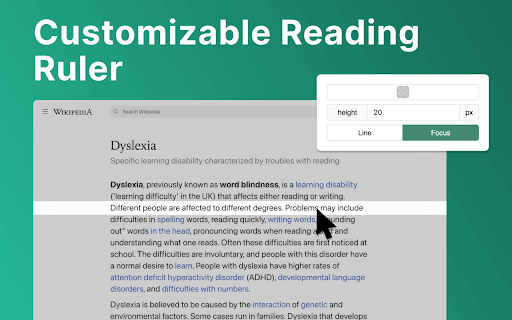
Maak kennis met Reader Line: revolutioneer uw leeservaring! 📕
🚀 Snelle starttips
1. Klik op "Toevoegen aan Chrome" om de extensie naadloos in uw browser te installeren.
2. Open elke webpagina of document waar u uw leeservaring wilt verbeteren.
3. Pas de kleur, hoogte en dekking van de leesliniaal aan volgens uw voorkeuren.
4. Verplaats de leesliniaal met uw muisaanwijzer om te focussen op specifieke regels of alinea's.
5. Duik in uw leesmateriaal met verbeterde helderheid en focus, dankzij de leesondersteuning!
💎 Verrijk uw leesreis met leesliniaal
Reader Line fungeert als uw vertrouwde leesgezel en biedt een reeks functies om te voldoen aan uw unieke leesbehoeften. Of u nu een student, professional bent of gewoon graag in een goed boek duikt, de focusliniaal staat klaar om uw leesreis te verheffen.
⚙️ Aanpasbare leesgids
Dit zijn de opties van de leesliniaal die u gemakkelijk kunt aanpassen in de instellingen van de extensie:
✴️ Kleur en dekking. Het veranderen van de kleur van de leesliniaal verbetert de leesbaarheid op websites met verschillende achtergronden.
✴️ Liniaalhoogte. Door de hoogte van de leesgids in te stellen, kan de gebruiker zich aanpassen aan verschillende lettergroottes en regelafstanden voor een optimale leeservaring.
✴️ Leesmodus. Reader Line biedt twee leesmodi: regel en focus. Deze gespecialiseerde modi bieden op maat gemaakte oplossingen om uw leeservaring te verbeteren.
✨ Naadloze integratie en toegankelijkheid
💡 Reader Line integreert naadloos in uw Chrome-browser en zorgt voor toegankelijkheid en gebruiksgemak voor gebruikers van alle vaardigheidsniveaus.
💡 Schakel de extensie in of uit met slechts één klik, zodat u volledige controle heeft over uw leeservaring.
💡 Met inclusiviteit in gedachten ontworpen, geeft Reader Line prioriteit aan toegankelijkheid, waardoor het een waardevol hulpmiddel is voor individuen met diverse leesbehoeften.
🛠 Toekomstige functies
1️⃣ Focusmodus. De focusmodusfunctie verbetert de concentratie door een enkele leeslijn te benadrukken, ideaal voor dyslexie. Het maakt gebruik van de leesliniaal om de aandacht van de lezer te sturen, waardoor de leeslijn duidelijker wordt en afleidingen worden geminimaliseerd, wat de leesbaarheid voor dyslectische gebruikers verbetert.
2️⃣ PDF-ondersteuning. Integreer naadloos de functies van de leesliniaal in pdf-bestanden en bied een consistente leeservaring over verschillende formaten en platforms. Of u nu academische papers bestudeert, rapporten doorneemt of geniet van vrijetijdslezen, de leeshulp staat klaar om waardevolle ondersteuning en assistentie te bieden.
❓ Veelgestelde vragen
📌 Wat is Reader Line?
Leesregel is een Chrome-extensie die is ontworpen om uw leeservaring te verbeteren door een aanpasbare regelhulp te bieden om u te helpen door tekst te navigeren. Nadat het is geïnstalleerd, voegt de leeshulp een virtuele leesliniaal toe aan uw browservenster. U kunt de kleur, hoogte en dekking aanpassen aan uw voorkeuren.
📌 Kan het helpen bij specifieke leesuitdagingen?
Ja, leesregel biedt gespecialiseerde modi zoals dyslexiehulp en focuslijn om individuen te helpen die moeite hebben met lezen.
📌 Is de leesregel gemakkelijk te gebruiken?
Absoluut! Leesregel heeft een intuïtieve interface en kan met slechts één klik worden ingeschakeld of uitgeschakeld, waardoor het toegankelijk is voor gebruikers van alle vaardigheidsniveaus. Leeshulp kan eenvoudig worden uitgeschakeld of opnieuw worden ingeschakeld met één klik, waardoor u volledige controle heeft over uw leeservaring.
📌 Kan ik het uiterlijk van de leesliniaal aanpassen?
Ja, u kunt de kleur, hoogte en dekking van de leesliniaal aanpassen aan uw voorkeuren en leesomgeving.
📌 Werkt leesregel op alle websites?
De leesliniaal is compatibel met de meeste websites en webgebaseerde documenten en biedt een consistente leeservaring op verschillende platforms.
📌 Hoe kan de leesgids mijn leessnelheid en begrip verbeteren?
Door een visuele gids te bieden en afleidingen te minimaliseren, helpt de leesliniaal gebruikers zich te concentreren op de tekst, wat leidt tot verbeterde leessnelheid en begrip.
📌 Is leesregel geschikt voor studenten?
Ja, de leesliniaal is een uitstekend hulpmiddel voor studenten, waardoor ze gefocust kunnen blijven tijdens het studeren, onderzoek doen en academische teksten lezen.
Latest reviews
- J
- It simply does what it says it does. Good for focus, video presentations, dyslexia. The color filters are nice.
- Mark Thornton
- It provides a line to help me read documents as promised, and let me say it is one heck of a line.
- Luis Arellano
- Very good help to keep track while reading. Thank you!
- Michelle Vega
- This is amazing, thank you so much. It truly helps me focus, and it's user-friendly.
- Angus Kelly
- The simple ideas are usually the best, so glad somebody has actually taken time to develop this. Very useful.
- daniel burnell
- This is a user friendly and straightforward ruler/highlighter that has certainly helped my concentration and eye strain. What a great accessaibility feature!
- Maya
- Go-to for reading accessibility.
- Carla Bamesberger
- Works in PDF viewers! This reading ruler is straight-forward and easy to use. It's the only one I have found so far that works when I am viewing an un-downloaded PDF file in my web browser. Like many other rulers, unfortunately, this one does not behave properly when using an in-browser spreadsheet, which is really where I need a reading ruler.
- Otto Lee
- its good
- Giada :p
- Helps soooooo much. A literal godsend for me and my eye tracking issues. I do like a lot of other reviews wish they were able to add a PDF function but other then that I love it
- Emily Rose
- SO helpful for reading on my computer with my dyslexia.
- ADRIANA ZORAYA FLÓREZ SANDOVAL
- It is an excellent tool: easy to use and perfect for reading without distractions and with comfort. I really recommend it! However, I usuallly read PDFs, and it doesn't work there. Please fix that; I love it! Having a good experience across different formats would make it fantastic.
- Rimas Dodriguez
- very good and easy to use :D
- Spiderman 36
- Really helpful and almost exactly what I was looking for. I do a lot of reading for my major and this has helped me stay focused on my studies. One thing that does bug me is that it doesn't work on PDF documents, which I also have to read a lot of. I hope that there will be a feature for PDF compatibility in the future! Other than that, it's a great extension
- Xiao Hofer
- This is beautiful and exactly what I needed! my online textbooks drive me crazy and I've been trying to come up with ideas to help me read them. I was using physical pieces of paper, the blue highlight option, even text-to-speech, and none of them were effective enough to combat being very annoying (or embarrassing) to use. Using a colored strip of paper is what I do for my physical textbooks (it also serves as a good bookmark), and I was thinking about somehow making my mouse into something like that to put under the line of text. I can't code so it was pretty hopeless, but this is pretty much exactly what I wanted. It works amazing and I wish more people knew about it!
- Afshin Zolfaghari
- Best ever chrome extention for ADHD people. finally i feel comfortable and focused while im doing my job. im using it on every site and not only for reading text.
- Michael Hyde
- Perfect - thank you!
- Junaid Arif Farooqui
- Why Dyslexia of all things in the extension preview? 😭
- Johan Widén
- Very useful. But I would like it to have some (user configurable) keyboard shortcuts: - To activate/deactivate the reader line on a web page. - To move the reader line up or down on the web-page, without scrolling.
- Jason Soto
- Really helpful Chrome extension. Allows for one to focus on the text.
- angel frances
- really helpful when in-depth reading is involved. no other comments, just anticipating a seamless activation for each site. amazing, amazing
- kristopher Wilder
- Highly customizable. helps me focus a little easier on blocks of text. I would like to see the activation changed from on on switch in the apps drop menu to just automatically opening.
- Katherine Koziar
- I usually don't give five star reviews because there is often room for improvement, but this extension does exactly what it says. It is easy to use, easy to adjust, and helps my eyes from not wandering. I wish there was a feature like this on all reading devices and apps.
- gabriella
- helpful and really easy to use
- Mahaveer Rajpurohit
- very helpful
- Abigail Diehl
- Super helpful with my Visual Snow. I wish I could lock the line in place when I need to move back and forth between monitors. Contact me if you want a Beta tester for that!
- Felix Liu
- Super useful and easy to use. Definitely a 5-star extension.
- Tracey Bye
- Exactly what I needed. Very useful app. Easy to open/close as needed.
- The Postman
- Very NICE!
- Robbie Palmer
- Looks solid
- Kevin
- It's nice and works well, but it does not do anything when opening a pdf
- Gabriel Young
- I works as intended
- Stefan Oana
- Such a useful app! Thanks, Kamil.
- William Alexander
- Exactly what I was looking for!
- Roger Manea
- does the job perfectly and very simple to use
- Lindsay Sullivan
- I love this, it helps me so much.
- Kelly Blane
- fantastic extension for academics---it works with paperpile (reference manager) too!
- SUPRIYO GORAI
- but how to use it on pdf or document please help
- Kaylee
- Exactly what I was looking for, thank you!
- Hữu Thịnh Nguyễn
- This is a very useful tool!! Thank you so much for making it!
- Liam Shanny
- Very promising idea! I double click and highlight text when reading on a browser constantly. Something like this could make reading much more enjoyable for me. I was hoping it would snap the highlighter to whatever line the cursor was hovering over though. Maybe something a potential optional feature down the line? It would remove the need to ever adjust the highlighter height, and make it so the line doesn't have to span across the entire window. Also once you have the bounds of lines of text detected you could toggle the highlighter automatically whenever the cursor is hovering over multiple lines of text only.
- Joaquín Alverde
- I always thought of it as I use a pencil or ruler with books. Never thought this could help me a lot while reading lots of data on the computer. Simple and very useful. Love it!
- Ifaz Abrar
- Never thought of something like this. Simple and no bugs so far, except for the fact that I had to install it twice for it to actually work. Nonetheless, good stuff.