
Vi Subtitle: Fügen Sie jeder Webseite Live-Untertitel hinzu
Extension Actions
- Extension status: In-App Purchases
- Live on Store
Vi Subtitle - Fügen Sie Live-Untertitel zu Ihrem Video oder Ihrer Rede mit KI hinzu
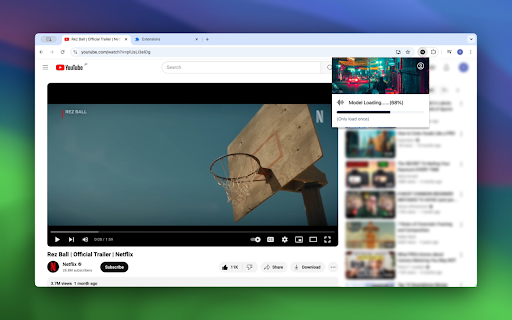
Generieren Sie Untertitel mit KI, fügen Sie Live-Untertitel zu Ihrem Video oder Ihrer Rede hinzu. (Chrome138 und höher)
Hauptfunktionen der Erweiterung:
1) Live-Untertitel mit On-Device-KI-Modell hinzufügen
2) Transkribieren und übersetzen zwischen Englisch, Chinesisch, Japanisch, Französisch und über 10 Sprachen
3) Unterstützung für das Herunterladen und Speichern von Untertiteltext
Dieses Tool verfügt über leistungsstarke Funktionen, die für Online-Videos, Meetings und Online-Kurse, Live-Streaming nützlich sind
Verwendung:
- Fügen Sie die Erweiterung zu Ihrem Chrome-Browser hinzu
- Gehen Sie zur Webseite, der Sie Live-Untertitel hinzufügen möchten
- Öffnen Sie das Pop-up (lädt Modell beim ersten Start) und schalten Sie Live-Untertitel ein
- Wählen Sie Ursprungssprache oder Zielübersetzungssprache, fertig
Unterstützte Sprachen:
Englisch, Chinesisch, Hindi, Spanisch, Französisch, Arabisch, Bengali, Russisch, Portugiesisch, Indonesisch, Italienisch, Deutsch, Griechisch, Japanisch, Koreanisch, Thailändisch, Vietnamesisch
Wenn Sie andere Sprachen benötigen, kontaktieren Sie uns
Wenn die Übersetzungssprache nicht verfügbar ist:
1. Gehen Sie zu chrome://flags/#translation-api
2. Wählen Sie "Aktiviert ohne Sprachpaket-Limit"
3. Klicken Sie auf Neu starten oder starten Sie Chrome neu
Empfohlenes Gerät: Windows 16GB RAM NVIDIA GPU, Mac mit Apple Silicon
Latest reviews
- Duy Hưng Lê
- I tested the basic function on a YT video, basic English. no subtitle appeared
- Danielle Catalogna
- 1. it only works after you log in 2. the live caption is really bad for simple recordings... the timing is off and it changes the words on the fly like it's trying to figure out what had been said. the native Chrome tool is way better. sadly, the caption this extension created did not fit the speech at all. I guess the AI model isn't that good... thanks for trying though
- A.
- It transcribes for free, translation is paid. i like how simple it turns on and off because i often change tabs. my ad blocker didn't even touch it
- Glaku Gliku
- DO NOT WASTE YOUR TIME. It is insane that you make an extension for which you waste 30 minutes of my time to install, downlead updates and when I want to put it to work and translate the movie for me, you realize that it will not translate not a single language if you don't pay for the extensions premium. Basically its a "free" extension only to add to your library, but you get to use it only if you pay for it. And its not that you get like 5 minutes of free test so that you see that this is worth giving the 9.99$ they ask. No.. you desperate? Throw away 10$ into an extension with 8 reviews which you don't even know of its proper functionality after having wasted 30 mins of your time for not telling you in the store's description that this is an only pay to use extension. This whole thing seems to be an actually good idea that could have some functioning but was just added to chrome and was left out without giving it any of the further interest that this required to be a great solution. There does not seem to be someone who cares or can do much about this thing being trully the soluition people are after.
- Robert Cannon
- I tried to install the extension on Edge but it was blocked by U block origin my ad blocker for some reason. I overrode that and it installed and works immediately providing live subtitles for YouTube videos, however when I try to change the font size to varying percentage sizes or the font colour or anything else on the options nothing changed at all despite refreshing YouTube many times. Please can you advise what the problem might be with that as otherwise it seems to work excellently as a closed caption provider.
- dawsdad adawdawd
- not working and its not free
- wxi anti
- Excellent work. It's an excellent tool for high-performance computers.