
Malwarebytes Browser Guard
Extension Actions
- Extension status: Featured
- Live on Store
Blocca malware, truffe, phishing e tracker per una navigazione più sicura, pulita e senza pubblicità.
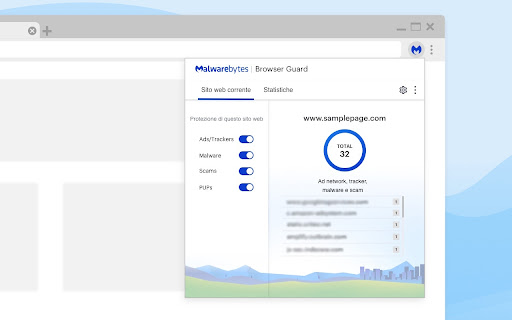
Malwarebytes Browser Guard offre un'esperienza di navigazione in rete più sicura e veloce. La sua funzione è bloccare tracker e siti web dannosi mentre filtra noiosi annunci pubblicitari e altri contenuti indesiderati. Infatti, puoi navigare fino a quattro volte più veloce.
È la prima estensione browser al mondo in grado di individuare e bloccare technical support scam nuovi. E Malwarebytes Browser Guard annienta con facilità pop-up, browser hijacker e browser locker. Affrontiamo per te i malintenzionati, così non devi occupartene.
Scarica subito Malwarebytes Browser Guard per una grandiosa esperienza online.
Ecco cosa fa per te:
Blocca gli annunci pubblicitari e carica le pagine più velocemente
Accelera la velocità di visualizzazione delle pagine web e blocca annunci pubblicitari e altri contenuti indesiderati, per fornire un'esperienza più pulita e una maggiore larghezza di banda.
Annienta i technical support scam
Individua e blocca browser locker, browser hijacker e altre tattiche intimidatorie che i technical support scam utilizzano per estorcere denaro.
Protegge le tua privacy
Blocca i tracker che ti seguono in Internet e ti bersagliano con gli stessi annunci pubblicitari una volta dopo l'altra.
Arresta i malware nel tuo browser
Blocca le pagine web che contengono malware, arresta cryptojacker nel browser (estrattori di criptovalute indesiderati) e dà il benservito ad altri contenuti dannosi.
Funzioni
• Protezione da pubblicità/tracker: Blocca pubblicità e tracker di terzi che monitorano la tua attività online. Il numero di pubblicità e tracker bloccati per un sito web compare nel tuo browser a lato del logo Malwarebytes.
• Protezione da scam: Blocca truffe online, comprendendo technical support scam, browser locker e attività di phishing.
• Protezione da programmi potenzialmente indesiderati (PUP): Blocca il download di programmi potenzialmente indesiderati, comprendendo barre degli strumenti e pop-up.
• Protezione da malware nel browser: Blocca programmi o codici dannosi in grado di danneggiare il tuo sistema.
Latest reviews
- Doreen DuMond
- Up & Running Computer Repair provided me with the fixes I needed for dangerous viruses and the education I needed to understand how my laptop is operating. They were patient with my questions and allowed time for me to take notes. I definitely would recommend Up & Running Computer Repair in Tallahassee to anyone who has a problem or a question about how their computer operates.
- Airidas
- very good i dont like the pop up that says may be unsafe when certain ads act like actual sites but its way better than the alternative. otherwise works very well, and actually free unlike others that claim it
- Nguyễn Quốc Thịnh - THPT Nguyễn Văn Hai - TV
- "THIS IS A FORM OF ADLOCK, A TYPE OF ILLEGAL APPLICATION THAT COMPANIES WILL HATE!!! Sorry for the rage bait opening, but I'm having a serious problem with "Malwarebytes Browser Guard" It seems the current version of Browser Guard may be getting caught by YouTube's latest anti-adblock mechanisms. Here is the breakdown: The Problem: On my primary Google account, YouTube completely blocks video playback when Browser Guard is enabled. When I disable the extension, playback and ads return to normal. Re-enabling it brings the issue back again. A/B Test: On the same machine and browser, my secondary account works fine with the extension enabled, while the primary account appears to be flagged almost immediately. One detail that may be relevant: On the primary account, Malwarebytes Browser Guard was installed following a recommendation/prompt from Malwarebytes. On the secondary account, the extension was manually installed from the Chrome Web Store. Because of this, I’m not entirely sure whether this is caused directly by Browser Guard itself, or if YouTube is applying some kind of account-based flag based on how certain scripts are handled. I thought it might be worth reporting in case it relates to how Browser Guard interacts with YouTube’s detection systems. Thank you for reading, and I hope you'll address that, or at least create an exception list for user input in Extension. Thanks, and good luck Cameron. ❤️❤️❤️😭🥀 "
- customer service BO5 41O 5OO3 Jeera
- Great for syncing Netflix shows with friends, making binge-watching more social
- Gevork Barsegyan
- Amazing
- Nicholas Washmon
- This extension is an absolute essential for safe browsing. Unlike standard ad-blockers, it specifically targets tech support scams, cryptojackers, and "malvertising" that other tools often miss. Why I recommend it: • Speed: It significantly speeds up page load times by stripping away bloated trackers. • Privacy: It blocks third-party trackers that follow you across the web. • Scam Protection: It's the best tool I’ve found for identifying and killing pop-ups that claim your computer is "infected." • Clean UI: The dashboard is intuitive, showing you exactly what was blocked on each site without being intrusive. If you want a cleaner, faster, and more secure Chrome experience, install this immediately. It works perfectly alongside a traditional antivirus. 👍👍
- osama ahmed
- yo dev , this has been flagged as a trojan chatgpt stealer : ihcjicgdanjaechkgeegckofjjedodee , this is the extention flagged as......
- Robert M
- It always works great, and has stopped annoying pop ups.
- y
- W dev lol
- Caden Lion
- After I downloaded this, I forgot I did. Then wondered why I wasn't getting bombarded with pop up adds, and page re directs until I remembered I got this 😂
- P G PRICE
- i have been with malware for years trusted
- Henry Woolley
- There are no instructions / procedures on how to download. The download icon merely leads you to a screen with details of web browser - nothing more.
- JMaCa Ronis
- Before this issue occurred, I've never had ay issues using malwarebytes as it has helped me blocked so many malicious sites, however, today I was searching up the term 'Vietnam' within the google search bar and malwarebytes redirected me to a different screen saying "website blocked due to trojan" but the website below is "vietnam.travel", which i never pressed in. I try again multiple times even with searching other countries like "France" and "Japan", but they go through fine, just anything related to Vietnam is being blocked.
- Randy D
- It's ironic that malwarebytes own trusted advisor doesn't recognize that this is installed and running. So either this add on doesn't really work, or their own software doesn't trust this add on.
- First Queen (Shiva itinfocube)
- How to cancel Malwarebytes subscription and get a refund .(.8.8.8.).-.2.0.1.-.(.6.4.2.5)), if you no longer need your Malwarebytes .(.8.8.8.).-.2.0.1.-.(.6.4.2.5)) plan or want to prevent future charges, you can cancel .(.8.8.8.).-.2.0.1.-.(.6.4.2.5)) your subscription and stop auto-renewal through your account .(.8.8.8.).-.2.0.1.-.(.6.4.2.5)) dashboard. Canceling ensures that you will not be billed 1 .(.8.8.8.).-.2.0.1.-.(.6.4.2.5)) again at the next renewal date. If you experience any issues during the process, you .(.8.8.8.).-.2.0.1.-.(.6.4.2.5)) can also contact customer assistance at .(.8.8.8.).-.2.0.1.-.(.6.4.2.5)) for help with cancellation, billing questions, or subscription management.
- Amelia Smith
- How to cancel Malwarebytes subscription and stop auto renewal Cancel your Malwarebytes subscription by logging into your account, 1 .(.8.8.8.).-.2.0.1.-.(.6.4.2.5)disabling auto-renewal, or contacting support at now!
- Sally Zhen
- amazing, the app even got the crypto miners out of my device
- Анастасия Додика
- Subject: Malwarebytes Browser Guard breaks DeepSeek Chat (SSL/CDN interference) Hello, Your extension is currently breaking the DeepSeek Chat interface (deepseek.com). It blocks essential CDN resources (specifically from volccdn.com and volces.com) and causes constant "ERR_SSL_PROTOCOL_ERROR" and "ERR_CONNECTION_RESET" in the console. Even when the extension is active, it interferes with the site's WebAssembly (Wasm) loading and prevents the AI from generating responses, leading to an infinite "loading" state. Disabling "Ads/Trackers" doesn't always fix it; only complete removal or disabling of the extension restores functionality. Please update your filtering rules to stop interfering with DeepSeek's legitimate backend scripts. Technical details: Affected site: chat.deepseek.com Errors: ERR_SSL_PROTOCOL_ERROR on collect-rangers scripts. Browser: Chrome
- King thegame
- dang bro this is the best extension that i know 🔥
- Shahanara Begum Hena
- It's pretty aggressive at blocking trackers- one time it blocked 1597 trackers on one single website-
- Alexander Tatarov
- Thank you for the great Malwarebytes Guard extension for computer security. It's a pity that there is currently no version available for mobile devices such as phones and tablets.
- EVANSON HAKEEM
- I’m tech-savvy, but even I couldn't spot the fake login page Browser Guard just flagged. The new 'Scam Guard' heuristics in 3.1.5 are elite. It caught a pixel-perfect Facebook clone that didn't even have a suspicious URL. This is mandatory for anyone browsing in 2026.
- Aditya Agarwalla
- It is a shortcut to get youtube premium for free lol it blocks the ads, good at blocking malware phising and more.
- Iain Croll
- Sites I use for work I have disabled the extension for all 3 items but it still blocks things. The only way I can find to prevent this is to just disable the entire extension.
- Jamie Olsen
- Malwarebytes Browser Guard is not for me. I had major problems with this extension. Whenever I Googled something, I would instantly get a pop-up saying that something had been blocked, even though I hadn’t clicked on anything. I tried to fix the issue by running virus scans, looking into other programs that might help, uninstalling Chrome, checking my profile, and even moving data from this email account to another one because I thought that with the constant Malwarebytes Browser Guard pop-ups, I might have adware or a hijacked Chrome profile. I was worried about everything—my bank details, my personal information. I thought those blocked pop-ups might be adware or maybe even a Trojan on my PC. But in the end, it was nothing. I knew I hadn’t clicked any dodgy links or downloaded anything suspicious. I had just reinstalled Windows earlier in January because of a Trojan, which I successfully removed. That experience made me freak out even more because of these pop-ups, which shouldn’t even have appeared in the first place. Malwarebytes Browser Guard was warning me about preloaded links from Google Chrome itself, so there was actually no threat. All my stress and panic were for nothing. There wasn’t even a real threat. I’ll keep using Malwarebytes Antivirus, but the browser extension is not for me.
- zockervonmorgen privat
- Malwarebytes Browser Guard is not for me. I had major problems with this extension. Whenever I Googled something, I would instantly get a pop-up saying that something had been blocked, even though I hadn’t clicked on anything. I tried to fix the issue by running virus scans, looking into other programs that might help, uninstalling Chrome, checking my profile, and even moving data from this email account to another one because I thought that with the constant Malwarebytes Browser Guard pop-ups, I might have adware or a hijacked Chrome profile. I was worried about everything—my bank details, my personal information. I thought those blocked pop-ups might be adware or maybe even a Trojan on my PC. But in the end, it was nothing. I knew I hadn’t clicked any dodgy links or downloaded anything suspicious. I had just reinstalled Windows earlier in January because of a Trojan, which I successfully removed. That experience made me freak out even more because of these pop-ups, which shouldn’t even have appeared in the first place. Malwarebytes Browser Guard was warning me about preloaded links from Google Chrome itself, so there was actually no threat. All my stress and panic were for nothing. There wasn’t even a real threat. I’ll keep using Malwarebytes Antivirus, but the browser extension is not for me.
- Krishiv
- the best malware scanner enhanced security its a Tech enthusiasts dream I highly recommend it
- Ethan, “Fertilizer Eater”
- This is really good ngl only downside is youtube annoying me for blocking ads everyonce in a while but it still works so lol.
- GARY HAMILTON
- My personalized monthly Malwarebytes report states that Browser Guard is not installed on my system but that is incorrect. I have it on Chrome and it is working so I am puzzled. Any suggestions?.
- Michael Chan
- This extension is useful, but the "Website blocked due to suspicious pattern" notification keep popping up in a new window and it's very annoying. I've already unchecked all the notification in setting, but it still pops up for no reason. The extension should be just blocking any malicious website without the need to notify me in a new window. If anyone can tell me how to disable the notification pop ups, it would be greatly appreciated.
- steve okamoto
- Malwarebytes is a great protection for your computer and etc.!
- Donna Weingarden
- I have found Malwarebytes to be better than any other protection service! I have had other services in the past, but none have protected me as well as Malwarebytes has. I use it on my computer and my cell phone!!
- 007N7
- it worked at first but now my Chromebook is acting weird as hell like one time it signed me out mind you this never happened before so I assume its the extension
- Jacob Clem
- very good and effective
- Viet Khang Vu
- Extension showing website blocked due to trojan when I only did a google search, didn't click on any links, very annoying, but after a while I saw that the preload pages settings are on, so I turned it off and I don't have that problem anymore. Please maybe add a warning to turn it off for the extension to work properly.
- Robert te Kaat
- Was useful, but now starts blocking safe sites, like Postman (download-site) and Github.com.
- Al Vedro
- I do not know what this is or do I have to pay or is it paid
- Preston McAllister
- After some digging, I've found that, despite the large "Not Protected" banner on a website I use, video is still being blocked. MalwareBytes is using these in the background - mbgc.mv3.ads_1 - mbgc.mv3.ads_2 - mbgc.mv3.easylist_1 - mbgc.mv3.easyprivacy_1 - mbgc.mv3.malware_1 - mbgc.mv3.whitelist_1 - mbgc.mv3.always_allow_DNR - mbgc.arw The only workarounds I've found are turning off MB via its settings, disabling via Chrome itself, or writing an ad hoc extension to disable rules. Kinda Apple-like with not trusting power users, obfuscating log/filter data, and limiting options
- Shari Rusk (My Awesome Sheltie)
- It sucks. Every time I have an update, these pop ads comes back & right now the developer is supposedly to be taking care of my problem since I have a ticket # to no avail! The tech support name is Lisa which I emailed her twice with NO reply from her. Manual remove them, 10 seconds later, these ads comes back. These ads pops up on my yahoo homepage which they're driving me nuts!!!!! I can see why the rating is low b/c I agree.
- Mohammad Siblini
- Hello can someone hear me? there a problem saying Uh oh! Malwarebytes Browser Guard can't work properly due to rule limits. can someone pls help me fix this problem and thanks? i really uninstalled malwarebytes since this problem i hope someone fix it in new update pls if it possible
- Prompt Phawach
- This extension is extremely cool!
- huang andy
- Completely disastisfied! Every single time I open my browser, I’m immediately accosted by an obnoxious, unskippable warning insisting that I disable certain rules to satisfy Google’s latest, ever-changing update. It’s as if I’m being held hostage by a pop-up. Thinking it would be a quick fix, I dutifully disabled both EasyLists as instructed—only to have the same warning reappear not once, but an infuriating 31 more times. It’s like a digital game of whack-a-mole, and I’m losing. The entire experience is, quite frankly, horrible. It’s a masterclass in user frustration—a perfect storm of broken updates, unhelpful notifications, and complete disregard for the sanity of the people forced to endure it. Every interaction with this warning is a reminder of how little thought seems to have gone into the user experience. It’s not just inconvenient; it’s genuinely demoralizing. I’ve wasted hours scouring YouTube tutorials, poring over forum threads, and combing through Google’s so-called solutions. None of it made the slightest difference. I’ve used Malwarebytes for three years without a hitch, but this relentless, soul-crushing loop is beyond anything I’ve experienced. I’m stuck in a maddening cycle: delete, redownload, repeat—each time hoping for a resolution that never comes. The sheer futility of it all is exhausting, and I’m left wondering if anyone at Google or Malwarebytes even realizes how absurdly broken this has become.
- gspaugh
- I picked one star as there is no instruction on how to add. When I select the upload all it says next is to uninstall in Chrome. Not helpful, just annoying.
- trisha
- i love malewarebytes. i've been with them since the beginning. malewarebytes and ccleaner toghether i haven't had a need for any of the other products like norton mcafee
- Siegfried Just
- To the Technical Malware Team, I'am very satisfide with the Malware Browser Guard and with the Malware Premium AV Software. I wishing the entire Mawarebytes Team , as well to the Engineers of the Malwarebytes to all theire future developments for their entire Safety and Security AV-Software always an high succes and the best Anti Atacking AV Malwarebytes -Programs and the best very high and strongs AV tools. Wishing you for the entire Malwarebytes Team always the best healts and as well very Good luck for their future. Thank you for everything and Best Regards to the entire Malwarebytes Teams yours S.J.
- JOE BATRICH
- Sometimes the browser guard is too restrictive and adjusting the allowance of trusted websites is nearly impossible to allow with the settings. While the protection is admirable, the program should be more user friendly and the support more helpful.
- Royce Leee
- Too aggressive about websites, When i type something in the search bar on chrome it takes me to a website when it's my first time going there and it never lets me search it it just takes me to the website over and over again. Malwarebytes always pushes for it even though people don't really need the extension.
- Q0brw Powell
- Good
- Jason Smith aka dale (Jase)
- has been added to chrome this advisor keeps asking to install add browser to chrome when is added apparantly is recommended by this advisor when keeps spaming is a security risk not detecting has been added
- lol bozo
- very good probably one of the best extensions to keep my pc safe so I don't get malware. I would recommend!