
Simple = Select + Search
Extension Actions
Fare clic destro sul testo per cercare su più motori.
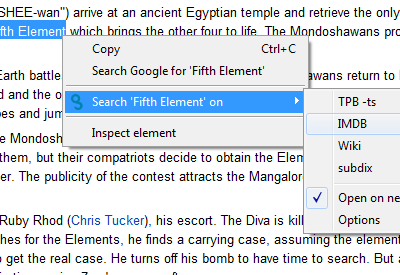
It's simple: select some text, right click, and search on your preferred search engines.
Configuring your search engines is very easy: There are multiple pre-configured search engines to pick from (like Amazon, BBC, CNN, etc.) plus you can add any other you might like. To add new search engines, follow instructions in the Help section of the Options page.
Once a new search engine is configure, it will show up the next time you select some text in your browser, right click and go to the Simple = Select + Search menu option.
I'ts my first public extension. I hope you like it.
Please, be adviced: the usage of this extension is being tracked by Google Analytics.
It also tracks which search engines are the most used by users, so I can then be able to add them to the featured Search Engines list.
The extension does not track the identity of its user, nor what terms they're looking for.
Only the search URL syntax is being recorded.
This information won't be shared with third parties.
Latest reviews
- Toren Hohke
- Instead of a new tab, it opens everything in an incognito window. As far ask I can determine, that's not even supposed to be an option.
- Nelson Martinho
- This extension is amazing! So simple and works like a charm. Thank you!
- JP
- Thank you for the great extension, working perfectly on my end
- Matthew Duran
- for some reason after the last update the first time I use it nothing happens I have to right click select etc. again for anything to happen, it also seems every time it updates it loses my settings but that not a big issue as it is SUPER easy to import the old settings I'm SO glad that is something the Dev thought about before they updated. I just don't know why it is taking 2 queries to work as I love this extension this is the first thing that bothers me
- Nicolas Arcade
- Used it for a long time and was happy with it. Now it updates all the time and the settings are lost. What happened?
- Stephan Mayer
- It used to be a good extension, but now, its just annoying. Loads an update & resets its settings nearly every day.
- Vivi Tamasi
- I have auhd, and I hoarding information.I love this addon because it let me do so much (category the search, open only those,etc).I tried so many (trustme ,a lot ) and I always came back to this one. The creator is always on updates and trying the best so definitely recommend to stay with this one! (If its down or not work,he always fast to fix the issues) Ps: Always save an extra copy of your settings,just incase (notepad etc)
- Cosmin Stanca
- I use this extension every day and I hope it will be updated in time to continue working on Chrome. Thank you
- David Hite
- Version 2.1 fixed the problem below. Version 2.0.5 still has the same problem I described below: following the instructions in the migration issues tab does not work. It is impossible to restore my previous configuration. Version 2.0.4 completely broke my ability to use my configured searches. Following the instructions in the migration issues tab did not help. Copying my old configuration, pasting it into the import box, saving it, it still uses the default configuration.
- R Green
- Used this for years. The recent updates (apparently necessary due to Chrome) pretty much borked my old configuration, and then populated the search items with defaults. Good extension but I found a similar extension that is simpler and fulfills the same goal.
- Costin
- lost my old configuration, and you fixed it. thank you.
- Omar John Antocan (Omz)
- Config doesnt execute as of today. sad, cant work faster without this.
- CaLviN Ng
- can't save my config
- Devin J
- Mostly stopped working, and its true that "Following the instructions in the migration issues tab did not help". I also tried deleting it from chrome and reinstalling it new. I set my settings and search engines. It worked in that it took me to the page but did not do the search. After i changed a search string to match the site, it stopped working completely again. Well there went a good ext. Thanks google.
- Carolyn Geiges
- Stopped working after migration to the manifest version 3.
- Nepprai Juynial
- Ever since the new version update, it becomes extremely buggy. Many times, when I search phrase, it just outright refuse to open the search page.
- Nam Nguyen
- I've been using this for 2 yrs. Last 2 weeks or so, You.com, You.com shopping keeps injecting / replacing Google as my default search engine. I smell a virus. But when I keep SS option page opens, then Google search returns. Very strange, random behavior. I'm so sick of trying so many different options. Pls bring back the previous version.
- Al B
- Used to be amazing. now I need to search twice before it opens, and for some reason sometimes it reverts to the default search options, instead of my updated list :(
- Dark Puzzle
- Stop opening up when I open chrome
- Joon Keat
- Excellent extension. Essential!
- Joon Keat
- Excellent extension. Essential!
- benyamin sueb
- 2022 worked well
- benyamin sueb
- 2022 worked well
- Valiko
- Отличное расширение, автору респект.
- Sergey P.
- Спасибо автору этого расширения. Всё отлично работает, пользуюсь уже давно, никаких нареканий.
- Rakshan Kumar
- Excellent extension!
- Rakshan Kumar
- Excellent extension!
- 김동윤
- 최고의 앱 중 하나. 다양한 검색 엔진을 추가해 넘나들며 빠르게 검색할 수 있어 생산성이 매우 증대되고 작동이 빠르며 잘 최적화되어 있어 쓰는 데 불편함이 없다.
- 이재진
- I lost all my config after recently auto update. All other my browser is same. This is worst extension ever I had.
- 이재진
- I lost all my config after recently auto update. All other my browser is same. This is worst extension ever I had.
- Francis Lalonde
- I've been using it for so long, I feel lost without it. Still works great!
- Francis Lalonde
- I've been using it for so long, I feel lost without it. Still works great!
- Asado san
- Great Exentsion, was about to try & learn how to program in greasefork but encountered this which is good.
- Asado san
- Great Exentsion, was about to try & learn how to program in greasefork but encountered this which is good.
- Leandro
- Excelente! Você personaliza o site onde quer buscar. Simples e eficiente.
- Eric
- Used to be great, until it stopped working. Select something, click this extension, and all it does is open a blank Google tab. Doesn't actually search anything. Will get 5 stars once it actually works again.
- Eric
- Used to be great, until it stopped working. Select something, click this extension, and all it does is open a blank Google tab. Doesn't actually search anything. Will get 5 stars once it actually works again.
- Anthony Michael Palma
- They say the most simple things are the most useful. :) This is beyond awesome! It's Be-awesome!
- Anthony Michael Palma
- They say the most simple things are the most useful. :) This is beyond awesome! It's Be-awesome!
- Terje Skuggen
- Does it sync between browsers?
- Terje Skuggen
- Does it sync between browsers?
- Xiangyu Tang
- No longer works as of Oct. 2020. Search in google does not work anymore.
- Xiangyu Tang
- No longer works as of Oct. 2020. Search in google does not work anymore.
- Peter Beckley
- Great add-on! Once configured and customized, it's one of the most powerful upgrades you can do for Chrome. The drag-and-drop is a bit wonky, and sometimes it mysteriously eats rows or duplicates them. A bit frustrating so I hope it's looked at and fixed in an upcoming update.
- Peter Beckley
- Great add-on! Once configured and customized, it's one of the most powerful upgrades you can do for Chrome. The drag-and-drop is a bit wonky, and sometimes it mysteriously eats rows or duplicates them. A bit frustrating so I hope it's looked at and fixed in an upcoming update.
- Mart Männik
- Tried to find an alternative to the fantastic Multi Search 4.5.4 (which google has now removed for some idiotic reason...) failed again. This one here has a silly UX flaw - hiding the "search all" option inside a group to the end of the list so you need to hover and hover and hover... waste of time. It should work by clicking the group name.
- Mart Männik
- Tried to find an alternative to the fantastic Multi Search 4.5.4 (which google has now removed for some idiotic reason...) failed again. This one here has a silly UX flaw - hiding the "search all" option inside a group to the end of the list so you need to hover and hover and hover... waste of time. It should work by clicking the group name.
- Stefan B.
- just what I looked for! I created a simple hardcoded plugin myself to a specific webpage and thought about just what "Simple = Select + Search" is. So saved me a lot of work ;) even if it would have been fun. The options user interface is great. Thanks for that nice plugin.
- Stefan B.
- just what I looked for! I created a simple hardcoded plugin myself to a specific webpage and thought about just what "Simple = Select + Search" is. So saved me a lot of work ;) even if it would have been fun. The options user interface is great. Thanks for that nice plugin.
- Göran Ingvarsson
- I have used this extension...extensively for some 4-5 years and it is one of two Chrome extensions I cannot imagine being without (AdBlock being the other). It gives me one-click access to a great number of search engines, most of which I have added myself. This possibility to 1. easily add your preferred engines and 2. save/restore the configuration (invaluable when reinstalling Chrome) are two of its best features. Kudos to you Diego!