
Limit - Set Limits for Distracting Sites
Extension Actions
- Extension status: Featured
Limit your time spent on distracting sites. Limit is an extension that allows you to set time limits for distracting websites.
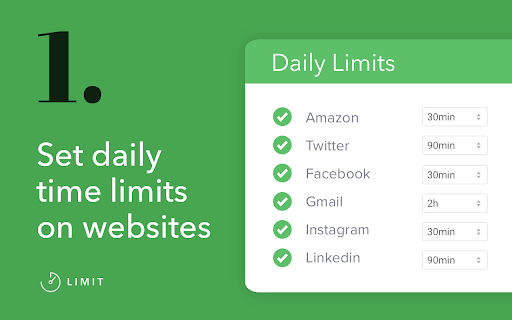
When you control your time on distracting websites, you’ll find you have far more time to focus on the things that matter most.
To use Limit, simply enter the websites you find distracting and choose a daily time limit. For example, you could limit yourself to ten minutes a day on Facebook, or half an hour a day on Duolingo.
When you approach your limit, Limit gently notifies you your time is almost up, so you can wrap up. And when you've reached your limit, you'll be directed to Freedom's calming Green Screen when you try to visit a limited website.
- You can add or delete any website from the list of sites
- Your time limit for each site is configurable, from 5 to 500 minutes
- Limit comes pre-seeded with 10 distracting sites
Limit is a product of Freedom Labs, where we develop new tools to help you balance your relationship with technology. Like our other extensions, Limit is highly privacy-conscious. None of your data is sent anywhere (the cloud, our servers, etc.) It remains secure on your own device. Learn more about Freedom here: https://freedom.to
We hope you find Limit to be a simple and useful tool for developing healthier online habits and routines.
Please note: Limit 1.0.3 is third release with Manifest 3 compatibility. You may experience slight differences in behavior due to the significant changes required to comply with Manifest V3. Please send us your feedback at [email protected] and we'll continue to improve Limit. Thank you!
Release notes - 1.0.3:
🐞 Fixes a bug with our countdown timer notifications
Latest reviews
- R
- 4.5 actually dunno how people put the .5 but so good i recomend it even blocks apps such as youtube if u have puut the time limit as 0 apps ot just the website
- Chris Johnson
- One of the best site blockers available. Easy to setup and use. At least it gives you a warning and block on the site (like facebook, instagram, tictok, etc) that you KNOW you should be avoiding. My weakness is youtube videos so this blocks the site giving me a strong warning of my commitment. My prayer intention is that it helps you also.
- Deepeka
- Incredibly useful. Love this.
- Eliane
- I love how you can set timers, and when the tab closes, you get a minimalist screen with no adds. Very simple and useful!
- Sankamithra S
- I love it cuz it completely blocks me from the site for the day, stopping me from scrolling all day and making my day productive... very useful for students, I am a student myself. It has helped me a lot!! must use for students trying to set limits from distractions
- ines gallegos
- Great tool. Could you add the option to put a password on the extension, this way it cannot be simply deactivated. It would help a lot as a tool for reducing screentime / compulsive use of social media.
- Yazhini's Funworld
- Thank you, Limit! This has been such a useful tool! I highly recommend it for anyone who wants to stop addiction to websites!
- I'm Mohit Saini
- Very much helpful
- Alya Le Nestour
- really good.
- Fernando Branco
- The app is good but it should display a message when blocking the website and no random letters which seems you got hacked.
- Florent Tavernier
- very useful.
- user tormented
- good limiting.
- hb
- Doesn't work with Youtube.
- Billy H
- finally, an extension that prevents me from extending time off of a blocked website
- Bảo Trân Phạm Nguyễn
- slay cool wonderful actually stops me from doom scrolling and wasting time
- Oso Amplio
- You need to install Freedom on every browser on your computer for it to work (for me, that’s Chrome and Edge). I advise deleting all the browsers on your phone unless you need them for business reasons. This way, you won’t be tempted to reach for your phone when websites are blocked on your computer. Why not install this extension on your phone? In my opinion, most people can live without a browser on their phone. As a wise man said in the book Digital Minimalism, for many questions, we don’t need to know the answers immediately. My tactic is to set the time limits to 0 or 5 minutes in most cases. And remember to enable the extension in private mode so you can’t bypass it. Interestingly, the history of Freedom is also mentioned in Digital Minimalism. The author was trying to work on his thesis but kept getting distracted by surfing the internet. He looked for an accessible solution, but there wasn’t one. So he ended up inventing Freedom. P.S. You can use the extension UBlacklist to hide the websites you set to 0 minutes from search results.
- Virender K Gupta
- Have been using freedom now for last 1 year. Also there paid software. It works ...and saves a lot of time for sure
- gemma tortella-procter
- really helps me limit my procrastination and super easy to use
- Ahnaf Abdullah
- I’ve been looking for a simple extension like this for a long time! The UI is very easy to use, just like you promised, and the timer sits beautifully right on top of the screen. It’s super straightforward and convenient. I’m really happy with it—exactly what I needed!
- Mariam Magdy
- great extension!
- Vincenzo Colucci
- Useful
- sehan theminda
- good extensions
- Furkan Kadıoğlu
- Simple, free, best.
- Sidney Groweven
- good, does what it supposed to do
- Malena Olmedo
- Helps me a lot to avoid spending hours on specific website. The only "but", in my opinion, is that the time limits can be changed quickly and easily. Perhaps if changing them was more difficult/a process with more steps, the user would have more time to reflect on whether they actually need to extend the time limits.
- Z Anon
- saves my time and life
- H Bol
- The input box for adding new sites automatically removes "www." subdomain. This is causing issues where I want to set a limit for "www.youtube.com" but not for "music.youtube.com". It helps that I can set a separate entry for "music.youtube.com" which takes precedence, but then I cannot set the limit higher than 500 minutes.
- Nivaan
- Helped me focus during my exams preparation :)
- bhargav kalva
- Works as described.
- H W
- Simple, clean, and effective. Does exactly what it’s supposed to do and makes staying focused so much easier. Definitely worth installing!
- Novalux Nox (Noxlux)
- i dont liker it it desrve 0 but dat no pozbu so it get 1
- Hursh Karkhanis
- Simple, easy to use, effective. Great extention
- Mostafa Hosseini
- Great plugin. Does what it promises. Good for reducing time on social media and other time wasting sites.
- Rajiv R singh
- best
- Francisco Suárez Salas
- It is very helpful! It would be great to have a "snooze" option for a few minutes when you need to access a restricted site for a specific purpose. Additionally, it should be more difficult to remove the limit, perhaps by requiring a password or similar security measure.
- Person 1
- Thank you so much for this amazing extension, it helped me quit my social media addiction and improve my grades! This extension I would completele recommend! 10 out of 10!
- ASGAR BAIG
- Very much required extension for me . Helped me in being focused
- Soodol Huh
- There are two or more YouTube video tabs, A and B. When tab A reaches the end of its video, tab B also goes into a paused state. However, if Chrome is closed and restarted while in this state, both tabs A and B appear as paused tabs. As a result, it becomes impossible to know which YouTube videos were originally playing in tabs A and B.
- Shimu Banerjee
- Thank you so much, Now, I can focus on my work and don't feel guilty while going to sleep, because, I focused on my work and did my best there. Again , thanks a ton 💖💖
- Talha
- Pretty good if you're heavily addicted to stuff. Would totally recommend. That's all.
- Ashik Ramdaw
- Works well. No glitches. Does exactly what it should do.
- Naresh Sahoo
- it is best
- Zohaib Hasan
- loving it, simple and effective extension
- Ian Moran
- A great little extension to stop you from getting carried away and distracted on addictive websites. I have a habit of messing about on YouTube when I am supposed to be working. As you can see, I clearly have absolutely no sense of self-control, so this extension stops me from wasting time and gets me back on track with my work projects. :) Well done to the developers.
- J J
- It does what it says. Helps stop habitual use of distracting sites.
- Wxtr2025
- Works, but doesn't work. Overriding it is as simple as clicking "Disable Limit". You should be able to set a strong password or a cooldown time where there is no way of deactivating it. If you create a product, you must understand why people would adopt it, what's the reason behind it, what they are looking for. The reason is not being able to control ourselves over distracting content. And if we are not able to control ourselves, putting it so easy to bypass it, makes the whole thing useless. We need a wall we can set when we are thinking straight, make a decision and set that defense so that when we are weak we cannot fall into that pit. But if when we get the cravings it's super easy to continue consuming silly content, then we will. The whole point is to set barriers for that time when your will is not that strong and not being able to go through.
- RT Avrahami
- Excellent. So helpful. Works perfectly, no hidden sending user data to who knows where. And I AM FREE when I want to be!
- Shubham Khajuria
- Simple and great
- SIDDHARTH
- ahhh finally there is something that is stopping me from distractionssss
- Akshay Chavan
- nice ap