
Easy Encrypt
Extension Actions
Simple text encryption and decryption tool supporting various algorithms
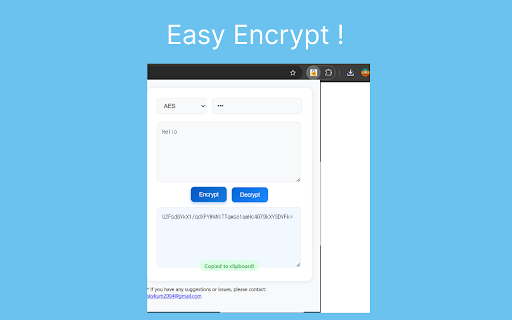
🔐 Easy Encrypt - Simple Text Encryption & Decryption Tool
Easy Encrypt is a fast and secure text encryption extension for Chrome.
Encrypt and decrypt your sensitive text with AES, DES, Base64, or SHA-256 in one click, right in your browser.
🌟 Key Features and Benefits:
🔒 Multiple Encryption Algorithms
- 🛡️ AES (Advanced Encryption Standard): Industry-standard strong encryption.
- 🔑 DES (Data Encryption Standard): Legacy encryption for compatibility.
- 📦 Base64: Simple encoding for safe text transfer.
- #️⃣ SHA-256: One-way cryptographic hash for data verification.
🖱️ Right-Click Integration
- 📄 Select any text on a webpage and right-click.
- ⚡ Choose "Send to Easy Encrypt" to automatically load it into the extension.
- 🚀 No copy-pasting required—streamlined workflow for quick encryption.
⚡ Auto Copy & Clear
- 📋 Auto Copy: Automatically copy encrypted/decrypted results to your clipboard.
- 🧹 Auto-Clear (5 min): Privacy-focused feature that clears sensitive data after 5 minutes of inactivity.
- 🔄 Reset timer on any user activity to keep your session alive while working.
🎛️ User-friendly Interface
- 🔛 Simple toggle controls for Auto Copy and Auto-Clear features.
- 💾 All settings (algorithm, secret key, preferences) are automatically saved.
- 🌐 Internationalization: Full support for English and Korean (한국어).
👤 Personalization
- 🔑 Save your preferred secret key for quick access.
- 🎯 Remember your favorite encryption algorithm.
- 💾 Settings persist across sessions via Chrome local storage.
🛠️ Technical Features:
- 🛡️ Manifest V3 Compliant: Built with the latest Chrome Extension standards.
- ⚡ Lightweight and Fast: No external dependencies except for CryptoJS library.
- 🚫 No Remote Code: All encryption happens locally in your browser for maximum privacy.
- 🔐 Context Menu API: Seamless integration with browser right-click menu.
- ⏰ Chrome Alarms API: Smart auto-clear timer management.
❓ FAQ:
Q: Where is my data sent?
A: Nowhere. All encryption/decryption happens locally in your browser. Your data never leaves your device.
Q: What happens to my secret key?
A: Your secret key is stored locally in Chrome storage only. It's never transmitted anywhere.
Q: Can I use this for file encryption?
A: Currently, Easy Encrypt only supports text encryption. File encryption may be added in future updates.
Q: What's the difference between encryption and hashing?
A: Encryption (AES/DES/Base64) is reversible—you can decrypt it with the right key. Hashing (SHA-256) is one-way and cannot be reversed.
Q: How secure is AES encryption?
A: AES is the industry standard used by governments and banks. Your data's security depends on using a strong, unique secret key.
🚀 Planned Future Updates:
- 📁 Batch encryption for multiple texts.
- 🎨 Custom themes and dark mode.
- 🔐 Additional encryption algorithms (RSA, Blowfish).
- 📤 Export/Import encrypted files.
📧 Contact:
For feedback, suggestions, or issues, please contact: [email protected]
Latest reviews
- Alexander Queen
- A great little tool for text encryption. Not sure why there aren't any reviews. I work on a public PC and journal a lot, so having that extra layer of privacy in case my google account is left open is pretty good. Can wholeheartedly recommend.