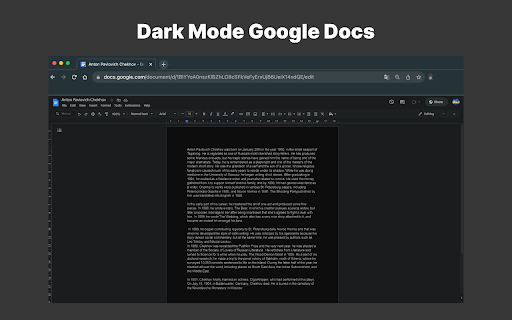
Dark Mode Google Docs
Extension Actions
- Extension status: Featured
- Live on Store
Boost efficiency with our Dark Mode Google Docs Extension. Experience seamless Google Docs dark mode for enhanced writing.
🌟 Why Choose Dark Mode Google Docs Over Competitors?
With numerous Chrome extensions offering dark mode functionality, you might wonder what makes Dark Mode G Docs your top choice. Let's explore why Dark Mode Google Docs stands out:
1. User-Friendly Interface: Dark Mode Google Docs provides an intuitive interface for easy navigation. Finding settings and customization options is a breeze.
2. Speed and Efficiency: Our extension is optimized for performance, ensuring it won't slow down your browser or Google Docs, delivering a dark theme without compromising speed.
3. Regular Updates: g docs black mode continuously updates to keep pace with Google Docs' changes, ensuring your dark mode experience remains current and functional.
4. Responsive Support: If you encounter issues or have questions, our support team is ready to assist promptly, committed to ensuring a smooth experience.
5. Wide User Base: google doc dire mode has a thriving user community with positive reviews attesting to its quality and reliability. Join the ranks of satisfied users who've transformed their Google Docs experience.
🎨 Customization to Suit Your Style
Personalizing your writing environment is a key advantage. Customize to your heart's content:
Darkness Level: Adjust the darkness level to match your preference, from a gentle dim to an immersive darkness.
Font Customization: Choose the font style, size, and color that suits your writing style.
Background Options: Tailor the background to a color or texture that complements your aesthetic.
Accent Colors: Select accent colors to highlight specific document elements.
🌐 Compatibility Across Browsers
Whether you use Chrome, Firefox, or another browser, Black Mode G Docs is designed for cross-browser compatibility. Enjoy a comfortable and productive dark theme regardless of your web browser choice.
🚀 Boost Your Productivity
Dark Mode G Docs isn't just about aesthetics; it's about boosting productivity and enhancing your writing experience:
Focus and Concentration: The Dire theme minimizes distractions, allowing you to concentrate on your work without interruptions.
Reduced Eye Strain: Your eyes will thank you for the reduced brightness, making long writing sessions more comfortable and less fatiguing.
Energy Efficiency: By using Dark Mode G Docs, you save your eyes and help conserve energy, reducing your carbon footprint.
🌚 In Conclusion
Dark Mode is the ultimate Chrome extension for anyone seeking a comfortable, customizable, and efficient writing experience. Activate it with a single click, customize it to your preferences, and enjoy a distraction-free environment that's easy on your eyes. Join the satisfied community of users who've made Dark Mode G Doc their go-to choice for a superior documents experience.
🌙 Google docs dark mode - Enhance Your Writing Experience!
Do you find the blinding glare of your screen while working on files tiresome? Are you yearning for a more comfortable and visually pleasing writing environment? Look no further because Dark Mode is here to transform your writing experience.
Our tool is the ultimate Chrome extension for those who prefer a darker, more eye-friendly appearance when creating, editing, or reading documents. With this extension, you can seamlessly switch your interface to a sleek and soothing dark theme, making your writing sessions more enjoyable than ever before. Say goodbye to the harsh brightness and hello to productivity in style.
🌟 Key Features of Dark Mode Google Docs
1. Effortless Activation: tool is incredibly easy to use. With just a single click, you can activate the dark theme, creating a more comfortable and focused writing environment.
2. Customization Options: We understand that one size doesn't fit all. That's why we offer various customization options, allowing you to tweak the extension to match your personal preferences. Adjust the darkness level, font, and background to your liking.
3. Saves Your Eyes: Long writing sessions can take a toll on your eyes. Dark Mode G Documents reduces eye strain by providing a gentle, dark background that is easy on your vision, making your writing experience more comfortable.
4. Improved Focus: The dark theme helps eliminate distractions and keeps your attention where it belongs – on your writing. No more unnecessary glare or bright screens to pull your focus away.
5. Energy Efficiency: Using Dark Mode documents not only benefits your eyes but also conserves energy, prolonging the life of your device and saving on electricity costs.
🖥️ Compatibility and Accessibility: Dark Mode G Docs is compatible with all major web browsers and is readily available on PCs and desktops. Now, you can enjoy Google Docs dark mode on your preferred platform.
🌚 How to Activate Black Mode Google, Activating Dim Mode is a breeze. Simply download the extension from the Chrome Web Store and click on the Dark Mode Google Docs icon in your browser. Your Documents page will instantly switch to the soothing dark theme, enhancing your writing experience.
📜 Why You Need this Extension?
Dark Mode G Docs is the definitive solution to bring dark mode to your Google Doc, ensuring that your eyes remain comfortable during your writing sessions.
Enhanced Productivity: With the distraction-free environment that the black theme provides, you'll find yourself more focused, efficient, and productive in your writing tasks.
Eye Protection: Prolonged exposure to a bright screen can be harmful to your eyes. Dark Mode Documents safeguards your eyes by reducing the intensity of light emitted from your device.
Customization Options: Tailor Black Mode Google Doc to your liking. Adjust the dark mode settings, fonts, and backgrounds to suit your individual preferences.
Cross-Browser Compatibility: Whether you prefer Chrome, Firefox, or another browser, Dim Mode Google Docs is compatible across the board, so you can enjoy mode experience no matter your choice of browser.
📚 FAQs:
1. How do I put Google Docs in moonless mode with this extension? To activate Dark Mode Google Docs, simply download the extension from the Chrome Web Store, and then click on the Google documents dark mode icon in your browser.
2. Is Dark Mode G Docs available for desktop? Absolutely! Dark Mode Google Docs is available for both PCs and desktops, ensuring that you can enjoy a comfortable writing environment on your preferred platform.
3. Can I customize the appearance of Dark Mode Google Docs? Yes, you can! Our product offers various customization options, allowing you to tailor the extension to your personal preferences.
4. Does G Docs have a native dark mode? Unfortunately, Google Docs does not offer a native dark mode.
This extension shows ads for our other products. They won’t interrupt your experience or restrict anything—you can keep using all features in full.
Latest reviews
- Walker Morgan
- Paywall not worth it
- Devin Grubb
- Who's going to pay to make Docs black when there are so many free alternatives?
- jae the clay
- Was originally free, worked great. Now it has undisclosed paywall after three days. Not three active days, not 72 hours. Three days. Whether you opened docs or not.
- Chris Logan
- LOVE this extension - I've been using it for months. And then suddenly it stops working, I open to investigate and there's a paywall - no warning, no explanation. Very angry.
- Ryan Ab
- Forces you to pay, no free option, no notice beforehands that the extension is paid
- Jorge Estevez
- paywall dont bother
- Khoi Pham
- undisclosed paywall
- Bea
- What kind of idiots thought that I would PAY A MONTHLY SUBSCIRPTION to use a dark-mode add-on? Use ANY OTHER add-on. Don't let these people scam you.
- Chill
- I don't use docs very often in my personal life as i don't have much more time to write, but I do organize a lot of things for personal projects, like charts and checklists for games. The one complaint I do have about this app is that it sets pictures to high contrast mode, but it's easy to work around if it doesn't bother you.
- momentum
- was very good till i got flash-banged mid-writing session then given a prompt to pay to continue using. if you're going to suddenly decide to lock your app behind a paywall you could at the very least disclose that information to its users, yes? as nice as this was to have, i'd rather swap to a different extension now instead.
- Justin Garza
- Paywall
- Euan Ymana
- these bums added a paywall LOOL
- Omar ALRemeithi
- Great
- Charlie George
- Paywall
- Zach Wanless
- paywall
- Chaitanya Shinde
- Clean, customizable, and works exactly as expected This dark mode extension works really well and does exactly what it promises. The interface is simple and intuitive, with easy controls for brightness, contrast, and grayscale, making it very comfortable for long usage sessions. The ability to fine-tune settings is a big advantage. You can adjust the display exactly how you like it instead of being stuck with a fixed dark mode. The toggle shortcut (Shift + Alt + D) is also very convenient for quick switching. It works smoothly across websites, including Google Docs, without any noticeable lag or issues. The per-site control is especially useful if you don’t want dark mode everywhere. Overall, it’s a reliable and flexible solution for anyone looking to reduce eye strain and customize their browsing experience. Simple, effective, and does the job perfectly.
- T. Rex
- Works for about a day before suddenly getting locked behind an undisclosed paywall.
- A W
- HA! I ain't paying for this.
- giana
- This WAS one of my all time favorite and most useful google extensions. I'm a teacher, so I'm consistently using google docs in and out of the classroom. Now today, I go to use it and I'm blinded by a white document. I thought I had to re-download the extension or there was some kind of mistake but, no, they want me to pay for a subscription now. I've had this extension for a while now and it's wild to me that you expect people to pay after all this time. Just to make a document black. I understand it requires a lot to keep a functioning extension running, but this is pretty ridiculous.
- Willow “Evergreen” Demigoddess
- I have been using this plugin for a long time now, and then suddenly while writing on a document I get flash banged by my screen turning white. When I open the plugin tab to try and turn back on the darkmode, I get hit by a paywall. Screw this plugin I'm not paying for something that was free to me since I started using it.
- Edward Renouf
- this may be the best thing of all time.
- SunMoonFX
- Works fine for a little while... then forces you onto a subscription page and makes you pay money. Not worth it. Don't download in the first place, find a different extension.
- Peter Sun
- Charging money for a dark mode? Really?
- b
- saves my eyes
- Ryan H
- does what it says on the tin.
- Ansh Wadhwa
- Doesnt work. Useless
- Apollyon (mecha)
- dude this sucks why are you lying to us this isnt free
- John Meise Jr
- Went from free to paid (subscription too)....not cool.
- Jasmine
- A subscription fee after three days? Lol get real.
- Saqib Khan
- Best....
- Carmilla Choate
- What this description utterly fails to mention is that after a relatively short period, it will simply stop working and require subscription to keep. This absurd given there are extensions that work just as well and won't require a monthly fee just to keep Google Docs in dark mode.
- Mark T
- A once Incredible **Free** extension that has now been removed from all of my profiles. Really? A monthly fee? Y'all are hilarious when there's dozens of other apps that do the same thing just with a slightly clunkier UI. Next time, do the Wikipedia strat and ask for donations. I would've been happy to donate if you folks had just been honest and transparent.
- Tahmid Khan
- This extension makes my gpu usage go above 20-30% while in the google doc page in chrome!
- WaarBeast
- make it free again you money greedy people!
- Syliva Mocca (Rosalia)
- make it free again :/ this is bull.
- Lin
- Sub based only. You are a fool for paying.
- Felix Resch
- Used to be free, now I have to pay. What a shame.
- Daija Ginyard
- This used to be free. I've had it downloaded for months. Got on Docs today and tried to use it. Now I have to pay? Absolutely not. Shame on you for your greed.
- Karina Anklesaria
- Used to be free, but now subscription based.
- Retro TBG
- Subscription based.
- Yaroslav S
- AI vibecoded slop with no security that steals your data. Their parent domain redirects to casino.
- Tyla Cusack
- Just to let people know, this used to be free, I know because it was my go-to for a long time. The fact that you now have to pay just to use it, is the most insanely laughable thing in the world to me. It would be one thing if paying was optional, as I actually would donate to keep things like this going, hell if this was a service that required payment back in the beginning, also understandable. But going from this service being 100% free, to now requiring payment just for the ability to use dark mode, is honestly very gross to me. There's different extensions that do the same thing, may not be perfect, but it's a far better sight than wasting your money. Do NOT support practices like this, please.
- Giovanni
- Saved my eyes & so easy to use
- AtticusR
- Very nice UI Works in 5 seconds no setup other than pinning it
- Caelen (LenStrider)
- $30 lifetime subscription for a free service in a hundred other extensions, and even in google itself (force dark). yeah, no. no. i'm not paying even $1 to use something that's normally free.
- Kaleb Willis
- dark
- Mike T
- I understand wanting to fund your work but it's a no, dog.
- Nathaniel Brittin
- Don't know what everyone else is saying about subscriptions but I have had Google dark mode extension for a while now and i've never paid for it. Im on a Chromebook though so that might play a factor? anyways fire app. Highly recommend, super easy to toggle on and off doesn't mess with anything it shouldn't and is easy to finetune and adjust.
- AXJ B
- Its now asking for payment to use it
- Vampy Kitsune
- What is greed? I thought once that there were virtuous people in this world, but this instance is proof that anyone can live long enough to become a villain.