
ExportGPT: Eksport Perbualan ChatGPT
Extension Actions
- Extension status: In-App Purchases
Plugin eksport perbualan ChatGPT serba boleh, salin atau eksport kandungan halaman web ChatGPT, menyokong pelbagai format
📙 Penerangan ciri
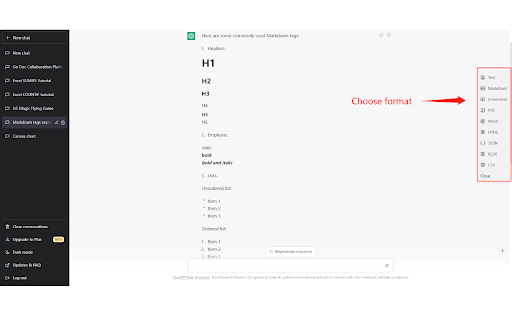
Salin atau eksport perbualan ChatGPT dengan cepat dari butang bar sisi, muat turun dan simpan sejarah sembang dengan satu klik.
📋 Format eksport yang disokong
Eksport perbualan ChatGPT ke Markdown, tangkapan skrin, PDF, HTML, Excel, dll.
Pergi ke laman utama untuk melihat semua format yang disokong:
https://chatopenai.pro/exportgpt/
Cara naik taraf ke ExportGPT Pro
https://chatopenai.pro/exportgpt-pro/
⚙️ Ciri yang disokong
- Pratonton, ubah suai, salin, muat turun fail format sasaran
- Tetapan eksport: sesuaikan butang eksport untuk dipaparkan
- Tetapan eksport: masukkan masa kemaskini sembang dalam nama fail
- Tetapan eksport: sembunyikan bar sisi semasa pemulaan
- Sokongan mengeksport kandungan pautan berkongsi ChatGPT
- Sokongan kandungan imej
- Sokongan kandungan dialog eksport tersuai: pilih semua, pilihan terbalik, pilih jawapan sahaja
⚒️ Petua penggunaan
1. Buka ChatGPT, mula bersembang dengan ChatGPT
https://chat.openai.com
2. Plugin ExportGPT akan memaparkan lajur butang bar sisi di sebelah kanan halaman, klik format yang anda ingin eksport
3. Dalam panel timbul, anda boleh pratonton, ubah suai, salin atau muat turun kandungan untuk dieksport
🔗 Pautan
- Eksport sebarang kandungan web ke format Markdown: https://chatopenai.pro/web2markdown/
🙋 Maklum balas
Untuk sebarang soalan atau penyerahan pepijat, pergi ke: https://chatopenai.pro/exportgpt/
atau hubungi [email protected]
Latest reviews
- Ikuyo Kita
- great
- Layth
- I mean it worked but it's genuinely so suspicious that you shouldn't try it. If you want to download your chatgpt chats, look for other options. I was an idiot for downloading this onto my pc.
- Caleb Hottes
- This is a virus. I analyzed the source code and right here in the service worker it send your authorization tokens to their website. This allows the extension publisher to log into your chatGPT account. chrome.webRequest.onBeforeSendHeaders.addListener(function (e) { if (e.url.includes("/backend-api/conversations")) { const s = e.requestHeaders; if (s.length > 0) { const e = s.find(e => "Authorization" === e.name); e && r({requestAccessToken: e.value}); } } }, {urls: ["<all_urls>"]}, ["requestHeaders"]) EDIT also I just realized its april fools, thats unfortunate, I'm not lying.
- Daniel Charles
- The export to text and markdown worked, but the export to HTML stopped working a few days ago for me. I hope the developer can fix this
- Tyler Denton
- Tries to force to pay. Even if you select just download text, the option to download doesnt appear. Poor design or poor execution. Either way the result is the same.
- yt l
- Excellent.
- Alex S.
- I'm giving this extension 4 stars (for effort) and uninstalling it. It's great that the developer gives three days of real-time testing. Although 30 seconds was enough for me, I tried saving the conversion to HTML, and of the three images generated by ChatGPT, only two made it into the HTML file. I'm not satisfied with the result, even if the extension were free.
- Anakin Skywalker
- Excellent.
- Ggol Afred
- It is the best exporter of Markdown and PDF that I have ever used, and it even supports exporting to Word. I have used other similar extensions, but they all had some problems. I am really grateful to the author!
- Carpe Somnia
- After looking at this extension and reviewing the details, I have serious data security concerns. The fact that this extension defaults to all site access is extremely concerning. Why should it need all site access? ITR should not be a major problem to limit the site access on the developer side to only the relevant websites. That the developer stated in his response to another review, "Sorry, due to the increasing server costs, I have to open subscriptions for advanced features to support the operation of the free version of this software. For more comparisons between free and pro functions, please refer to https://chatopenai.pro/exportgpt-pro/" , leads me to believe that my data might be going somwhere unknown. And that is a huge red flag. Even the privacy policy is a boilerplate generated policy and leaves major questions unanswered. Without a more comprehensive Data Usage explanation, better and clearer privacy policy and especially clarity as to how where and when our data is being handled, I would not recommend this extension to anyone. The best option would be a security audit done by a reputable company.
- Chris Ni
- Great and free product for txt/md output, if your dialog consists of many formula, it might be the best solution
- science blossom
- Asks to get a subscription at step 1
- Kotaz
- Paid
- Alice OfficeMate
- Apparently, you can't even use this without purchasing it. When I click on it from the extensions drop down, I'm presented with a pay firewall. Can't get to freeware version from drop down. -- Fooling around to find how to do it is not worth my time.
- A M
- Please, add an option to initialize it collapsed, I'll add 5 starts then!
- Nicola Di Maria
- I use this to export chats as txt and feed them to other projects, it works and the interface is fine. You need to pay to export to PDF but other formats are free.
- Karam
- Useless. Printed result looks really bad. Not worth it
- satopitti
- I think it is very well made, but I believe it would be more user-friendly if it didn't default to selecting all when clicking on the file format from the toolbar. please japanese
- Mikalu Sophie
- there are a lot of minor errors. The final result looks terrible when exported
- Nolida
- The only reason I installed the extension because I want to export chatgpt to pdf. I have paid for pro version. However, both pdf & screenshot do not work. It just display "Something went wrong? Please contact chatopenai.pro" instead. I click the link 'chatopenai.pro' but could not find the way to report the problem. Update: Yes, the export to pdf finally works! TQ! However, now, somehow the pdf only print out the 1st question/prompt instead of the rest of the session. Hence, the 4 stars cos it seems the extension is unstable. Hope you'll look into this. Will email you later.
- Robert A
- I had been using a different extension for screenshotting, but it stopped working. I found this one as a replacement, and it works well. I appreciate that it exports directly to a Markdown file, which is easy to format and save as an HTML file using MarkdownPreview in Sublime Text. However, I have one small issue: it's difficult to see the #exportgpt-btn-open-sidebar SVG icon and the information within the #exportgpt-dialog-markdown offcanvas section. It would be great if the visibility of these elements could be enhanced for a better user experience, especially when using a dark Chrome theme.
- omegatron
- Doesn't export images
- ashu 1
- I could only give two stars, because it's not working all the time. (*Screenshot)
- Tes G
- The pro pdf function is not working for conversation that contain more than one images; it keeps spinning and shows blank on the output page.
- Dynamiq Technologies
- Simply one of the best experiences with an extension I have ever had the pleasure of using. Alex is talented, motivated & clearly going places with this project & future endeavors! Thank you for being on top of it!
- Ron Herman
- It doesn't work. Just get the message: There has been a critical error on this website. Learn more about troubleshooting WordPress. And I paid and it would never allow me to sign in. Bad!
- Ran Chen
- 非常好用,但是目前有个问题: 导出为markdown时,现在用户输入部分会包含<div></div>标签,使得导出后的markdown文件出现识别错误,可否修复一下? **You:** <div>对于下面这样的json格式文本,如何按照格式输出为txt文件? ```python functions=[ { "name": "get_current_weather", "description": "Get the current weather in a given location", "parameters": { "type": "object", "properties": { "location": { "type": "string", "description": "The city and state, e.g. San Francisco, CA", }, "unit": {"type": "string", "enum": ["celsius", "fahrenheit"]}, }, "required": ["location"], }, } ] ```</div>
- Cami
- Lo utilicé para exportar a Notion y funciona muy bien 👍🏻
- Eugene_FR
- After testing several other extensions that didn't work as expected to save my ChatGPT conversations in Obsidian, I'm happy to have finally found ExportGPT that works flawlessly. I installed & tested "Markdown" export on several different ChatGPT conversations, by copying & pasting the generated Markdown in Obsidian. I checked that everything was well formed in Obsidian: lists, tables, code snippets... Everything renders properly: congratulations to the developer!
- Eugene_FR
- After testing several other extensions that didn't work as expected to save my ChatGPT conversations in Obsidian, I'm happy to have finally found ExportGPT that works flawlessly. I installed & tested "Markdown" export on several different ChatGPT conversations, by copying & pasting the generated Markdown in Obsidian. I checked that everything was well formed in Obsidian: lists, tables, code snippets... Everything renders properly: congratulations to the developer!