
To-do List Chrome Extension
Extension Actions
- Extension status: Featured
To-do List Chrome Extension - A free to-do list app and task manager right in your browser. Organize tasks, boost your productivity.
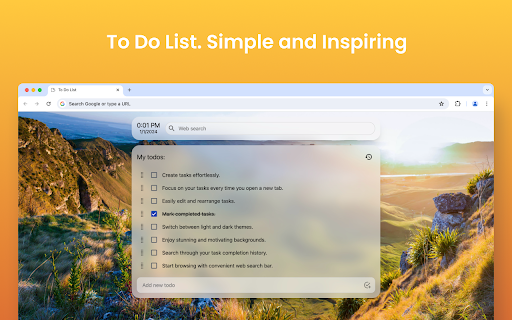
Want to increase your productivity and focus with a to-do list?
This minimalist To-do list Chrome extension instantly displays your todo activities whenever you open a new tab, keeping your priorities front and center.
Most to-do list applications are overloaded with features you don’t need. That’s why we created a clean, simple, and effective todo list extension, designed to help you stay focused, meet deadlines, and track your tasks effortlessly. It's especially helpful for people who struggle with distractions, including those with ADHD.
❓ What is a to-do list chrome extension?
A to-do list app is a tool used to organize tasks and helps to track tasks based on a specific time limit. Thus, the advantage of using a to-do list is that it is helpful to track and prioritize your workload without forgetting anything.
Key features of the To-do list chrome extension:
✅ Multiple task lists.
✅ Notes and deadlines.
✅ Supports both dark and light themes.
✅ Add and edit items with one click.
✅ Ability to view the history of completed activities.
✅ Drag-and-drop feature for reordering and assigning tasks.
✅ Easy-to-use search bar compatible with all popular search engines.
✅ Design your to-do task list layout with beautiful backgrounds to inspire yourself.
✅ It has a minimalistic, simple, and convenient online to-do list to organize tasks in a few clicks.
How do you install the to-do list chrome extension?
1️⃣ Once you are on the extension page of the Google Chrome browser, click on the option "Add to Chrome" on the extension page.
2️⃣ Once the installation is complete and added to your extension, it opens a new tab.
3️⃣ In the new tab in which the extension opens, press the button "Keep it". This helps from disabling the to-do list chrome extension.
4️⃣ That's it! Now it's time to add your tasks and enjoy the application's effectiveness.
Why choose to-do list chrome extension?
▸ Stay focused on your tasks.
▸ You will never miss due dates or deadlines as you know the list of tasks you should do.
▸ Have all the sticky notes on one page.
▸ Keep track of your multiple projects and tasks.
▸ Ensure the utmost productivity in your routine by adding tasks to your Google calendar.
Try our To-Do List Google Chrome extension to simplify managing tasks and enhance your efficiency and effectiveness.
↪️ Simple and user-friendly Design:
To-do list apps need to be simple to use! Hence, our extension has beautiful easy-to-use interfaces that are less daunting. Our center focuses on effectively displaying all the tasks with a clean and intuitive layout.
🔥 Accessible Task Management App:
Our extension allows you to add new to-do items and edit them with just a few clicks! Thus, you can effortlessly add tasks or even edit existing ones. There is no complex layout, menus, or forms — it's just simple to use.
🏃 Drag-and-Drop tasks to Reorder:
You can control your to-do items based on your priorities by simply dragging and dropping them. Thus, you can rearrange or reorder tasks with ease and less effort.
🔒 Track your Task History:
Do you want to check whether you already did a task or check the completed tasks? Absolutely, you can do it with our To-Do List app! We have a built-in task history feature to track your productivity.
🔍 Easy Search Function:
Do you want to find a specific task in your extensive history? The to-do list chrome extension's search function can help you identify a task based on keywords or other criteria.
😍 Update Inspiring Backgrounds:
If you are the type of person who stays motivated through inspiring backgrounds, you can update them in our extension! Just choose the right background to get a personalized experience.
✒️ Offer Dark and Light Themes:
Whether you prefer dark or light themes, we have both for you! Just choose the one you like and stay comfortable handling more tasks.
🔍 Integrated Search Bar:
Do you want to search for something from your favorite search engine without leaving the to-do list extension? Oh, we've got you covered there! Go check out that exclusive feature now.
🔥 Free to-do-list extension:
This extension is free to use and includes all features at no cost. There are no hidden fees or upfront payments. Please note that ads may be displayed at some point, but you can remove them with a subscription.
🤔 What do you write in a todo list?
In a to-do list, you write down tasks you plan to do in your daily routine. For example, you can include personal tasks, professional and team management, work-related tasks, grocery lists, household chores, shopping list, team's work, appointments, personal goals, and more!
🫣 How can I write a Best To-Do list?
You can write a to-do list based on the below steps:
1️⃣ List all the task list you need to accomplish to manage.
2️⃣ Break down larger tasks into sub-tasks in your todo lists.
3️⃣ Prioritize the list of tasks based on priority(set reminders if essential).
4️⃣ Set reminders per your requirements by keeping track of task lists (use location-based reminders).
5️⃣ Make an organized list from your todo lists.
6️⃣ Add the most important work to your Google calendar (if your app supports it), which would help you focus on and maintain an organized main interface.
7️⃣ Daily or frequently update your new tasks and progress to the to-do list app.
🕓 Upcoming features
↪️ Ability to create tasks using AI: We plan to integrate an AI assistant to automate and simplify your task-generation process by creating a list of new tasks based on your goal.
↪️ Ability to synchronize tasks across devices: We plan to sync your tasks and make them flexible enough to handle all your devices, including smartphones, tablets, and desktop computers. Thus, the sync functionality helps you manage your to-dos no matter what device you handle in everyday use.
↪️ Integrate with leading task management tools: The ability to connect "To-do List Chrome Extension" with popular task management applications like Google Tasks, Microsoft To-Do, calendar events, Todoist, and other apps on Apple devices (for Apple users) or mobile app ensures user flexibility.
Don't miss trying out the to-do list chrome extension to manage tasks efficiently and effectively!
FAQS (Frequently Asked Questions)
❓ What is the Chrome extension with to-do lists?
You can use this to-do list chrome extension to handle your tasks in just one view instead of multiple views and organize your work effectively.
❓ How do I create a To-Do list in Chrome?
Add to-do list chrome extension by downloading and enabling it under your extensions. Next, start adding your data of tasks, which would be helpful to organize your work effectively.
❓ How to make a daily checklist?
You can make a daily checklist using a to-do list application to update your daily work or tasks, prioritize it based on deadlines, and tick off tasks once you complete them.
This extension contains ads for our other products. They do not interfere with your experience or limit any features — you can continue using all the functionality in full.
Latest reviews
- Yashdeep
- Looks good & easy to use.
- Dj Shiflet
- honestly love this extension for work tasks or random things i remember and want to work on in the future. 10/10 recommend
- LiBliss
- the background picture that picked to me was so stunning, love at the first sight
- Sean Maginnis
- Only used it for about 5 minutes already love it
- koko king
- Perfect, but please add an option to delete a background photo if you added one by mistake or don’t like the existing one. Also, please add more backgrounds.
- Syed Faris Ahmed
- perfect
- James F. Dobrow
- Great job. Minimal, but not **too** minimal, todo tab. It's minimal, but it still lets you edit todos, move, and re-order todos, and add sub-todos. Also, it has multiple lists. And at least for now it has survived the infamous extension apocalypse of 2025. Thanks!
- HTOO AUNG LWIN
- Perfect! Simple, minimal and most importantly efficient!
- Patricia Benzing
- I really love the simplicity of this extension - however, with my job, I use 4-5 different devices, but always the same chrome profile. This does not sync with Chrome, so if I change devices, my to do list disappears. If that could be fixed this extension would be perfect for my needs. Unfortunately without syncing to my chrome profile it is not very useful for my needs.
- mohammad crouse
- Perfect
- 江昀恩11224
- its really good now after i redownloaded it but OH MY GOD its so hard deleting tasks, where was that simple X button please
- Ayele Masresha
- minimal and easy to use extension
- Mr. GG
- for me ACTUALLY THE BEST EXTENSION I COULD USE. It's best for reminding me for small easy to forget task plus it helps me manage my shortcuts and keep a good backgroud(customisable)
- Angela Rountree
- Elegant, low profile, simple to use. One of the only extensions I've kept for a very long time. Helpful for jotting down a quick item on your To-Do list, and it's always right there if you set it as your home page. I like the way it unobtrusively displays frequently visited site links to the side and that I can change the background image. You can drag your tasks to change the order as you wish.
- Ayan Pal
- loved it makes a lot of easy to notify me to complete tasks thanks a lot
- Alex Xavier
- simple and does the job very well. Request for feature: Can you please have the ability for adding hyperlinks to the text ? That will help to quickly connect with almost all other applications like docs. Will be great if it could be added
- StillAroma Pakistan
- Very Useful as a Losing Mind Helpful also
- Sina Sadri
- goddamn amazing
- akash anarse
- One of the best Extension to focus on the important task rather then doom scrolling. Please add more background. Highly Recommended.!!!
- Muhammad Gulzaib Ijaz
- Simple and nice
- Pranav
- Loving it ❤️
- Masoud Bozorgi
- fiiire
- Joshua Paul
- Fire extension. I agree with the others on "the ability to select which backgrounds are randomized instead of all backgrounds being randomized" and more customization options. wish the to-dos could be sorted into folders like Momentum does.
- Mounir Khaoulaf
- Nice One Bro , Still needs Some Minor customizations.
- LeadFlow Builders
- Love this very easy to use, looks great and made me 2x more productive
- Fraz
- Amazing extension! Awesome backgrounds and an easy to manage To-Do list. I have a few suggestions: 1. The ability to customize where the To-Do list & and tab shortcuts are 2. For Random Backgrounds, the ability to select which backgrounds are randomized instead of all backgrounds being randomized
- Thoy Jerry
- Super, clean and useful
- Bui Anh Thu Tran
- Very good and useful.
- Tony Lambie
- It is very convenience and useful.
- Ξενοφων Αγγελίδης
- The only ability missing is to synch between different devices.
- lahmid abderrahmane
- i think you need to improve setting by adding size editing to the list to be more flexible, and finally i think you should add more wallpapers . overall it looks very nice and wonderful
- Chelsea Silva
- Using this for university and it is a game changer!
- WONG PAK YIN ETHAN s20191158
- amazing
- Mohammad Hossain
- The To-Do List Chrome Extension is a great choice for users who need a lightweight and easy-to-use task manager without the complexity of larger apps. It’s perfect for personal use, quick reminders, and managing simple to-do lists. If you need more advanced features like team collaboration or cross-platform support, you might need to look elsewhere. Would I recommend it? Yes, especially for casual users and minimalists!
- Jason Zhang
- I like it, it looks clean and easy to use but lacks basic functionality such as reoccuring daily tasks that I want to be reminded of everyday on my new tab. ie if I have a task, I set it to reoccuring and I finish it today, it will automatically show up again on my dashboard tomorrow
- Sunil Tongaria
- very good - better than all those pay to use apps
- Ethan Gliddon
- dashing
- Miller Jolly
- Helped Me so much. The looks are really aesthetic aswell. Great extension
- José Mendes
- Great, does what it says on the tin, only feedback I have is that I'd like to have different lists, work, hobbies, etc. so that it isn't all mixed in
- Ahlem Htey
- Good
- Zain Ali Gondal
- Your new update removes the feature of disabling the todo list being opened in new tab, I was loving it before but now I'm frustrated and looking for any other alternative
- Gajanan Patange
- good though make some new features add the todolist on right side and bookmarks on left side that look more good
- TJ Tenari
- Pretty cool, needed this. The background, the ease of use and intergration in google chrome is nice.
- Anh Bui Kieu Lan
- Great for those looking to track tasks efficiently and simplify the workflow. But still hope will be a quick note feature added yay
- Anton Mcleave
- Really good. Simple. Reliable. Does exactly what it says on the tin.
- Naome Khan
- its very good clean and simple. so keeps you focused on task. Would really prefer it had an option to add to google calendar!! Then when i open google calendar on my phone i can see my to do list still.
- Morris Devearl
- I like the "To-do-list" extension alot; it makes things easier.
- Emilia Soomeri
- So so so suprised! Awesome extension for my school laptop, it has google search bar and delightful design.
- Austin M
- I LOVE this extension, it's just really simple, clean and easy to use. I just wish that there would be a section that had a pomodoro timer - or a timer - all of the other extensions I tried were just too difficult to use.
- Rose Joy Boloy
- the best <3