
רשימת מטלות
Extension Actions
- Extension status: Featured
- Live on Store
רשימת מטלות - אפליקציית רשימת מטלות פשוטה וחינמית ומנהל המשימות ישירות בדפדפן שלך.
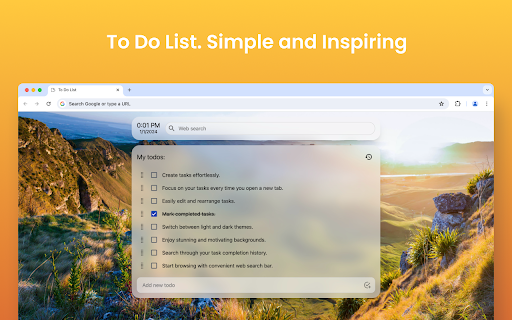
נמאס לך להתאמץ לעקוב אחר המשימות שלך, לעמוד בלוחות זמנים ולהישאר מאורגנים? לכן כדאי להשתמש ב"רשימת מטלות". אנו יודעים שיישומי רשימת מטלות עשויים להיות מורכבים מדי! אז, אנו מציגים בפניכם את סיומת הכרום המינימליסטית שלנו של "רשימת מטלות".
❓ מהי רשימת מטלות?
אפליקציית רשימת מטלות היא כלי המשמש לארגון משימות ועוזרת לעקוב אחר משימות על סמך מגבלת זמן מסוימת. לפיכך, היתרון בשימוש ברשימת מטלות הוא שמועיל לעקוב ולתעדף את עומס העבודה שלך מבלי לשכוח דבר.
תכונות עיקריות של התוסף "רשימת מטלות".
✅ שימוש בחינם (בעל עלות אפסית).
✅ תומך בערכות נושא כהות ובהירות כאחד.
✅ הוסף וערוך משימות בלחיצה אחת.
✅ יכולת לצפות בהיסטוריה של משימות שהושלמו.
✅ גלה בקלות את ההיסטוריה של משימות שהושלמו.
✅ תכונת גרור ושחרור לסידור מחדש והקצאת משימות.
✅ סרגל חיפוש קל לשימוש התואם לכל מנועי החיפוש הפופולריים.
✅ עצב את פריסת רשימת המשימות שלך עם רקעים יפים כדי לעורר את עצמך.
✅ יש לו רשימת מטלות מקוונת מינימליסטית, פשוטה ונוחה לארגון משימות בכמה קליקים.
איך מתקינים את התוסף "רשימת מטלות"?
1️⃣ ברגע שאתה בדף ההרחבה של דפדפן Google Chrome, לחץ על האפשרות "הוסף לכרום" בדף ההרחבה.
2️⃣ לאחר השלמת ההתקנה והוספת לתוסף שלך, היא פותחת כרטיסייה חדשה.
3️⃣ בלשונית החדשה בה נפתחת התוסף, לחץ על הכפתור "שמור". זה עוזר מ-Chrome להשבית את רשימת המטלות.
4️⃣ זהו! עכשיו הגיע הזמן להוסיף את המשימות שלך וליהנות מהיעילות של האפליקציה.
למה לבחור "רשימת מטלות"?
▸ הישאר מאורגן.
▸ לעולם לא תחמיץ תאריכי יעד או מועדים מכיוון שאתה מכיר את רשימת המשימות שאתה צריך לעשות.
▸ שמור את כל הפתקיות בעמוד אחד.
▸ עקוב אחר הפרויקטים והמשימות המרובות שלך.
▸ הבטח את הפרודוקטיביות המרבית בשגרה שלך על ידי הוספת משימות ליומן Google שלך.
נסה את התוסף "רשימת המטלות" שלנו ל-Google Chrome כדי לפשט את ניהול המשימות ולשפר את היעילות והאפקטיביות שלך.
↪️ עיצוב פשוט וידידותי למשתמש:
אפליקציות רשימת מטלות צריכות להיות פשוטות לשימוש! מכאן שלתוסף שלנו יש ממשקים קלים לשימוש ופחות מרתיע. המרכז שלנו מתמקד בהצגת כל המשימות בצורה יעילה בפריסה נקייה ואינטואיטיבית.
🔥 אפליקציית ניהול משימות נגישה:
התוסף שלנו מאפשר לך להוסיף ולערוך משימות בכמה לחיצות! כך, אתה יכול ליצור משימות חדשות ללא מאמץ או אפילו לערוך משימות קיימות. אין פריסה, תפריטים או טפסים מורכבים - זה פשוט פשוט לשימוש.
🏃 גרור ושחרר משימות לסדר מחדש:
אתה יכול לשלוט במשימות שלך על סמך סדר העדיפויות שלך פשוט על ידי גרירה ושחרור שלהן. כך, אתה יכול לסדר מחדש או לסדר מחדש משימות בקלות ובפחות מאמץ.
🔒 עקוב אחר היסטוריית המשימות שלך:
האם אתה רוצה לבדוק אם כבר ביצעת משימה או לבדוק את המשימות שהושלמו? בהחלט, אתה יכול לעשות את זה עם אפליקציית רשימת המטלות שלנו! יש לנו תכונה מובנית של היסטוריית משימות כדי לעקוב אחר הפרודוקטיביות שלך.
🔍 פונקציית חיפוש קלה:
האם אתה רוצה למצוא משימה ספציפית בהיסטוריה הענפה שלך? פונקציית החיפוש של תוסף "רשימת המשימות" יכולה לעזור לך לזהות משימה על סמך מילות מפתח או קריטריונים אחרים.
😍 עדכן רקעים מעוררי השראה:
אם אתה מסוג האנשים ששומר על מוטיבציה באמצעות רקעים מעוררי השראה, תוכל לעדכן אותם בתוסף שלנו! פשוט בחר את הרקע המתאים כדי לקבל חוויה מותאמת אישית.
✒️ מציעים נושאים כהים ובהירים:
בין אם אתה מעדיף נושאים כהים או בהירים, יש לנו את שניהם בשבילך! פשוט בחר את זה שאתה אוהב והישאר נוח להתמודד עם משימות נוספות.
🔍 שורת חיפוש משולב:
האם אתה רוצה לחפש משהו ממנוע החיפוש המועדף עליך מבלי לעזוב את סיומת רשימת המטלות? הו, אנחנו מכוסים אותך שם! לכו לבדוק את התכונה הבלעדית הזו עכשיו.
🔥 תוסף חינם לרשימת מטלות:
מכיוון שיש לנו תכונות ייחודיות רבות, האם זו גרסה ללא כלים? אתה יכול ליהנות מכל המאפיינים השוטים האלה מבלי להוציא אגורה. אין עמלות נסתרות, עלויות מראש, חיוב או מנויים. זה ללא עלות.
🤔 מה כותבים ברשימת מטלות?
ברשימת מטלות, אתה רושם משימות שאתה מתכנן לעשות בשגרת היומיום שלך. לדוגמא, ניתן לכלול משימות אישיות, ניהול מקצועי וצוות, משימות הקשורות לעבודה, רשימות מכולת, מטלות בית, רשימת קניות, עבודת צוות, פגישות, יעדים אישיים ועוד!
🫣 איך אני יכול לכתוב את רשימת המטלות הטובה ביותר?
אתה יכול לכתוב רשימת מטלות על סמך השלבים הבאים:
1️⃣ רשום את כל רשימת המשימות שאתה צריך לבצע כדי לנהל.
2️⃣ חלקו משימות גדולות יותר לתת-משימות ברשימת המטלות שלכם.
3️⃣ תעדוף את רשימת המשימות לפי עדיפות (קבע תזכורות אם חיוני).
4️⃣ הגדר תזכורות לפי הדרישות שלך על ידי מעקב אחר רשימות המשימות (השתמש בתזכורות מבוססות מיקום).
5️⃣ צור רשימה מסודרת מרשימות המטלות שלך.
6️⃣ הוסף את העבודה החשובה ביותר ליומן Google שלך (אם האפליקציה שלך תומכת בכך), שתעזור לך להתמקד ולתחזק ממשק ראשי מסודר.
7️⃣ עדכן מדי יום או תדיר את המשימות החדשות שלך והתקדמות לאפליקציית רשימת המטלות.
🕓 תכונות קרובות
↪️ יכולת ליצור משימות באמצעות בינה מלאכותית: אנו מתכננים לשלב עוזר בינה מלאכותית כדי לבצע אוטומציה ולפשט את תהליך יצירת המשימות שלך על ידי יצירת רשימה של משימות חדשות המבוססות על המטרה שלך.
↪️ יכולת לסנכרן משימות בין מכשירים: אנו מתכננים לסנכרן את המשימות שלך ולהפוך אותן לגמישות מספיק כדי לטפל בכל המכשירים שלך, כולל סמארטפונים, טאבלטים ומחשבים שולחניים. לפיכך, פונקציונליות הסנכרון עוזרת לך לנהל את המטלות שלך לא משנה באיזה מכשיר אתה מטפל בשימוש יומיומי.
↪️ השתלב עם כלים מובילים לניהול משימות: היכולת לחבר "רשימת משימות" עם יישומי ניהול משימות פופולריים כמו Google Tasks, Microsoft To-Do, אירועי לוח שנה, Todoist ואפליקציות אחרות במכשירי אפל (עבור משתמשי אפל) או אפליקציה לנייד מבטיח גמישות למשתמש.
↪️ הוסף תאריכי יעד: אתה יכול להוסיף את תאריכי הגבלה עבור כל משימה כדי לשמור על הרשימה שלך מעודכנת.
אל תחמיצו לנסות את "רשימת המשימות" הטובה ביותר לניהול משימות ביעילות וביעילות!
שאלות נפוצות (שאלות נפוצות)
❓ מהי תוסף Chrome עם רשימות מטלות?
אתה יכול להשתמש בתוסף Chrome זה של "רשימת מטלות" כדי לטפל במשימות שלך בתצוגה אחת בלבד במקום במספר תצוגות ולארגן את העבודה שלך ביעילות.
❓ כיצד אוכל ליצור רשימת מטלות ב-Chrome?
הוסף את התוסף "רשימת המטלות" שלנו על ידי הורדה והפעלתו תחת התוספים שלך. לאחר מכן, התחל להוסיף את נתוני המשימות שלך, מה שיעזור לארגן את העבודה שלך ביעילות.
❓ איך להכין רשימה יומית?
אתה יכול להכין רשימת בדיקה יומית באמצעות יישום רשימת מטלות כדי לעדכן את העבודה או המשימות היומיומיות שלך, לתעדף אותה על סמך מועדים ולסמן משימות לאחר השלמתן.
Latest reviews
- Yashdeep
- Looks good & easy to use.
- Dj Shiflet
- honestly love this extension for work tasks or random things i remember and want to work on in the future. 10/10 recommend
- LiBliss
- the background picture that picked to me was so stunning, love at the first sight
- Sean Maginnis
- Only used it for about 5 minutes already love it
- koko king
- Perfect, but please add an option to delete a background photo if you added one by mistake or don’t like the existing one. Also, please add more backgrounds.
- Syed Faris Ahmed
- perfect
- James F. Dobrow
- Great job. Minimal, but not **too** minimal, todo tab. It's minimal, but it still lets you edit todos, move, and re-order todos, and add sub-todos. Also, it has multiple lists. And at least for now it has survived the infamous extension apocalypse of 2025. Thanks!
- HTOO AUNG LWIN
- Perfect! Simple, minimal and most importantly efficient!
- Patricia Benzing
- I really love the simplicity of this extension - however, with my job, I use 4-5 different devices, but always the same chrome profile. This does not sync with Chrome, so if I change devices, my to do list disappears. If that could be fixed this extension would be perfect for my needs. Unfortunately without syncing to my chrome profile it is not very useful for my needs.
- mohammad crouse
- Perfect
- 江昀恩11224
- its really good now after i redownloaded it but OH MY GOD its so hard deleting tasks, where was that simple X button please
- Ayele Masresha
- minimal and easy to use extension
- Mr. GG
- for me ACTUALLY THE BEST EXTENSION I COULD USE. It's best for reminding me for small easy to forget task plus it helps me manage my shortcuts and keep a good backgroud(customisable)
- Angela Rountree
- Elegant, low profile, simple to use. One of the only extensions I've kept for a very long time. Helpful for jotting down a quick item on your To-Do list, and it's always right there if you set it as your home page. I like the way it unobtrusively displays frequently visited site links to the side and that I can change the background image. You can drag your tasks to change the order as you wish.
- Ayan Pal
- loved it makes a lot of easy to notify me to complete tasks thanks a lot
- Alex Xavier
- simple and does the job very well. Request for feature: Can you please have the ability for adding hyperlinks to the text ? That will help to quickly connect with almost all other applications like docs. Will be great if it could be added
- StillAroma Pakistan
- Very Useful as a Losing Mind Helpful also
- Sina Sadri
- goddamn amazing
- akash anarse
- One of the best Extension to focus on the important task rather then doom scrolling. Please add more background. Highly Recommended.!!!
- Muhammad Gulzaib Ijaz
- Simple and nice
- Pranav
- Loving it ❤️
- Masoud Bozorgi
- fiiire
- Joshua Paul
- Fire extension. I agree with the others on "the ability to select which backgrounds are randomized instead of all backgrounds being randomized" and more customization options. wish the to-dos could be sorted into folders like Momentum does.
- Mounir Khaoulaf
- Nice One Bro , Still needs Some Minor customizations.
- LeadFlow Builders
- Love this very easy to use, looks great and made me 2x more productive
- Fraz
- Amazing extension! Awesome backgrounds and an easy to manage To-Do list. I have a few suggestions: 1. The ability to customize where the To-Do list & and tab shortcuts are 2. For Random Backgrounds, the ability to select which backgrounds are randomized instead of all backgrounds being randomized
- Thoy Jerry
- Super, clean and useful
- Bui Anh Thu Tran
- Very good and useful.
- Tony Lambie
- It is very convenience and useful.
- Ξενοφων Αγγελίδης
- The only ability missing is to synch between different devices.
- lahmid abderrahmane
- i think you need to improve setting by adding size editing to the list to be more flexible, and finally i think you should add more wallpapers . overall it looks very nice and wonderful
- Chelsea Silva
- Using this for university and it is a game changer!
- WONG PAK YIN ETHAN s20191158
- amazing
- Mohammad Hossain
- The To-Do List Chrome Extension is a great choice for users who need a lightweight and easy-to-use task manager without the complexity of larger apps. It’s perfect for personal use, quick reminders, and managing simple to-do lists. If you need more advanced features like team collaboration or cross-platform support, you might need to look elsewhere. Would I recommend it? Yes, especially for casual users and minimalists!
- Jason Zhang
- I like it, it looks clean and easy to use but lacks basic functionality such as reoccuring daily tasks that I want to be reminded of everyday on my new tab. ie if I have a task, I set it to reoccuring and I finish it today, it will automatically show up again on my dashboard tomorrow
- Sunil Tongaria
- very good - better than all those pay to use apps
- Ethan Gliddon
- dashing
- Miller Jolly
- Helped Me so much. The looks are really aesthetic aswell. Great extension
- José Mendes
- Great, does what it says on the tin, only feedback I have is that I'd like to have different lists, work, hobbies, etc. so that it isn't all mixed in
- Ahlem Htey
- Good
- Zain Ali Gondal
- Your new update removes the feature of disabling the todo list being opened in new tab, I was loving it before but now I'm frustrated and looking for any other alternative
- Gajanan Patange
- good though make some new features add the todolist on right side and bookmarks on left side that look more good
- TJ Tenari
- Pretty cool, needed this. The background, the ease of use and intergration in google chrome is nice.
- Anh Bui Kieu Lan
- Great for those looking to track tasks efficiently and simplify the workflow. But still hope will be a quick note feature added yay
- Anton Mcleave
- Really good. Simple. Reliable. Does exactly what it says on the tin.
- Naome Khan
- its very good clean and simple. so keeps you focused on task. Would really prefer it had an option to add to google calendar!! Then when i open google calendar on my phone i can see my to do list still.
- Morris Devearl
- I like the "To-do-list" extension alot; it makes things easier.
- Emilia Soomeri
- So so so suprised! Awesome extension for my school laptop, it has google search bar and delightful design.
- Austin M
- I LOVE this extension, it's just really simple, clean and easy to use. I just wish that there would be a section that had a pomodoro timer - or a timer - all of the other extensions I tried were just too difficult to use.
- Rose Joy Boloy
- the best <3