
Fathom AI Note Taker for Google Meet
Extension Actions
- Live on Store
Records, transcribes & summarizes meetings FREE
Install this Fathom for Google Meet Chrome extension to unlock:
* Ability to use Fathom on any Google Meet - without it you have to make sure to join the meeting from the Fathom desktop app
* No more looking for the desktop app - Fathom recording controls embedded directly in Google Meet
ABOUT FATHOM
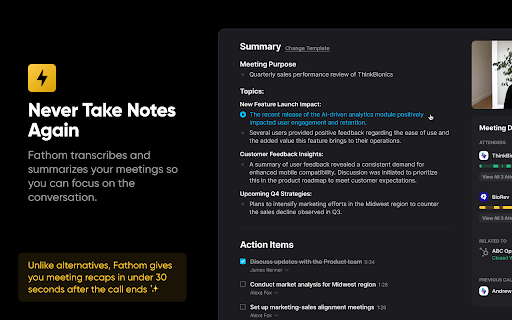
Fathom records, transcribes, and summarizes your Zoom, Google Meet, or Microsoft Teams meetings so you can focus on the conversation instead of taking notes!
🆓 Fathom is completely FREE to use! Get setup in a matter of minutes.
🥇 #1 Rated AI Meeting Assistant on G2 with a perfect 5/5 rating. Read our reviews: https://www.g2.com/categories/ai-meeting-assistants
KEY FEATURES:
💥 Instant Access to Fully Transcribed & Highlighted Recordings
No more waiting after your calls for the recording! Jump directly to highlights & action items.
🤖 Auto-Generated Call Summaries
Turn a 30 min call into a 1 min read! Copy your summaries into Google Doc, Notion, or Word with a single click.
🔥 Updates Salesforce & Hubspot Automatically
No more post-call data entry! Fathom will log your call and its summary into your CRM.
🙏 Easily Share Highlights
Show don't tell! Fathom makes it easy to share key passages of your customer calls or meetings with colleagues.
🔍 Search Across Calls & Transcripts
Getting on a follow-up call and don’t remember where you left off? Boss asking you if anyone’s brought up a certain competitor recently? Fathom’s got you covered.
Latest reviews
- Dennis Hernandez
- Fathom has been amazing for my meetings. It connects seamlessly with every platform I use, including Teams and Google Meet. The summaries are excellent, and the transcripts are incredibly accurate. Most of my meetings are in Spanish, and Fathom is the only tool I’ve found that handles note-taking and transcription in Spanish perfectly, without issues. It saves me a lot of time and makes follow-up much easier.
- Bridget Griggs
- What do you like best about Fathom? I love that it helps me take notes while I am doing interviews so that I can be fully focused on the candidate I am speaking with, rather than being distracted by trying to transcribe the call as it is going. What do you dislike about Fathom? I added the Chrome Extension because I thought that it would allow me to start the meeting or start the recording, but it only has the logout button. This feature would be very helpful as well. Thank you! What problems is Fathom solving and how is that benefiting you? I have been interviewing candidates for our newly opened recruiter role, and Fathom has allowed me to record the call, it provides valuable key takeaways as well as a nice summary. Additionally, it allows me to go back and listen or share it with members of my team.
- Zuleika Benitez
- "Effortless Follow-Ups with Helpful Recaps and Timed Clips" I love how it captures follow-up tasks and assigned items. I also appreciate the succinct recap email, along with the timed clip you can reference to see and hear exactly what was discussed—especially if you missed something. There is nothing that I can say about disliking the platform, but I think this may be more of a Zoom platform issue, but Fathom sometimes doesn’t launch automatically. Fathoms helps me remember what tasks I need to write down based on a discussion and that I can appreciate so much!
- Salih Rogo
- So easy to use, captures my meetings which is super helpful for me as a recruiter and hiring person who hosts intro calls every day. Fathom offers unbelievable amount of integrations, which is super cool for automation of stuff that I see after calls. I have not encountered a single problem, even on a free plan, and I will definitely go for even paid version just to explore. Onboarding was super easy and its intelligence is on another level, really gets sense of what happens in the meeting, creates tasks for after, I am super amazed with it!!! It has not once failed for me and I will keep using this fast super cool tool.
- Kwesi Raphael
- Really excited about this extension! I've been using Fathom for some time now over on Zoom but this Chrome extension for Google Meet has been eagerly awaited. Fathom makes training and coaching so much more effective in that it clearly lists action points and the highlight feature is perfect for pulling individual segments for review out of a long session. And the ability to bring it into a meeting with a single click is awesome.
- Jonas Søvik
- Pretty good! There are some inconsistencies here and there, but the overview, main themes, and action points are very good. It's extremely useful for my coaching, as I can keep track of what's happening with my clients without taking notes during the call or waste time on it after - and useful for them as reminders for what came up & what to work with
- Aran Giffen
- Works great - great free plan too!
- Jason Bentsen
- Great app! Easy to work with and they offer nonprofit discounts! I love having all my meetings recorded no matter what platform I'm using and getting my notes instantly with action items for each person!
- Cari Humphries
- Fathom is a true lifesaver! It allows me to actively listen and participate in my meetings in ways I haven't been able to on my own. Using Fathom, I am not distracted by trying to be sure I capture everything in handwritten meeting minutes. Fathom collects and analyzes every word spoken during meetings with multiple attendees. It is even very helpful when I am communicating with my team in India, even though I can't always understand the strong accent, Fathom can, and the meeting notes are impeccable! I love that Fathom breaks out action items and lists which person is responsible to complete them. Fathom highlights "Key Takeaways" from each meeting and even breaks out project goals and strategies or activities discussed to meet my goals. I can't recommend Fathom enough! Try it and you'll love what it does for your meetings!
- Lorie Trotter
- This is the first meeting tool that actually works for me. I use it for nonstop with client & supplier calls—transcripts are super accurate, summaries save me a ton of time, and I’ve ditched manual notes completely..well sorta of...
- Iniobong Ekpenyong
- I use Fathom for all my meetings. It records the video of the meeting, produces summaries and even a transcript of the meeting, with minute by minute breakdown of who said what. It is an awesome tool, especially has the free version also gets things done pretty much I love that they haven't restricted much in the free version. Not a lot of companies do that. Shoutout to them!!!!!!!!!
- Roca Williams
- I use Fathom for every video meeting I have, and it has become one of the most practical tools in my workflow. The AI meeting notes, summaries, and follow-up capture save me a significant amount of time and help me consolidate decisions quickly after each call. As a small business operator, Fathom has helped me improve workflows, keep track of action items, and turn conversations into clear next steps without losing momentum. It has also made me more effective in networking and operations because I can stay present in the meeting and trust that the important points, takeaways, and follow-ups are captured accurately. If you have a lot of virtual meetings and need better meeting summaries, action items, and organization, Fathom is absolutely worth using.
- Miguel Basilio Silveira
- Excellent! Complete, intuitive, and customizable. The main differentiator, IMO, is the AI-generated summary configured by the client's own prompt. The output comes out exactly as you need it!
- Kal
- Fathom is an absolute game changer! Never have I used an automated note taker that perfectly articulates human communication and provides the perfect brief in a easy to read report. I am in love with this tool and cannot imagine a work life without it anymore.
- Brooke Skillan
- Fathom has changed the way I manage my clients for the better. I no longer have to be the note taker and listener.
- agrand31
- This tool is amazing for us chicken scratch writer. The summary and take away notes are extremely useful and welcomed by all meeting attendees. The mere fact that the meeting notes, recording and summary are shared automatically is one less thing you need to think about if you select that option in your set-up. Totally enjoy this tool!
- Henry Bach
- I use it for every meeting and it is a game changer. even the free version has provided so much value for our business. thanks a ton. ps. customer support was great too when we ran into a small hiccup
- Mike Anders
- Excellent AI Note Taking. I highly recommend Fathom
- Nicolas Castellvi
- Amazing tool helps me coordinate multiple projects with notes, to-dos, summaries, recordings, everything. Doesn't miss a detail.
- Salih Durmuş
- Finally a meeting tool that actually works. I use it for back-to-back founder and client calls, transcripts are accurate, summaries save me tons of time on post-call writeups. Stopped taking manual notes entirely.
- Scot Nattrass
- I am a frequent user of Zoom, Meet, Teams and Riverside and for quite a while I used Otter to capture and summarize. Mostly it was ok, but sometimes it just got the context wrong. Then I was a guest on a podcast and I had Otter on my side doing the capture and the host was using Fathom. Afterwards we exchanged summaries. Both were reasonably accurate, because Otter is a great product. So for the next few meetings I used both and compared my internal take-aways from the meeting to the summaries, decisions and action items from both products. I like Fathom better. It does a better job of understanding and summarizing context from the transcript and does a better job in capturing both voices when the conversation collides. Its a great product and one I will continue to use as long as it is admitted to the meetings.
- Vladimir
- The coolest thing about Fathom is that it accurately captures conversations and creates great summaries and action items, even though our team is bilingual and multiple languages can be spoken in a single meeting. I rarely need to refine the action items and key takeaways after the meeting, as they are usually very accurate - unlike with other similar tools.
- Sarah H.
- I'm a huge fan of Fathom AI! I even shared it with a client, and they're using it now. It makes getting call transcripts and summaries so easy peasy. Keep up the good work!
- Ricardo Vargas Villalta
- Ever since I started using it, I forgot about taking notes. I relax and take business and personal meetings knowing that I'll get my summary, feedback, and a full transcript. The notes are accurate in Spanish and English. After using 3 different AI notetakers, I've realized that Fathom is, and will be, the best overall.
- Brian Berbati
- Fathom is the best app there is for recording meeting notes, and it is an all-inclusive, exceptional service for everything that you need for note taking for meetings. It summarizes, it records, it cloud hosts, and you can linkably share it. It's extremely convenient and an incredible product and incredible platform. I could not recommend it more.
- Guillermo Mahecha
- Love the app, I got the pro version and it helps me really to keep focussing on the meeting instead jotting down stuff and not paying attention. you can change the summaries and share them quickly. It is def not intrusive like some other of these type of softwares. Service if great, any question and they answer in less than a day. I LOVE Fathom!
- Kent Gustavson
- There is no competition for Fathom. It makes things so much easier in a life that is way too fast to keep track.
- Laura Courts
- We're a small church in need of a great note-taker. Fathom nails it every time by keeping outstanding notes and reminding us of things we'd forgotten. Very helpful in our follow-up procedures and has become our go-to for next steps. It shows up at every meeting without prompting and drops us notes after the meeting is done. Our new team member :-) Highly recommend.
- Vladimir Bulavko
- Precise summaries and action items. Easy to use UX, supporting multiple languages even in a single meeting. I don't have to write all the action items and decisions made during a call manually and distract from the actual discussion. Also I don't forget any decisions made.
- Shawn Quintero
- Fathom is a GAME CHANGER for our marketing agency of 25 staff. We're able to streamline communication, be more present in meetings, share video snippets with the click of one button to slack from within a meeting, use the transcript to feed our A.I. systems, and so much more. Thank you Fathom for being such a great tool!
- Tita Smyth Escobedo
- Fathom is great. From joining meeting to the recording and summary we got. Allow us review past recording without wanting us to "upgrade" our plan. Love it.
- Silvestre Cardenas
- Fathom has been the best option for me when it comes to recording, transcribing, and analyzing my meetings with coworkers and potential clients.
- jaime aguirre
- I use Fathom for client meetings and it has become one of my essential tools. It helps me record meetings, generate clear summaries, and capture key points without missing important details. It also makes it much easier to review conversations later and create follow-up content. Very useful and reliable.
- Dima Foremnyi
- Swithced to Fathom from Circleback and honestly event the free version of Fathom is way better. Now using Pro, and the team also appreciates it. Highly recommend
- PRASANNA KUMAR
- Extremely accurate transcription irrespective of regional or any language easy to transcribe and easy to use as well
- Alex Ozminskyy
- Great app does what I need it to.
- Anand Chhabra
- Extremely accurate capture of discussion. With its nuances and tones. Find it very useful for my Zoom and Google Meets.
- Nat Lev
- I have not stopped using Fathom since I installed it and I went full pro version after my third meeting. Havent looked back. Works impeccably in all platforms I use, am glad to have recommended it widely to all my colleagues, associates, friends and family.
- Brandon Hancock
- Fathom has become a core part of my workflow. As a CTO running constant sales calls, product syncs, and customer meetings, I used to lose too much time on notes and follow-ups. Fathom handles it automatically — the transcriptions are accurate, summaries are sharp, and action items get captured without me thinking about it. I can actually stay present in conversations instead of scrambling to write things down. Easily one of the best tools I've added this year.
- Brandon Hancock
- Fathom has become a core part of my workflow. As a CTO running constant sales calls, product syncs, and customer meetings, I used to lose too much time on notes and follow-ups. Fathom handles it automatically — the transcriptions are accurate, summaries are sharp, and action items get captured without me thinking about it. I can actually stay present in conversations instead of scrambling to write things down. Easily one of the best tools I've added this year.
- Lihle Mosiane
- The simplest and most efficient way to capture meeting notes and detect actionable items. Super nifty "Ask Fathom" tool makes everything oodles easier. Definitely would recommend!
- Bruna Bajram
- The best notetaker ever. I tried a few and nothing compares to Fathom. I discovered Fathom while attending Tony Robbins AI Summit --- and I am glad he mentioned this great tool. Now, I can run my meetings and not worry whether my students are taking notes and learning, FathomAi is making sure they are! This helps me save time, I do not need to repeat myself or answer Qs after meetings; the students learn faster and more efficiently with this tool.
- Santhoshi Natarajan
- I absolutely love Fathom. It works so seamlessly and captures all the needed points in the summary so well. Even under the free plan they have been generous unlike other AI note takers I have used and I would love using them.
- Johnny Chin
- Fathom is the best AI notetaker I've used. I love how simple it is to use. They also have a great API which makes it easy to integrate with my other workflow tools. Would strongly recommend!
- James Gathuita
- The best AI note taker ever.
- Taylor Fontenette-TMV
- I've been using Fathom for about a month, and it's exactly what I needed to capture meeting recaps. I love that it connects to Asana and drafts notes tailored for that platform. This tool is now a part of my workflow, and I love it!
- Darian Elmendorf
- Fathom is a great tool for anyone who wants a simple way to keep track of their meeting notes. My favorite part is the the insights feature, transcriptions, and the crm data/links generated. I think the best thing is being able to find an exact point that was mentioned in a meeting without having to search through the entire clip. I have also been using the API to create custom workflows im my CRM and project management tools which have been tremendous.
- Ada Olmedo
- Easy to navigate, reliable and has lots of helpful features.
- William Neil
- A Must-Have for Busy Professionals I’ve been using Fathom for a while now, and it has fundamentally upgraded how I capture and share information. It’s a lifesaver for staying present in high-stakes conversations while ensuring every detail is documented for the rest of the team. Two features specifically stand out: The Action Items: They are surgical in their accuracy. It catches the "to-dos" that usually get lost in the heat of a tactical discussion, which keeps everyone on the same page. Deep-Linking: This is the killer feature. Being able to jump from a high-level AI summary directly to the exact second of recorded discussion provides incredible transparency. It eliminates the "who said what" ambiguity and saves hours of manual review. Fathom doesn’t just take notes; it creates an auditable library of your team's intelligence. Whether you're a small team or a large organization, this is an essential asset for anyone who values efficiency and clear communication.
- Holly Harding
- I tell everyone I know about Fathom. It's an incredible tool for businesses like mine (a growing NPO) - I use it for all of our Board and committee meetings, and it is such an asset for capturing discussions, creating action steps, and capturing the nuances of conversations. I love having the full transcript as well, to analyze later for overarching topics and to evaluate the direction and dynamics of our group. It's a breeze to use. Thanks to the developers for such a gift!