
Custom Cursor for Chrome™ - Zmiana kursora
Extension Actions
- Extension status: Featured
- Live on Store
Zabawne niestandardowe kursory dla Chrome ™. Użyj dużej kolekcji bezpłatnych kursorów lub prześlij własne.
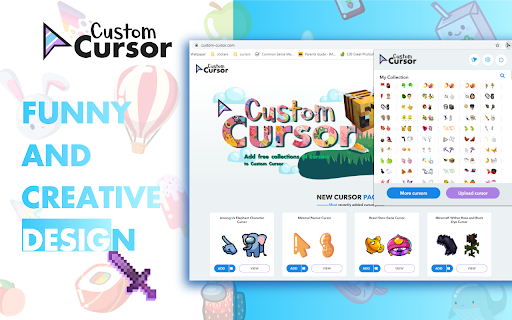
Dostosuj swoją przeglądarkę Chrome za pomocą naszej bezpłatnej kolekcji kursorów myszy na stronie Custom Cursor.
W Custom Cursor stworzyliśmy ogromną kolekcję ręcznie rysowanych uroczych kursorów. Na naszej stronie internetowej dostępnych jest ponad 8000 różnych pakietów. Z Waszą pomocą nasza kolekcja rozrosła się do tego stopnia, że podzieliliśmy ją na kategorie, które powinny trafić w każdy gust, takie jak:
- Minecraft;
- Śliczne kursory;
- Pakiety myszy anime;
- Memy;
- Pakiety wskaźników Spy x Family z Anyą Forger;
- Wśród nas;
- Dwa rodzaje minimalnych wskazówek do pracy i nauki;
- Gry;
- Roblox;
- I wiele, wiele innych zabawnych elementów do zabawy.
Niektóre z naszych pakietów wskaźników myszy są dołączone do rozszerzenia przeglądarki Custom Cursor, ale większość z nich czeka na Ciebie na naszej stronie internetowej. Miej oko na nowe i popularne dodatki.
Aby uprościć nawigację, podzieliliśmy naszą kolekcję na kolekcje Redakcje polecają, z których każda ma unikalny motyw. Przykłady obejmują:
- Zielone strzałki na jesień;
- strzałki o tematyce bożonarodzeniowej;
- Wakacje wybiera redaktora;
- Halloween;
- Współpraca Custom Cursor z Daieny Schuttz;
- Wybór edytora różowych wskaźników;
- Letnie dekoracje myszy;
- Kolory tęczy;
i wiele, wiele więcej na naszej stronie.
Jeśli nie możesz znaleźć tego, czego szukasz, użyj przycisku „PRZEŚLIJ KURSORA”, aby dodać własny. Zarządzaj swoją osobistą kolekcją strzał na stronie przesyłania i dostosuj rozmiar kursora w sekcji „Zarządzaj”.
Nowo dodane kolekcje zostaną przesłane do rozszerzenia Custom Cursor for Chrome i można je znaleźć na dole listy kolekcji. Twoje dodane pakiety pojawią się w „Mojej kolekcji”.
Stwórz własną kolekcję kursorów myszy z dowolnych obrazów za pomocą narzędzia Custom Cursor Creator na naszej stronie internetowej. Umożliwi tworzenie nowych paczek z prawie dowolnego obrazu w kształcie strzałki lub wskaźnika w Internecie.
-------------------
! Po zainstalowaniu rozszerzenia odśwież wcześniej otwarte karty, aby używać go na tych stronach. Pamiętaj, że rozszerzenie może nie działać na stronach Chrome Web Store lub na stronie głównej. Otwórz inną witrynę (np. google.com), aby przetestować rozszerzenie.
Jeśli podoba Ci się to rozszerzenie, możesz również sprawdzić naszą aplikację Custom Cursor for Windows.
Podejrzyj wygląd strzałki klikając na nią w oknie rozszerzenia i przesuwając mysz do pustego miejsca w oknie.
❤️ ❤️ ❤️
Latest reviews
- Mehak Loura
- not working
- Patricia West
- not working at all, sat for 3 hours trying to figure out why it wouldn't add. and im just removing it at this point
- meowliyn josh
- cool
- Zayna Qazi
- AMAZINGGGGGGGGGGGGG
- Omar Elhelely
- not working
- Isla Trowman
- This is such a good idea! I love this so much and doesn't take much effort to do. There is such a wide range of different cursors to choose from: any one that I searched up you had. I also love you fact you can make your own, it is so cool! It is just a shame that you can't use it everywhere, only on certain websites. That is the only problem!
- Marcus Hieber
- I love this app so fun and so easy to use. Their is so many vibrant and colorful curosors for your mouse and different trails too. You can even add you and your friends face so easily!
- dutch keano
- wonderful
- Saba Umair
- Personally as a really big chiikawa fan I really love it and think it is so cute to have chiikawa and usagi as your cursor but i do request more hachiware because i didn't find a cute one. But personally I don't have any issue so I don't understand the hate
- James Sebastian Conlan Acevedo Conlan Acevedo
- horrible
- Nancy Turner
- it dose not work do not use
- Caden Chappells
- i love this so much but it does not work
- IZABELLY DE OLIVEIRA GONCALVES
- very good
- XxStar maria10
- It's amazing,i found out about it from my bestfriend, oh my goodness I love all the designs, good job! God bless you!
- Anya
- It's really good because of how their quality and what cursors do they have though they don't always work in some sorts of places. The best thing I like about it is that you can turn off your custom cursor or turn on if you want it back on and because of that feature, most custom cursors that I've been searching doesn't have it. This not only works on the official site but other sites (except for homepage for google bc you can't get the custom cursor but good enough). It's already working well and I hope the developer can work better on the app and make the app work better and I hope there's no bugs! Thanks for this app! I love this extension and I will tell my friends to download it!!!
- Phượng Sồ
- good
- Lingxi Song
- So cuuuuuute! Thanks custom cursor production team!!🎊
- Aurora Zielke
- I'm sure its just me but the custom cursor only works on the website and i've tried refreshing my pages on the other tabs but nothing happens....
- Kim Steyn
- Really fun! Especially during teaching classes online.
- Kenia Anaya
- how do i make it work on other websites? it only works on the website
- Izzy V
- cool things
- Franklin J S
- SO COOL COLLECTIONS
- Mohammed Ubaid Ur Rehman
- It has all of my favorites, and even reese's.
- Habib Bakhshi
- Works very well, and you can customize your cursor.
- totil ojo
- such a W
- Nathan Power
- Great Fun and I'll never go searching for mu cursor again...
- Kia
- this is amazing
- chilena TUMBA LA CASA MAMI
- meh it wouldn't let me post in roblox or anywere else only on google and that's it here go 2 stars explain me how too do it if i am doing it right or wrong. :(
- Pastel de flango
- sooooo nice bruh
- JJ
- nice
- III
- This is too good to be true😭
- Dhruvender Tulla
- It's not working
- Kenny Money
- the best cursor
- Matias Ysaguirre
- the best cursor ever
- Siddhartha Mondal
- really cute and amazing
- Ian Silva
- ok
- Quinn Patrick
- impeccable so many cursors!
- Damian Alvarez
- it really goooooooooooooooooooooooooooooooood I love it so much
- Amelia Willey
- so cute!
- Katy
- i love all of the cute cursors
- Kelsey Wiles
- I CANT EVEN DO IT ‼
- jon doe
- how do i keep it on the chrome update it so it can my chrome
- Nicolas Reyna
- So good
- Abdul Mokid
- nice cursor
- Vân Trương
- nice
- Chelsea
- really good but my pc cannot allow some of it but its fine. really good :D
- Hồ Thanh Hà
- Cute
- Arcchit Dutth
- nice
- pepper _
- fav extension of all time!
- ryan laca
- Doesnt save to chrome 🤬