
Custom Cursor for Chrome™ - Con trỏ tùy chỉnh
Extension Actions
- Extension status: Featured
- Live on Store
Con trỏ tùy chỉnh cho Chrome ™. Sử dụng một bộ sưu tập lớn các con trỏ miễn phí hoặc tải lên của riêng bạn.
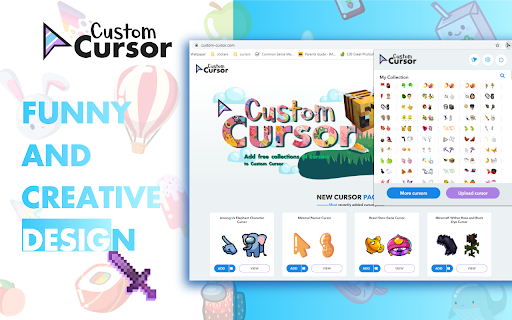
Tùy chỉnh trải nghiệm trình duyệt Chrome của bạn với bộ sưu tập con trỏ chuột miễn phí của chúng tôi tại Con trỏ tùy chỉnh.
Tại Custom Cursor, chúng tôi đã tạo ra một bộ sưu tập khổng lồ các con trỏ dễ thương được vẽ bằng tay. Chúng tôi có hơn 8000 gói khác nhau có sẵn trên trang web của chúng tôi để bạn thưởng thức. Với sự giúp đỡ của bạn, bộ sưu tập của chúng tôi đã lớn đến mức chúng tôi đã chia nó thành các danh mục phù hợp với mọi sở thích, chẳng hạn như:
- Minecraft;
- Con trỏ dễ thương;
- Gói chuột anime;
- Memes;
- Gói con trỏ Spy x Family với Anya Forger;
- Giữa chúng ta;
- Hai loại con trỏ tối thiểu cho công việc và học tập;
- Trò chơi;
- Roblox;
- Và rất nhiều yếu tố vui nhộn khác để bạn chơi cùng.
Một số gói con trỏ chuột của chúng tôi đi kèm với tiện ích mở rộng trình duyệt Con trỏ tùy chỉnh, nhưng hầu hết chúng đang chờ bạn trên trang web của chúng tôi. Theo dõi các bổ sung mới và theo xu hướng.
Để đơn giản hóa việc điều hướng, chúng tôi đã sắp xếp bộ sưu tập của mình thành các bộ sưu tập Lựa chọn của biên tập viên, mỗi bộ sưu tập có một chủ đề riêng. Những ví dụ bao gồm:
- Mũi tên xanh cho mùa thu;
- Mũi tên theo chủ đề Giáng sinh;
- Lựa chọn của biên tập viên ngày lễ;
- Halloween;
- Con trỏ tùy chỉnh hợp tác với Daieny Schuttz;
- Trình chỉnh sửa con trỏ màu hồng;
- Chuột trang trí mùa hè;
- Màu sắc cầu vồng;
và nhiều, nhiều hơn nữa trên trang web của chúng tôi.
Nếu bạn không thể tìm thấy nội dung mình đang tìm kiếm, hãy sử dụng nút "TẢI LÊN CON TRỎ" để thêm nội dung của riêng bạn. Quản lý bộ sưu tập mũi tên cá nhân của bạn trên trang Tải lên và điều chỉnh kích thước con trỏ trong phần "Quản lý".
Các bộ sưu tập mới được thêm vào sẽ được tải lên tiện ích Con trỏ tùy chỉnh dành cho Chrome và có thể được tìm thấy ở cuối danh sách bộ sưu tập. Các gói đã thêm của bạn sẽ xuất hiện trong “Bộ sưu tập của tôi”.
Tạo bộ sưu tập con trỏ chuột của riêng bạn từ bất kỳ hình ảnh nào bằng công cụ Custom Cursor Creator trên trang web của chúng tôi. Nó sẽ cho phép bạn tạo các gói mới từ hầu hết mọi hình ảnh mũi tên hoặc hình con trỏ trên internet.
-------------------
! Sau khi cài đặt tiện ích mở rộng, hãy làm mới các tab đã mở trước đó để sử dụng nó trên các trang đó. Lưu ý rằng tiện ích mở rộng có thể không hoạt động trên các trang Cửa hàng Chrome trực tuyến hoặc trang chủ. Mở một trang web khác (ví dụ: google.com) để kiểm tra tiện ích mở rộng.
Nếu bạn thích tiện ích mở rộng, bạn cũng có thể kiểm tra ứng dụng Con trỏ tùy chỉnh dành cho Windows của chúng tôi.
Xem trước sự xuất hiện của mũi tên bằng cách nhấp vào nó trong cửa sổ tiện ích mở rộng và di chuyển chuột đến khoảng trống trong cửa sổ.
❤️ ❤️ ❤️
Latest reviews
- GALLETA MARIA
- i love it , it is sooooo cuteeeeeeeeeeeeeeeeeeeeeeeeeeeeeeee
- 20-พงศ์พล คําทะริ
- clearly the best. no need for explanation
- Nhật Long Nguyễn Trịnh
- amazing
- Vigo Hindriks
- super cool
- LEI KA KIT 25SG2B07
- good
- icloud Hasan
- nice
- Melody Benke
- its got great cursors that I choose daily great idea
- Adele Antoño Mateos
- I love it
- kinderr eegg
- BROO IT LIT HAS EVRYTHINGGG!! LOVE IT
- LaurenPlayz
- im rlly angry bc i wanted to use it other than a browser
- 1ᴏᴡꜰᴏᴄᴜꜱ
- tuff
- Fred Game
- I love custom cursors!
- Quang Phát Phạm
- yeah it's a very beautiful cursor, I love itt
- abya
- i realy loved the DIY custom cussor u guys are sooooooooooooooooooooooooooooooooooo cool
- gia my kieu
- uk
- Grace
- love the different cursors! that's it that's the review.
- Ace
- i love it all!!
- Vitamin C
- It is so cute!!!
- Ahmed Yasser
- very gooooood
- Fabián Gustavo Iturriaga Búcaro
- The best extension EVER
- Bella Lofgren
- i love this extension so much! everytime i get bored with school or whatever task i should be doing i simply switch my courser and feel so much better lol. 10/10 do reccomend
- Moka
- so good
- Eldritch
- love the TMNT ones
- Yasir Ktp
- This is great............but I love it! TYSM!
- ANDRES FELIPE ROJAS CARDENAS
- I love this!! - (there's a bluey among us btw) OH YEAH!
- Panchita Lawkiatthada
- 🎄💝🌈🍬 love
- Kitty
- does not work on opera but is cute!
- Ron Sharp
- nice
- Eliel Galek
- pro
- Cườngg
- good , i like it
- Nada
- when I downloaded it it only worked when I am in the tab
- thiên ngô
- really good
- Lata Khanna
- Very nice and cool custom cursors .... I loveddd IT .
- Kafka Pipe
- good app
- taybah haideri
- it was orking good but then a few months later it stopped working
- Sharkey
- it's not working at all, I've added it but it's not giving me the cursor, i've tried refreshing and turning my computer on and off
- Kazuha Kaedehara
- love it so much, cute designs i cant choose
- Luis Manriquez
- good
- Leen Alsharabi
- not always working
- Hân Lê
- good
- Goh Rong Hui Roslyn (Chijoln)
- peak. but sometimes it does not work
- Aseel badr
- this is the best thank you man
- rakina rukaiya
- ate
- Mehak Loura
- not working
- Patricia West
- not working at all, sat for 3 hours trying to figure out why it wouldn't add. and im just removing it at this point
- meowliyn josh
- cool
- Zayna Qazi
- AMAZINGGGGGGGGGGGGG
- Omar Elhelely
- not working
- Isla Trowman
- This is such a good idea! I love this so much and doesn't take much effort to do. There is such a wide range of different cursors to choose from: any one that I searched up you had. I also love you fact you can make your own, it is so cool! It is just a shame that you can't use it everywhere, only on certain websites. That is the only problem!
- Marcus Hieber
- I love this app so fun and so easy to use. Their is so many vibrant and colorful curosors for your mouse and different trails too. You can even add you and your friends face so easily!