
Free Text To Speech Online
Extension Actions
- Extension status: Featured
- Live on Store
Text to speech TTS is a technology that converts text into spoken audio. It can read aloud PDFs, websites, and books using AI voices
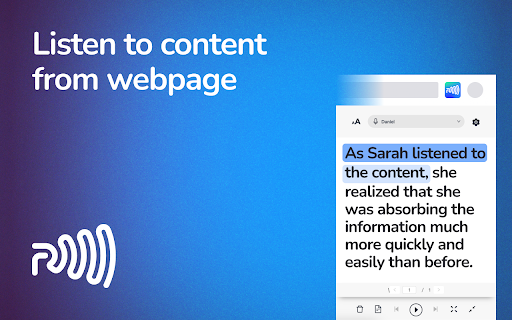
Readme TTS is a comprehensive Chrome extension that provides a convenient and innovative solution for text-to-speech technology. With its advanced text-to-speech conversion features, it allows you to listen to articles, blog posts, and other written content with just a click of a button. Say goodbye to boring reading and hello to a more enjoyable and hands-free way to consume information.
Readme integrate Summary function, using ChatGPT an advanced language model trained by OpenAI, that allows you to quickly and easily get a summary of any webpage you visit. With just a click of a button, this extension uses advanced natural language processing algorithms to analyze the content of the page and generate a concise summary of its main points.
Keywords: Text to speech, ChatGPT, voice control, voice, TTS, convert text to speech, voice generator, speech synthesis, voiceover, read aloud, free text to speech online, pdf, summary, summarize youtube.
Some of its key features include:
• Easy text-to-speech conversion.
• Support for multiple languages.
• Adjustable speaking speed.
• Ability to play/pause, skip forward/backward, and adjust volume.
• User-friendly interface.
• Option to choose a male or female voice for speech output.
• Ability to select specific text passages for text to speech conversion.
• Support for additional file formats such as PDF and eBooks.
• Summary text of any webpage you visit.
• Summary service is compatible with various video hosting platforms such as YouTube and Vimeo.
Instructions for use:
1. Install the extension from the Chrome Web Store.
2. Visit any web page with written content.
3. Click the Readme TTS icon in the Chrome browser.
4. Use the available controls to customize the text-to-speech output to your preference.
5. Sit back and listen as the extension converts the text to speech.
6. To make use of the Summary feature, you need to have a ChatGPT account.
7. Once you are logged in to ChatGPT, the summary function will be automatically enabled.
Benefits of using text-to-speech technology:
• Increased productivity and accessibility.
• More enjoyable and hands-free way of consuming information.
• Perfect for multitasking, or exercising.
Compare Readme TTS with traditional reading methods and discover the advantages of text-to-speech. Our satisfied users have already made the switch, why not you too?
The development team behind Readme TTS is dedicated to providing the best text to speech technology on the market. Our expertise and experience in the field ensure that you receive a high-quality product with each use.
Text to speech, ChatGPT, voice control, voice, TTS, convert text to speech, voice generator, speech synthesis, voiceover, read aloud, free text to speech online, pdf, summary, summarize youtube.
FAQs
Why does this text-to-speech extension need access to all my site data?
To provide accurate and effective text-to-speech capabilities, the extension needs to be able to read all the text content on a web page when you activate it. No data leaves your computer.
Why does this extension struggle to read some text accurately?
The text-to-speech engine is designed to work with standard text formats, but it may have difficulty reading certain content such as text embedded in images or unusual font styles. Additionally, the pronunciation of certain words may not be accurate for every language or dialect.
How do I change the voice and speed of the text-to-speech?
The voice and speed of the text-to-speech can be adjusted from the extension's settings page. Simply click on the extension icon in your browser's toolbar and select the "Settings" option. From there, you'll be able to select the desired voice and adjust the speed.
Can I use the text-to-speech on websites with a login?
Yes, you can use the text-to-speech on websites with a login. The extension has access to all the content on the web page when you open the popup, including the content behind a login.
Does the text-to-speech work offline?
No, the text-to-speech requires an internet connection to work as it uses an online speech synthesis API. However, if you need to use text-to-speech while offline, you can use the built-in voices provided by your browser. These built-in voices may not have the same quality or level of customization as the premium voices available online. To use the premium voices, you need to have an active internet connection.
Is the text-to-speech technology used by this extension human-like?
The text-to-speech technology used by this extension is based on machine learning algorithms and is designed to sound natural and human-like. However, the quality of the speech output may vary based on the specific voice and language used.
Text to speech, ChatGPT, voice control, voice, TTS, convert text to speech, voice generator, speech synthesis, voiceover, read aloud, free text to speech online, pdf, summary, summarize youtube.
What is ChatGPT?
ChatGPT is a language model developed by OpenAI, it's a type of AI that is able to understand and generate human-like text. It's been trained on a vast amount of text data from the internet, so it has a good understanding of various topics and it can perform various natural language processing tasks such as language translation, text summarization, and text completion. Essentially, it's a computer program that can communicate with people in a way that feels natural and human-like.
What is Summary from ChatGPT?
ChatGPT generate a condensed version of a given text, highlighting the most important points and key information. This can be useful for quickly understanding the main ideas of a long document or article without having to read through the entire text. However, it's important to note that my summaries are generated algorithmically and may not always capture the full nuance or context of the original text.
Do I need a ChatGPT/OpenAI account?
Yes, you need to have a ChatGPT account to use summary function. You can create an account for free at chat.openai.com
Read aloud the current web-page article with one click, using text to speech (TTS). Supports 40+ languages.
Read Aloud uses text-to-speech (TTS) technology to convert webpage text to audio. It works on a variety of websites, including news sites, blogs, fan fiction, publications, textbooks, school and class websites, and online university course materials.
Read Aloud allows you to select from a variety of text-to-speech voices, including those provided natively by the browser, as well as by text-to-speech cloud service providers such as Google Wavenet, Amazon Polly, IBM Watson, and Microsoft. Some of the cloud-based voices may require additional in-app purchase to enable.
Read aloud any Google Doc, PDF, webpage, or book with text to speech (TTS). Natural sounding voices in 30+ languages & 130 voices.
Text to speech from Speechify lets you listen to docs, articles, PDFs, email, and other formats — anything you read. It’s one of the fastest growing voice generator extensions in the Chrome store.
Our speech synthesis TTS technology is trusted by millions of happy users who listen in various languages and accents in the most natural-sounding speech. Our users have listened to 6.5 billion words.
Text to speech (TTS) is a technology that converts text into spoken audio. It can read aloud PDFs, websites, and books using natural AI voices.
Turn text into natural-sounding speech in 220+ voices across 40+ languages and variants with an API powered by Google's machine learning technology.
Try Text to Speech online for free. Type or paste your text and click play! Official & Exclusive Snoop Dogg & Gwyneth Paltrow voices. Try it out now!
Reads out loud texts, webpages, pdfs & ebooks with natural sounding voices. No sign in required. Set your text and click play.
AI Voice Generator in 20 languages. 120+ realistic text to speech voices to create the perfect AI voiceover. Go instantly from text to voice with ease.
AI Voice Generator with 600+ AI voices. Generate realistic Text to Speech voice over online with AI. Convert text to audio and download as MP3 & WAV files.
Readme TTS is a comprehensive Chrome extension that provides a convenient and innovative solution for text-to-speech technology. With its advanced text-to-speech conversion features, it allows you to listen to articles, blog posts, and other written content with just a click of a button. Say goodbye to boring reading and hello to a more enjoyable and hands-free way to consume information.
Readme integrate Summary function, using ChatGPT an advanced language model trained by OpenAI, that allows you to quickly and easily get a summary of any webpage you visit. With just a click of a button, this extension uses advanced natural language processing algorithms to analyze the content of the page and generate a concise summary of its main points.
Keywords: Text to speech, ChatGPT, voice control, voice, TTS, convert text to speech, voice generator, speech synthesis, voiceover, read aloud, free text to speech online, pdf, summary, summarize youtube.
Some of its key features include:
• Easy text-to-speech conversion.
• Support for multiple languages.
• Adjustable speaking speed.
• Ability to play/pause, skip forward/backward, and adjust volume.
• User-friendly interface.
• Option to choose a male or female voice for speech output.
• Ability to select specific text passages for text to speech conversion.
• Support for additional file formats such as PDF and eBooks.
• Summary text of any webpage you visit.
• Summary service is compatible with various video hosting platforms such as YouTube and Vimeo.
Instructions for use:
1. Install the extension from the Chrome Web Store.
2. Visit any web page with written content.
3. Click the Readme TTS icon in the Chrome browser.
4. Use the available controls to customize the text-to-speech output to your preference.
5. Sit back and listen as the extension converts the text to speech.
6. To make use of the Summary feature, you need to have a ChatGPT account.
7. Once you are logged in to ChatGPT, the summary function will be automatically enabled.
Benefits of using text-to-speech technology:
• Increased productivity and accessibility.
• More enjoyable and hands-free way of consuming information.
• Perfect for multitasking, or exercising.
Compare Readme TTS with traditional reading methods and discover the advantages of text-to-speech. Our satisfied users have already made the switch, why not you too?
The development team behind Readme TTS is dedicated to providing the best text to speech technology on the market. Our expertise and experience in the field ensure that you receive a high-quality product with each use.
Text to speech, ChatGPT, voice control, voice, TTS, convert text to speech, voice generator, speech synthesis, voiceover, read aloud, free text to speech online, pdf, summary, summarize youtube.
FAQs
Why does this text-to-speech extension need access to all my site data?
To provide accurate and effective text-to-speech capabilities, the extension needs to be able to read all the text content on a web page when you activate it. No data leaves your computer.
Why does this extension struggle to read some text accurately?
The text-to-speech engine is designed to work with standard text formats, but it may have difficulty reading certain content such as text embedded in images or unusual font styles. Additionally, the pronunciation of certain words may not be accurate for every language or dialect.
How do I change the voice and speed of the text-to-speech?
The voice and speed of the text-to-speech can be adjusted from the extension's settings page. Simply click on the extension icon in your browser's toolbar and select the "Settings" option. From there, you'll be able to select the desired voice and adjust the speed.
Can I use the text-to-speech on websites with a login?
Yes, you can use the text-to-speech on websites with a login. The extension has access to all the content on the web page when you open the popup, including the content behind a login.
Does the text-to-speech work offline?
No, the text-to-speech requires an internet connection to work as it uses an online speech synthesis API. However, if you need to use text-to-speech while offline, you can use the built-in voices provided by your browser. These built-in voices may not have the same quality or level of customization as the premium voices available online. To use the premium voices, you need to have an active internet connection.
Is the text-to-speech technology used by this extension human-like?
The text-to-speech technology used by this extension is based on machine learning algorithms and is designed to sound natural and human-like. However, the quality of the speech output may vary based on the specific voice and language used.
Text to speech, ChatGPT, voice control, voice, TTS, convert text to speech, voice generator, speech synthesis, voiceover, read aloud, free text to speech online, pdf, summary, summarize youtube.
What is ChatGPT?
ChatGPT is a language model developed by OpenAI, it's a type of AI that is able to understand and generate human-like text. It's been trained on a vast amount of text data from the internet, so it has a good understanding of various topics and it can perform various natural language processing tasks such as language translation, text summarization, and text completion. Essentially, it's a computer program that can communicate with people in a way that feels natural and human-like.
What is Summary from ChatGPT?
ChatGPT generate a condensed version of a given text, highlighting the most important points and key information. This can be useful for quickly understanding the main ideas of a long document or article without having to read through the entire text. However, it's important to note that my summaries are generated algorithmically and may not always capture the full nuance or context of the original text.
Do I need a ChatGPT/OpenAI account?
Yes, you need to have a ChatGPT account to use summary function. You can create an account for free at chat.openai.com
Read aloud the current web-page article with one click, using text to speech (TTS). Supports 40+ languages.
Read Aloud uses text-to-speech (TTS) technology to convert webpage text to audio. It works on a variety of websites, including news sites, blogs, fan fiction, publications, textbooks, school and class websites, and online university course materials.
Read Aloud allows you to select from a variety of text-to-speech voices, including those provided natively by the browser, as well as by text-to-speech cloud service providers such as Google Wavenet, Amazon Polly, IBM Watson, and Microsoft. Some of the cloud-based voices may require additional in-app purchase to enable.
Read aloud any Google Doc, PDF, webpage, or book with text to speech (TTS). Natural sounding voices in 30+ languages & 130 voices.
Text to speech from Speechify lets you listen to docs, articles, PDFs, email, and other formats — anything you read. It’s one of the fastest growing voice generator extensions in the Chrome store.
Our speech synthesis TTS technology is trusted by millions of happy users who listen in various languages and accents in the most natural-sounding speech. Our users have listened to 6.5 billion words.
Text to speech (TTS) is a technology that converts text into spoken audio. It can read aloud PDFs, websites, and books using natural AI voices.
Turn text into natural-sounding speech in 220+ voices across 40+ languages and variants with an API powered by Google's machine learning technology.
Try Text to Speech online for free. Type or paste your text and click play! Official & Exclusive Snoop Dogg & Gwyneth Paltrow voices. Try it out now!
Reads out loud texts, webpages, pdfs & ebooks with natural sounding voices. No sign in required. Set your text and click play.
Latest reviews
- Anonymous
- it was working perfectly fine for a while until it just decided "you know what? I dont feel like functioning anymore".
- Anonymous
- please bring back the volume slider
- Anonymous
- Machine voice even in premium subscription
- Anonymous
- easy to use and very good, supports many languages compared to other extensions
- Anonymous
- very helpful when doing homework
- Anonymous
- Great
- Anonymous
- easy to use and very good
- Anonymous
- very good and easy to use
- Anonymous
- I have been using this extension for a little over a week and it has been great so far, with a few hiccups. One positive is that this thing just works. I have used quite a few text-to-speech applications in the past and this one is definitely near the top. The UI is easy to use, the speech can be customized to a degree, and the price-point is just right. It's not all great though ... the constant pausing is super annoying, I cannot get through a single page of content without it pausing and telling me to upgrade to premium for a pause-free experience. I know you have to advertise your product, and I respect it, I wish there was a balance that benefited both parties, the consumer and developer. Secondly, a lot of the voices are just unusable. They sound absolutely terrible an robotic, you have to spend some time going through nearly all of the voices to bookmark the ones you like or can at least tolerate. The last thing I would mention, is that I wish that I could customize the speech pattern a little more. There are times when the voice doesn't pause when it is supposed to like after a colon, an example of this is like when there is a term that is being defined, it usually has a format like, Dog: A four legged creature, instead of pausing for a beat after Dog, it just reads it like one sentence. Some voices deal with this better than others. All in all a great product and I will be recommending it to everyone I know who's looking for something like this.
- Anonymous
- for free tts its well worth dl
- Anonymous
- This is very helpful to me, I use it to read my books as I game. I use Goole US English 1 Natural and I find it pretty good. I copy and paste the text because I don't trust most software to read anything.
- Anonymous
- Great web extension, am able to read through a lot of work and understand within short period of time.
- Anonymous
- Does nothing, id give 0 if i could.
- Anonymous
- woring for me thank you
- Anonymous
- This is a very helpful app for when I am grading, essays and need to multitask as a teacher. Thank you so much for making this program, app, or whatever it's called. I love all the variations of voices. The only thing I would improve is to have the clear common voices towards the top of the list. Either way, I am extremely grateful. Awesome app.
- Anonymous
- reliable, works great
- Anonymous
- super helpful and great app! I have dyslexia and its really helped me. have not had any problems for the past 5 months :) recommend
- Anonymous
- Works amazingly well. I only wish it would go faster than 2.0
- Anonymous
- I love this! I have been looking for an extension that can read my documents and websites for me! Its not great at reading tables yet, but paragraphs and sentences, it got that. I like how you can change the voices and languages on the fly. Nice utility!
- Anonymous
- Had to change the voice from the default and the change was awesome, simple, and user-friendly. I read a lot, and i have been searching everywhere for this kind to text to speech tool, and its amazing. Thank you to it's developers and to chrome. I am happy to be a user.
- Anonymous
- The voices are horrible. About as choppy as you would expect for someone reading for the first time. Not to mention it does not see the text in between footer and header.
- Anonymous
- Best free chrome extension, period! Thank you for all the hard work your team put in!
- Anonymous
- This is such a useful tool. Thank you so much!!!
- Anonymous
- Dont even work for German. Takes it directly to the website where you pay it in order to use it. Do they think we are that stupid? Good translate works as fine and there must be more free extension that would be providing this service for free. Dont download it. It is a waste of time
- Anonymous
- Its alright but the program can't read words separated by a hyphen that do to not fitting on the sentence line.
- Anonymous
- top,top,top.
- Anonymous
- Excelent extention to read courses and help studying
- Anonymous
- GREAT!
- Anonymous
- I have always relied on read-out-load tools to keep up with my readings while moving away from my computer. This one is by far the most practical and stable I have used!
- Anonymous
- Very good, I don't have anything to complain.
- Anonymous
- The default voice was some horror story from a 1990's computer. It couldn't even pronounce English words correctly like "alloy". a LOY? Really? The list of voices was infinite the second voice I heard was worse than the first. I have no idea how there can be so many positive ratings.
- Anonymous
- Better than more prominent competitors
- Anonymous
- I just wish they would learn after awhile by different things that we have it do or correct; especially if we correct! Why can't we have it use our own voice by training it? Why not make us \the dictate and read aloud in one ap? They could then definitely learn.
- Anonymous
- Works very well with the articles I wanted to read aloud. The voices are only American English and a little robotic, and sometimes pronounce words strangely, but very understandable and you stop noticing after a few minutes.
- Anonymous
- Very good once you get used to the interface.
- Anonymous
- Very helpful! Robot voice, though...
- Anonymous
- Good!
- Anonymous
- Thank you. Great service. Some words that the voice pronounces need to be refined, but everything is good.
- Anonymous
- Simple and free.
- Anonymous
- I like having the read aloud feature since I'm mostly using it for school. My only gripe is that the voice doesn't read fast enough to keep my attention, even on the fastest setting. Other than that it's great!
- Anonymous
- Every time you want to listen to text, this extension opens a new tab, makes you read through a lorem ipsum paragraph, and then requires you to complete a captcha—just to get it working. It's more hassle than it's worth.
- Anonymous
- Excellent
- Anonymous
- I'm a college student who struggles reading all day long and this application really helps me stay focused as it reads with me my assignments. It also helps me speed up the process for sure
- Anonymous
- this extension has helped me so much with my school work.
- Anonymous
- good app, simple, functions well and easy to use
- Anonymous
- For things like PDFs it doesn't read, so I have to manually copy the text over which I can do by highlighting and copying, its strange how it works
- Anonymous
- Excellent, no nonsense and just what I was looking for.
- Anonymous
- exactly what i was looking for. Voice options are better than I thought they would be!
- Anonymous
- good
- Anonymous
- Solid enough, reliable, unobtrusive as well. I'm happy.